Resellers
In the CRM application, leads can be distributed to resellers (partners) either manually or automatically based on predefined criteria such as location and partner level.
Within the CRM application, leads can be assigned to resellers (also referred to as partners). These assignments can be handled manually by users or automatically based on specific criteria like partner level and geographic location.
Configuration
To start using reseller functionality, install the Resellers module.
-
Go to the Apps application
-
Remove the default Apps filter from the Search… bar
-
Search for
Resellers

Click Install on the module card. Once installed, return to the main dashboard.
After installation, open the CRM app. Under the Configuration menu, a new section called Members will appear with the following options:
-
Levels
-
Partner Activations
-
Commission Plans
Levels
Partner levels help categorize resellers based on their importance or performance.
To access them, go to:
CRM app ‣ Configuration ‣ Levels
By default, the following levels are available:
-
Gold
-
Silver
-
Bronze
You can create additional levels by clicking New and filling in the required details. Existing levels can also be edited or renamed as needed.
Level Weight
Each level includes a Level Weight, which determines how likely a partner is to receive leads.
-
Higher weight → higher chance of assignment
-
Weight set to
0→ no leads assigned
Tip
You can override the default level weight directly on an individual partner record. This allows more precise control over lead distribution.
Partner activations
Partner activations indicate the current status or maturity of a reseller.
To manage them, go to:
CRM app ‣ Configuration ‣ Partner Activations
Default activation statuses include:
-
Fully Operational
-
Ramp-up
-
First Contact
You can:
-
Add new statuses using New
-
Rename existing ones
-
Enable or disable them using the toggle in the Active column
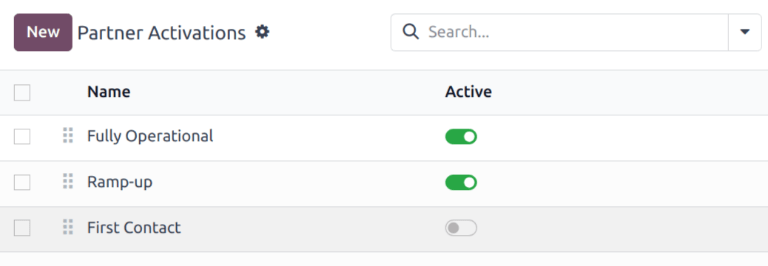
These statuses are useful for filtering and analyzing partner performance in reports such as Partnership Analysis.
Partner assignments
Once Levels and Partner Activations are configured, you can assign them to individual partners.
To update a partner:
-
Go to CRM app ‣ Sales ‣ Customers
-
Open the desired customer record
-
Navigate to the Partner Assignment tab
From here:
-
Select a Partner Level
-
Choose an Activation status
-
Adjust the Level Weight if needed
This setup controls how leads are distributed across your partner network.
Publish partners
When both the Website and Resellers apps are installed, a dedicated partners page (/partners) is automatically created to showcase your resellers.
To publish a partner:
-
Go to CRM app ‣ Sales ‣ Customers
-
Open a partner record
-
Click the Go to Website button
This opens the partner’s public page.
Click Edit to customize the page using website building blocks. You can add descriptions, visuals, or any relevant business information.
Tip
Adding a short company overview improves visibility and credibility.
After editing:
-
Click Save
-
Toggle the page from Unpublished to Published
Repeat this process for each partner you want to display.
