Discount and loyalty programs
The Odoo Sales, eCommerce, and Point of Sale applications allow users to create discount and loyalty programs that customers can use for online and in-store shopping. These programs offer more varied, public, and time-sensitive pricing options than pricelists.
Configure the settings
To enable discount and loyalty features, go to Sales ‣ Configuration ‣ Settings.
Under the Pricing section, activate Discounts, Loyalty & Gift Card by checking the option, then click Save.
Create and manage programs
To set up discount or loyalty programs, navigate to:
Sales ‣ Products ‣ Discount & Loyalty
If no programs exist yet, Odoo displays template options to help you get started. You can select a template or click New to build a program manually.
If programs already exist, simply select one to modify it.

Note
Templates are only shown before the first program is created. Once a program exists, templates are no longer displayed.
Opening a program (new or existing) brings up the configuration form.
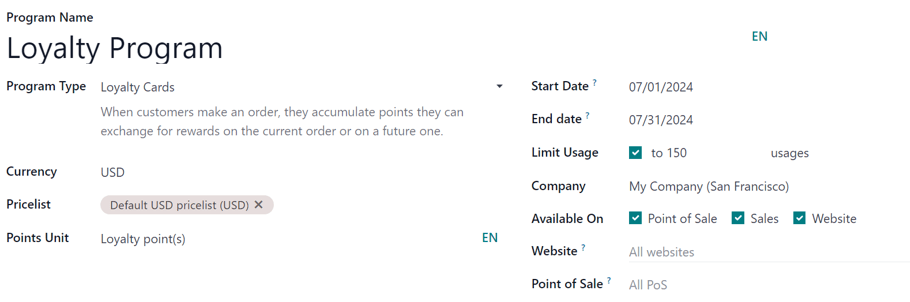
Program fields
The program form includes the following options:
-
Program Name: Internal name used for identification (not visible to customers).
-
Program Type: Choose the program type.
-
Currency: Define the currency used in the program.
-
Pricelist: Optionally assign the program to specific pricelists. If left empty, it applies to all customers.
-
Points Unit: Define the name of the points (e.g., Reward Points). Visible to customers and only available for Loyalty Cards.
-
Start Date / End Date: Control the validity period. Leave empty for ongoing programs.
-
Limit Usage: Restrict how many times the program can be used.
-
Company: Specify the company (for multi-company environments). Leave blank to apply globally.
-
Available On: Select where the program is applicable (Sales, eCommerce, POS).
-
Website: Limit the program to a specific website if needed.
-
Point of Sale: Restrict the program to certain POS configurations.
Note
Available fields may vary depending on the selected Program Type.
All generated items (cards, coupons, codes) can be accessed via the smart button at the top of the form.

Note
In Odoo 17+, if a loyalty card or coupon is linked to a contact, a Loyalty Cards smart button appears on the contact form.

This button is only visible when relevant records exist.
Program types
Available program types include:
-
Coupons: One-time codes that unlock rewards immediately.
-
Loyalty Cards: Customers earn points from purchases and redeem them later.
-
Promotions: Automatically apply rewards when certain conditions are met.
-
Discount Code: Codes entered during checkout to receive discounts.
-
Buy X Get Y: Earn rewards after purchasing a certain quantity.
-
Next Order Coupons: Rewards issued for use on a future purchase.
Set conditional rules
Conditional rules define when a program becomes applicable.
In the Rules & Rewards tab, click Add next to Conditional rules to open the configuration window.

Note
Available rule options depend on the selected Program Type.
Available conditions
-
Discount Code: Custom or auto-generated code (for Discount Code programs).
-
Minimum Quantity: Minimum number of items required.
-
Minimum Purchase: Minimum spending amount (tax included or excluded).
-
Products: Apply the rule to selected products.
-
Categories: Restrict to specific product categories or all.
-
Product Tag: Apply based on product tags.
-
Grant: Define how points are earned (per order, per amount spent, or per product unit).

Click Save & Close to apply the rule or Save & New to add another.
Configure rewards
Rewards define what customers receive when conditions are met.
In the Rules & Rewards tab, click Add next to Rewards.
Note
Reward options vary depending on the Program Type.
Reward options
-
Reward Type: Choose between:
-
Free Product
-
Discount
-
Free Shipping
-
Free Product
-
Quantity Rewarded: Number of items given
-
Product: Product to offer
-
Product Tag: Optional filter
Discount
-
Discount Value: Percentage, per point, or per order
-
Apply to:
-
Entire order
-
Cheapest product
-
Specific products
-
-
Max Discount: Limit the discount amount (0 = no limit)
Free Shipping
-
Max Discount: Maximum shipping cost covered
-
In exchange of: Points required to claim the reward (for loyalty-based programs)
-
Description on order: Text shown to customers during checkout
