Commissions
Commission plans help drive sales performance by rewarding individuals or teams based on measurable results. Odoo’s Sales app allows businesses to design flexible commission structures aligned with revenue, volume, margin, or recurring sales objectives.
Configuration
To activate commissions, go to Sales app ‣ Configuration ‣ Settings.
Under the Invoicing section, enable the Commissions option and click Save.
Once enabled, a Commissions menu appears.
To create a new plan, navigate to Commissions ‣ Commission Plans and click New.
Commission plan structure
A commission plan consists of several key elements:
-
Based on: Defines whether commissions depend on Targets or Achievements
-
per: Specifies if the plan applies to individual users or sales teams
-
Target Frequency: Determines how often targets reset (Monthly, Quarterly, or Yearly)
-
Achievements: Defines the performance metrics used to calculate commissions

Target-based commission plans
Target-based plans reward users according to how much of a predefined goal they achieve. These plans are useful when you want to set clear objectives, such as reaching a specific revenue amount within a given period.
Tip
Unlike achievement-based plans, target-based plans focus on progress toward a fixed goal, making them ideal for milestone-driven incentives.
To configure a target-based plan:
-
Go to Sales app ‣ Commissions ‣ Commission Plans
-
Click New
-
Set Based on to Targets
-
Choose whether it applies per user or team
Then configure:
-
On Target Commission: Commission paid when 100% of the goal is achieved
-
Effective Period: Validity dates for the plan
-
Target Frequency:
-
Monthly: frequent tracking and payouts
-
Quarterly: balanced evaluation cycles
-
Yearly: long-term strategic goals
-
After selecting the frequency, define targets for each period in the Targets tab.
In the Achievements tab, add one or more achievement metrics using Add a new achievement.
Assign users in the Sales People tab using:
-
Add a new Sales Person
-
Add Multiple Salespersons (available in developer mode)
Commission levels
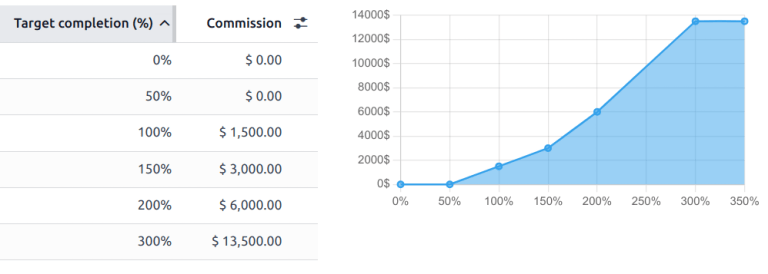
You can introduce multiple commission tiers within a target-based plan to reward different performance levels.
These levels can begin at 0% and extend beyond 100%, allowing commissions to scale as performance increases.
If no levels exceed 100%, earnings are capped at the target commission.
Example
In the example below, commission levels go up to 300%, meaning earnings continue increasing even after exceeding the initial goal.
Achievement-based commission plans
Achievement-based plans calculate commission as a percentage of actual results, such as invoiced amounts. These plans are ideal for consistent rewards without requiring predefined targets.
For example, a salesperson may earn 5% on all invoiced sales regardless of volume.
Tip
These plans differ from target-based ones because they apply a fixed rate directly to performance, rather than measuring progress toward a goal.
To configure:
-
Go to Sales app ‣ Commissions ‣ Commission Plans
-
Click New
-
Set Based on to Achievements
-
Choose whether it applies per user or team
Then:
-
Define the Effective Period
-
Set the Target Frequency
Add performance metrics in the Achievements tab using Add a new achievement.
Assign users via the Sales People tab.
Achievements
Achievements determine how performance is tracked within a plan. These are configured in the Achievements tab.
Available metrics include:
-
Amount Sold: Total value of sales orders
-
Amount Invoiced: Total confirmed invoice value
-
Quantity Sold: Units sold through sales orders
-
Quantity Invoiced: Units included in invoices
-
Margin: Profit generated (sales price minus cost)
-
MRR: Monthly recurring revenue from subscriptions (requires the Subscriptions app)
Note
All plans require both Targets and Achievements to be defined, regardless of the selected plan type.
Plan approval
Once the plan is configured, click Approve to activate it. This changes its status from Draft to Approved.
Important
Approved plans cannot be modified. To make changes, the plan must first be reset to Draft.
After approval, Odoo automatically tracks performance and calculates commissions according to the defined rules.