Quotation deadlines
Set expiration dates on quotations in Odoo to create urgency, protect pricing, and improve sales conversion rates.
In the Odoo Sales application, quotation deadlines can be used to define how long an offer remains valid. Adding an expiration date encourages faster decision-making from customers and helps businesses avoid honoring outdated pricing or terms.
Deadlines are especially useful in competitive or time-sensitive sales scenarios.
Quotation expiration
Odoo allows you to assign an expiration date directly on each quotation.
To set an expiration date:
-
Open the Sales app
-
Select an existing quotation or click New
-
Locate the Expiration field on the form
-
Choose a date using the calendar picker

Info
Once the expiration date passes, the quotation is considered no longer valid, helping teams avoid confusion around outdated offers.
Tip
Use shorter deadlines for high-demand products or limited-time offers to create urgency and improve conversion rates.
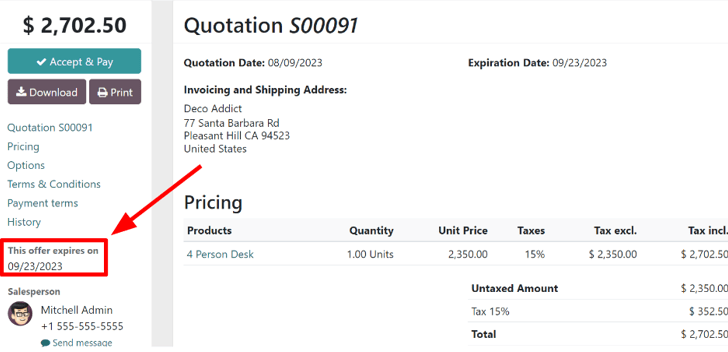
Customers can clearly see the expiration date when viewing the quotation through the portal.
Tip
Always preview quotations before sending to ensure the deadline is clearly visible and aligned with your sales strategy.
Quotation template expiration
Instead of setting deadlines manually each time, expiration rules can also be defined at the template level.
To configure this:
-
Go to Sales app ‣ Configuration ‣ Quotation Templates
-
Open an existing template or create a new one
-
Enter a value in the Quotation expires after field
This value represents the number of days the quotation remains valid from its creation date.

Info
When a template is applied, Odoo automatically calculates the expiration date based on this setting.
Note
The automatically generated expiration date can still be adjusted manually on the quotation before sending it to the customer.
Tip
Use template-based deadlines to maintain consistency across your sales team and reduce manual errors.