HyperShip AI - Intelligent Packaging Optimisation for Linnworks
HyperShip AI automatically analyses orders, selects the best carrier, simulates shipping costs, and splits multi-parcel shipments to reduce costs and improve fulfilment accuracy within Linnworks.
Overview
HyperShip AI is an intelligent packaging optimisation solution for Linnworks, powered by Rishvi AI. It automatically analyses each order to determine the most efficient and cost-effective way to package and ship it.
The system retrieves SKU dimensions and weights, applies carrier-specific constraints, and calculates complete shipping costs including volumetric weight, fuel surcharges, oversize thresholds, and multi-parcel pricing. It simulates multiple packaging scenarios across configured carriers to identify the most suitable and compliant shipping option.
Based on the optimised result, HyperShip AI can split orders into multiple parcels, apply packaging overrides where necessary, assign the best-fit carrier, and update Linnworks with relevant tracking notes - all with minimal manual intervention.
HyperShip AI helps reduce shipping costs, improve fulfilment accuracy, and automate carrier selection directly within Linnworks.
Who Should Use HyperShip AI
Warehouse & Fulfilment Teams
Teams responsible for packing and dispatch use HyperShip AI to receive pre-calculated packaging decisions, removing guesswork and reducing manual effort when selecting boxes and carriers.
Logistics Managers
Managers use HyperShip AI to enforce carrier rules, reduce shipping overspend, and ensure multi-parcel orders are handled correctly and cost-efficiently.
Integration Administrators
Administrators configure carrier constraints, cost parameters, packaging logic, and macro schedules. They also monitor the Rules Engine to verify automated carrier assignments are running correctly.
Operations & Finance Teams
Operations and finance teams benefit from consistent, rules-driven carrier selection that reduces surprise surcharges and ensures cost simulation is applied before every shipment.
Key Features
Intelligent Packaging Optimisation
Automatically analyses order items using SKU dimensions and weight to determine the most efficient packaging configuration.
Carrier Constraint Application
Applies carrier-specific rules including dimension limits, weight thresholds, volumetric calculations, and surcharge structures.
Cost Simulation Engine
Simulates multiple packaging scenarios across configured carriers to identify the most cost-effective shipping option.
Multi-Parcel Order Handling
Automatically splits orders into multiple parcels when required to maintain carrier compliance and optimise cost.
Best-Fit Carrier Assignment
Selects and assigns the most suitable carrier based on optimisation results and configured rules.
Linnworks Order Updates
Updates orders with selected carrier details, packaging decisions, overrides, and tracking notes automatically.
How HyperShip AI Works
HyperShip AI runs through a defined sequence every time it processes an order. The macro is triggered via the Linnworks Rules Engine and executes automatically without manual intervention.
Step 1: Order analysis
HyperShip AI retrieves the order from Linnworks and reads each line item, including SKU dimensions (length, width, height) and weight values stored against the stock item.
Step 2: Carrier constraint application
The system applies the configured carrier rules for each available carrier - including maximum dimensions, weight limits, volumetric weight formulas, oversize thresholds, fuel surcharges, and multi-parcel pricing tiers.
Step 3: Cost simulation
Multiple packaging scenarios are simulated across all configured carriers. Each scenario calculates the total landed shipping cost, taking into account all applicable surcharges and constraints.
Step 4: Optimised packaging decision
The system selects the packaging configuration that is both carrier-compliant and most cost-effective. Where required, the order is split into multiple parcels automatically.
Step 5: Carrier assignment
The best-fit carrier is assigned to the Linnworks order based on the optimised result and any override rules configured for the account.
Step 6: Linnworks order update
The order is updated in Linnworks with the selected carrier details, packaging decisions, any applied overrides, and relevant tracking notes - ready for fulfilment.
Configure the Macro
Once HyperShip AI is installed, you need to set up the configuration, so the system knows how and when to process orders. This is a one-time setup and can be adjusted at any time.
Steps to Configure
Access Macro Configuration
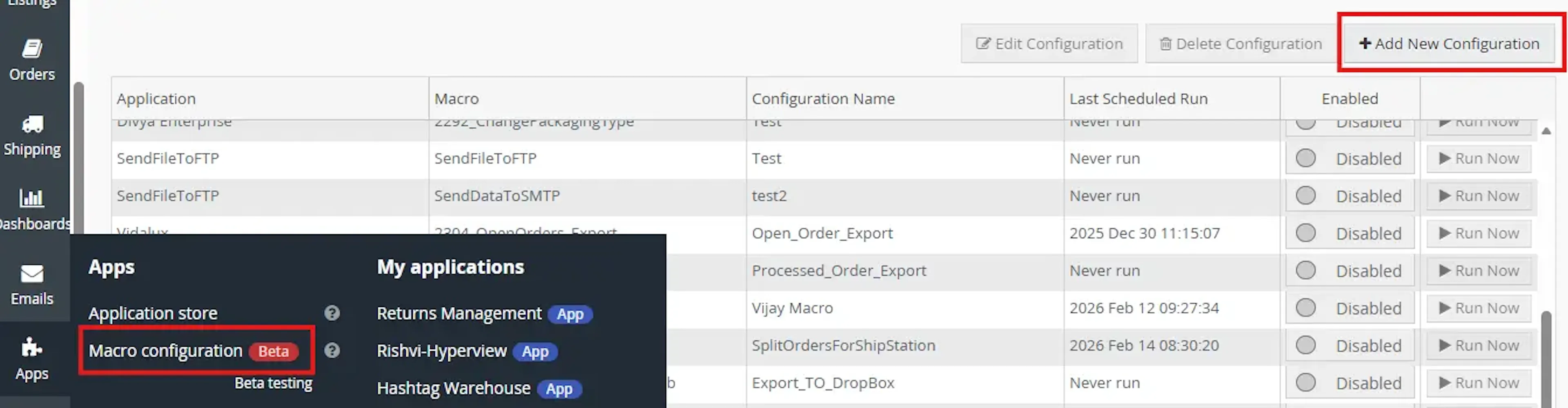
Go to Apps and open Macro Configuration to manage and create new HyperShip AI configurations.
Create New Configuration
Click Add New Configuration and select HyperShip AI from the list of available applications.

Configure Optimisation Settings
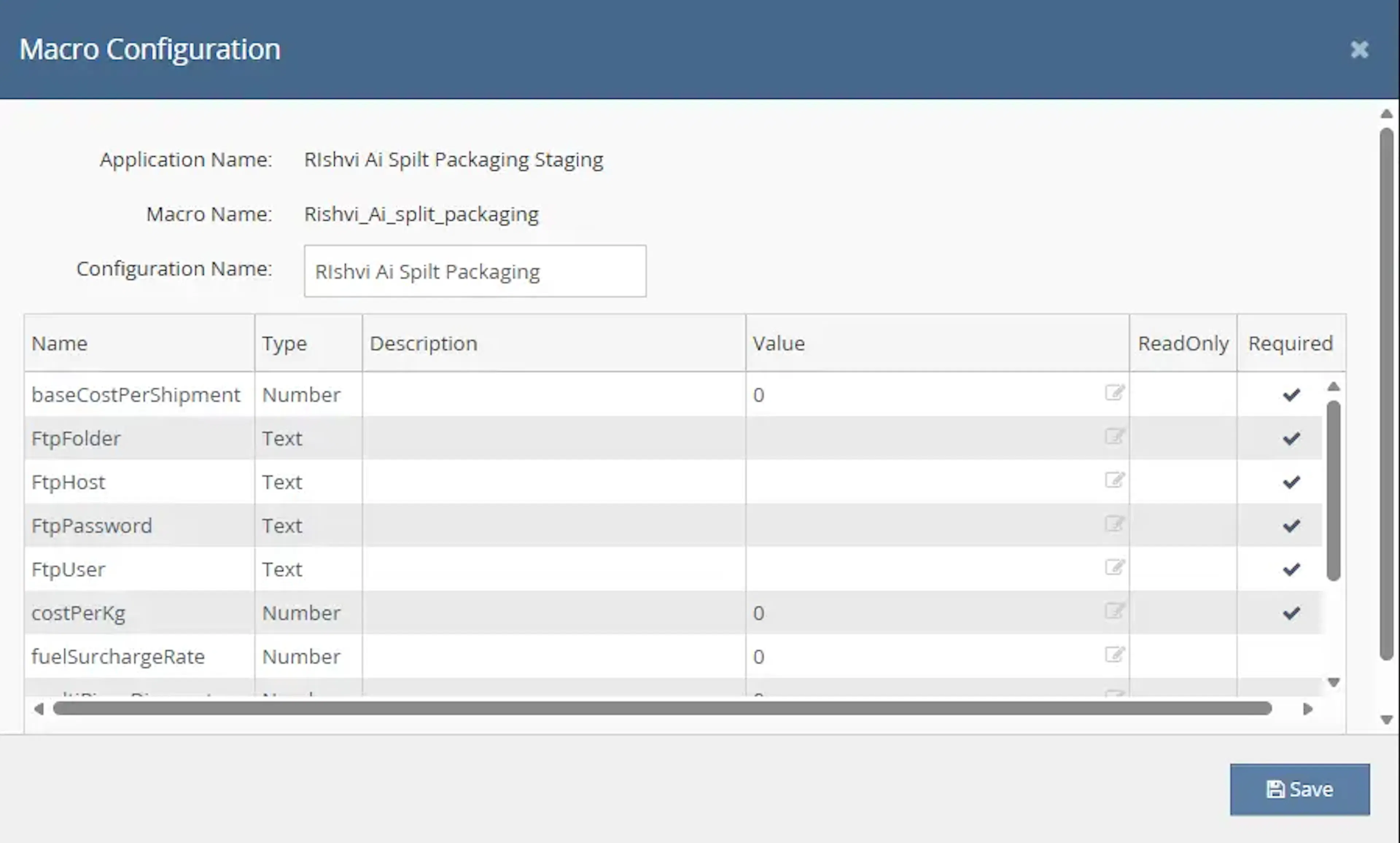
In the configuration screen, enter the required details:
-
Carrier rules: dimension limits, weight thresholds, and surcharge structures for each carrier
-
Cost parameters: volumetric weight divisors, fuel surcharge percentages, and oversize thresholds
-
Packaging logic: how items should be grouped and split across parcels
-
Override rules: any carrier or service preferences that should take priority
Review each field carefully. All required parameters must be filled before saving.
Save and Enable

Save the configuration and enable it to activate automated packaging optimisation within Linnworks.
Make sure the macro is toggled on to allow the schedule engine to run it automatically.
Key Benefits
Managing packaging and carrier selection manually across high order volumes introduces cost risk and fulfilment errors. HyperShip AI removes this uncertainty by applying consistent, rules-driven logic to every order.
Reduce shipping costs, eliminate manual carrier guesswork, and ensure every order is packed and dispatched as efficiently as possible.
Reduce Shipping Costs
Cost simulation identifies the cheapest compliant carrier and packaging configuration for every order, preventing overpayment on shipping.
Automate Carrier Selection
Removes manual decision-making from carrier assignment. Rules are applied consistently across all orders without human intervention.
Handle Multi-Parcel Orders Correctly
Orders that exceed a single carrier parcel limit are automatically split into the correct number of parcels, maintaining compliance and cost optimisation.
Improve Fulfilment Accuracy
Packaging decisions are based on actual SKU dimensions and weight data, reducing errors caused by manual estimation or guesswork.
Apply Carrier Constraints at Scale
Carrier-specific rules including volumetric weight, oversize thresholds, and surcharge structures are applied automatically to every order.
Update Linnworks Automatically
Orders are updated with all relevant shipping decisions without requiring manual data entry, keeping Linnworks accurate and up to date.
Usage of App
HyperShip AI is triggered through the Linnworks Rules Engine to automatically analyse orders and determine the most cost-effective packaging and carrier selection.
Execution
Trigger via Rules Engine
Call the HyperShip AI macro through the Rules Engine with the required OrderIds to initiate the automated packaging optimisation and carrier selection process. No additional manual input is required once the macro is triggered.
Outcome
When the macro runs against an order, it:
Reads SKU data
Retrieves dimensions and weight for each item on the order from Linnworks stock item records.
Applies carrier constraints
Evaluates each configured carrier against the order's item data, applying dimension limits, weight thresholds, volumetric calculations, and surcharge structures.
Determines packaging configuration
Selects the most efficient and compliant packaging arrangement, splitting into multiple parcels where required.
Assigns the optimal carrier
Assigns the carrier that meets all constraints at the lowest simulated cost.
Updates the Linnworks order
Writes the final shipping details, packaging decisions, and any applied overrides back to the Linnworks order with relevant tracking notes.
Input Parameters
HyperShip AI requires the following inputs to be configured before it can process orders:
| Parameter | Required | Description |
|---|---|---|
| OrderIds | Yes | The Linnworks order IDs to process. Passed via the Rules Engine trigger. |
| Carrier Rules | Yes | Dimension limits, weight thresholds, volumetric formulas, and surcharge structures per carrier. |
| Cost Parameters | Yes | Volumetric weight divisors, fuel surcharge rates, oversize penalty thresholds, and multi-parcel pricing tiers. |
| Packaging Logic | Yes | Rules governing how items are grouped into parcels and when splitting is triggered. |
| Override Rules | No | Carrier or service preferences that take priority over the default cost-optimised result. |
Best Practices
Consistent configuration and regular monitoring are key to getting the most from HyperShip AI.
Keep SKU dimensions up to date
HyperShip AI relies on accurate dimensions and weights stored against each stock item in Linnworks. Incomplete or missing data will result in suboptimal packaging decisions.
Configure all active carriers
Include all carriers you actively use in the cost simulation configuration. Omitting a carrier means it will never be selected, even if it would be the cheapest option.
Review override rules regularly
Override rules should reflect current business priorities. Review them whenever carrier contracts change or new services are added.
Test before enabling at scale
Run the macro against a small sample of orders before enabling it across your full order volume. Verify that carrier assignments and packaging splits match expectations.
Monitor Rules Engine execution
Check the Rules Engine logs regularly to confirm HyperShip AI is triggering correctly and processing orders without errors.
Keep cost parameters current
Update fuel surcharge rates, volumetric divisors, and oversize thresholds whenever carrier pricing changes to ensure cost simulations remain accurate.
FAQ
How is HyperShip AI triggered?
HyperShip AI is triggered through the Linnworks Rules Engine. When an order matches a configured rule, the macro is called automatically with the relevant OrderIds. No manual action is needed once the Rules Engine rule is active.
What data does HyperShip AI need to work?
The macro requires SKU dimensions (length, width, height) and weight to be stored against each stock item in Linnworks. It also requires carrier rules, cost parameters, and packaging logic to be configured in the macro settings before it can process orders.
Can HyperShip AI handle orders with multiple items?
Yes. HyperShip AI analyses all items on an order together and determines the most efficient way to package them, including splitting across multiple parcels when a single parcel would exceed carrier limits.
What happens if an order contains items with missing dimensions?
If SKU dimension or weight data is missing, HyperShip AI cannot accurately simulate packaging or costs for that item. It is important to ensure all active stock items have complete dimension and weight data in Linnworks.
Can I override the carrier that HyperShip AI selects?
Yes. Override rules can be configured within the macro settings to prioritise specific carriers or services, regardless of the cost simulation result. These overrides take precedence over the automated selection.
Does HyperShip AI update Linnworks automatically?
Yes. Once the optimised packaging and carrier have been determined, the macro updates the Linnworks order with the selected carrier details, packaging decisions, any overrides applied, and relevant tracking notes. No manual data entry is required.
Can I run HyperShip AI on a schedule?
Yes. A recurring schedule can be configured within the macro configuration's Schedules tab. You can set it to run daily or weekly at a specific time, or at a recurring interval throughout the day.
What carriers does HyperShip AI support?
HyperShip AI is carrier-agnostic. Any carrier can be configured within the cost simulation parameters. The system selects the best option from whichever carriers are set up in your configuration.
Legal Information
-
Privacy Policy: https://rishvi.co.uk/privacy-policy/
-
Terms and Conditions: https://rishvi.co.uk/terms-conditions/
Please review these pages to understand how data is handled and the terms governing the use of this application.
Summary
HyperShip AI fully automates packaging optimisation and carrier selection within Linnworks. Once configured with carrier rules, cost parameters, and packaging logic, the macro runs via the Rules Engine and handles the entire decision-making process for every order.
Automated packaging decisions
SKU dimensions and weights are read and analysed automatically to determine the most efficient packaging for every order.
Cross-carrier cost simulation
Multiple scenarios are simulated across all configured carriers before the lowest-cost compliant option is selected.
Automatic parcel splitting
Orders exceeding single-parcel limits are split automatically to maintain carrier compliance and optimise cost.
Instant Linnworks updates
Carrier assignments, packaging details, and tracking notes are written back to Linnworks immediately after optimisation completes.
For any orders that cannot be automatically processed, review the Rules Engine logs and verify that the relevant stock items have complete dimension and weight data configured in Linnworks.