Add Missing Last Name
Automatically update Linnworks order customer names when the delivery full name contains only a first name by appending a configured fallback last name.
Overview
Add Missing Last Name is an automated customer-name correction solution for Linnworks. It checks selected orders and updates the delivery customer FullName when the value contains only one name.
Some sales channels may supply customer names without a surname. This can create issues during courier validation, shipping-label generation, fulfilment, or dispatch.
The macro processes the order IDs supplied through the Linnworks Rule Engine. When the delivery FullName contains only one word, it appends the configured SetLastName value and saves the updated customer information back to the order.
Orders where the customer FullName already contains more than one word are left unchanged.
Improve customer-name completeness by automatically adding a configured fallback last name to qualifying Linnworks orders.
Who Should Use Add Missing Last Name
Warehouse & Fulfilment Teams
Teams preparing orders for picking, packing, shipping-label generation, and dispatch can reduce manual customer-name corrections.
Logistics Teams
Logistics teams can improve name completeness before orders are passed to courier systems.
Integration Administrators
Administrators configure the fallback last name, enable the macro, create the Rule Engine action, and monitor execution logs.
Operations Teams
Operations teams benefit from consistent customer-name formatting across selected orders.
Key Features
Single-Name Detection
Checks the delivery customer FullName to determine whether it contains only one name value.
Configurable Fallback Last Name
Uses the SetLastName configuration parameter to define the value appended to qualifying customer names.
Automatic Customer Update
Saves the corrected FullName directly to the Linnworks order customer information.
Safe Update Logic
Leaves customer names unchanged when the FullName already contains more than one word.
Rule Engine Execution
Processes only the Linnworks order IDs supplied through the configured Rule Engine action.
Execution Logging
Logs macro start, order details, original name, updated name, unchanged orders, errors, and completion.
How Add Missing Last Name Works
Add Missing Last Name runs through a defined sequence every time it processes one or more selected orders. The macro is triggered through the Linnworks Rule Engine and receives the relevant order IDs automatically.
Step 1: Order retrieval
The macro reads each order ID supplied through the OrderIds parameter and retrieves the corresponding Linnworks order.
Step 2: Customer name retrieval
The delivery customer FullName is read from CustomerInfo > Address > FullName.
Step 3: Name-part validation
The FullName is split by spaces to determine how many name parts are present.
Step 4: Fallback last name application
When the FullName contains only one name part, the configured SetLastName value is appended.
Step 5: Linnworks customer update
The updated customer information is saved back to the order using the Linnworks customer-information update operation.
Step 6: Logging and completion
Updated orders, unchanged orders, errors, and macro completion are recorded in the execution log.
Configure the Macro
Once the app is installed, create a macro configuration so the system knows which macro to run and allows it to be selected in the Rule Engine.
This setup can be adjusted anytime based on your operational requirements.
Steps to Configure
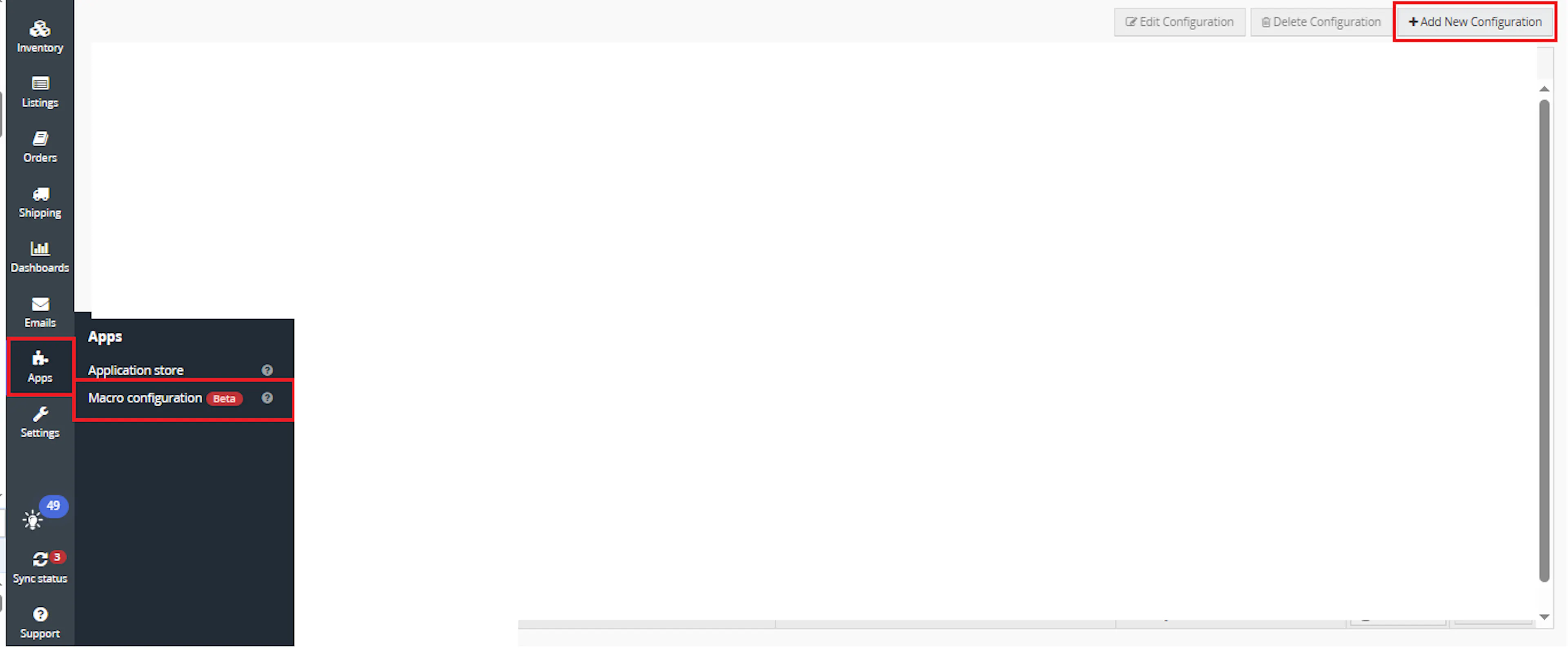
Go to Apps > Macro Configuration and click + Add new configuration.
Select the AddMissingLastName macro and click Create Configuration.
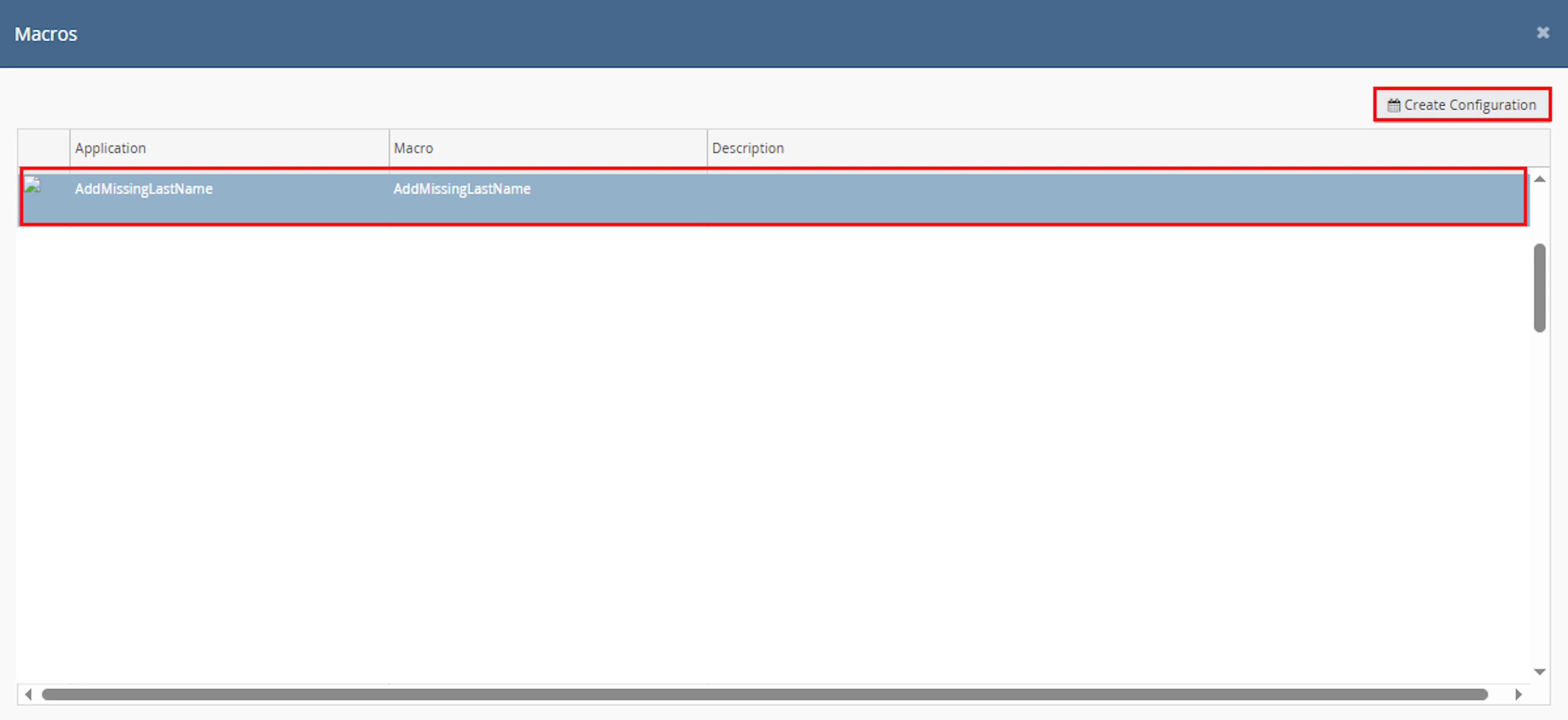
This creates a new configuration where the macro can be enabled and used by the Rule Engine.
In the Macro Configuration screen, add the configuration name and parameter value.
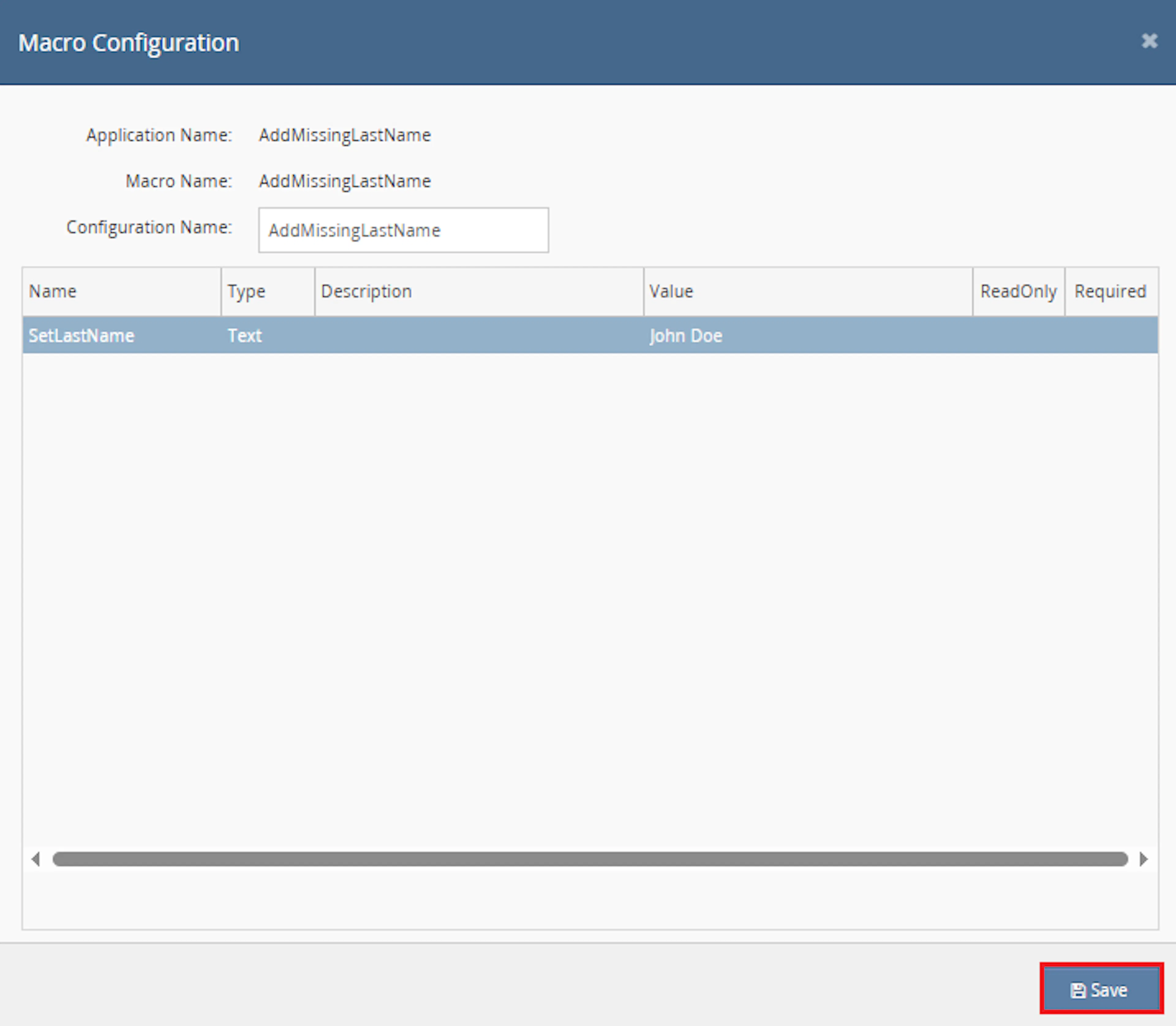
Example configuration name:
Add Missing Last Name
Configure the following parameter:
-
SetLastName
Enter the fallback last name that should be added when the customer full name contains only one word.
Example:
John Doe
The selected OrderIds are supplied by the Rule Engine when the macro action runs.
Make sure to enable the macro to continue with the Rule Engine configuration.

Note: If the macro is not enabled, it will not appear in the Action value list when setting up the rule.
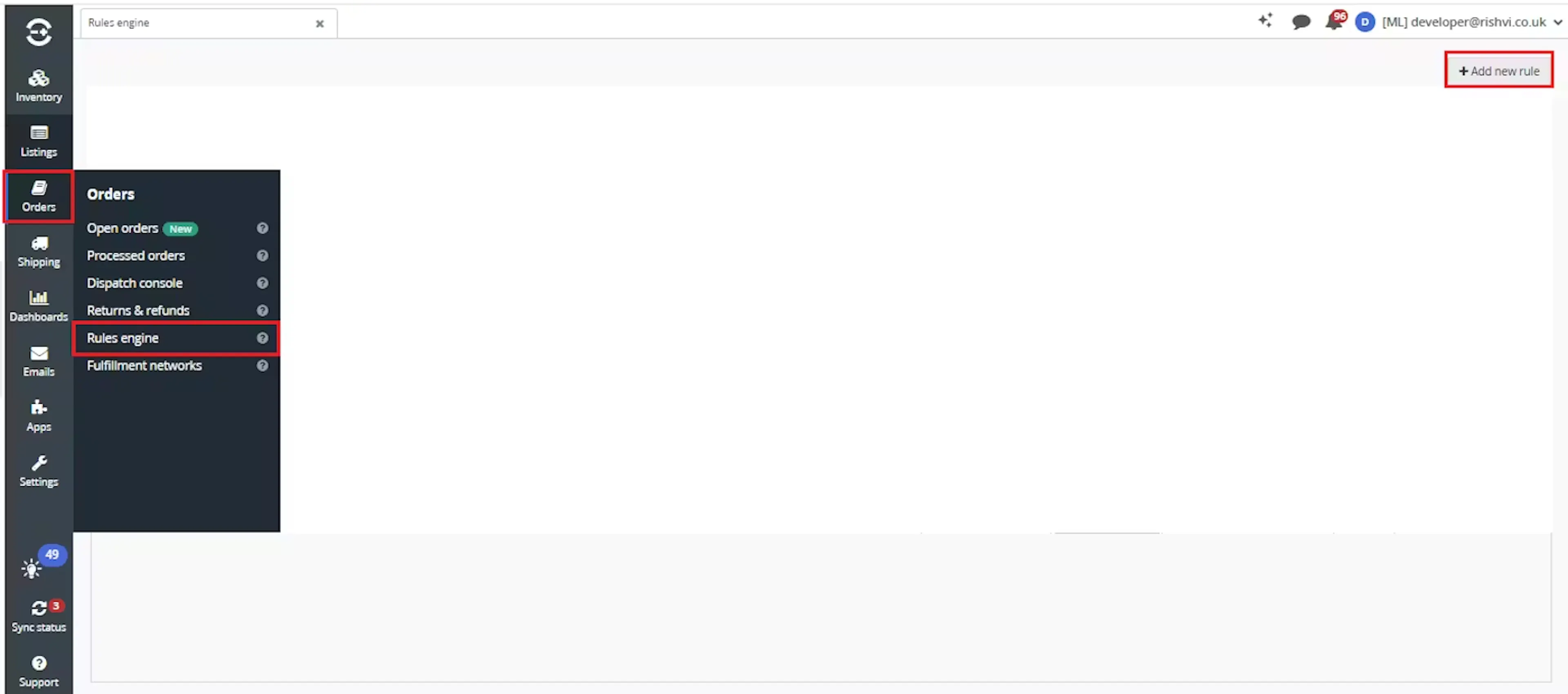
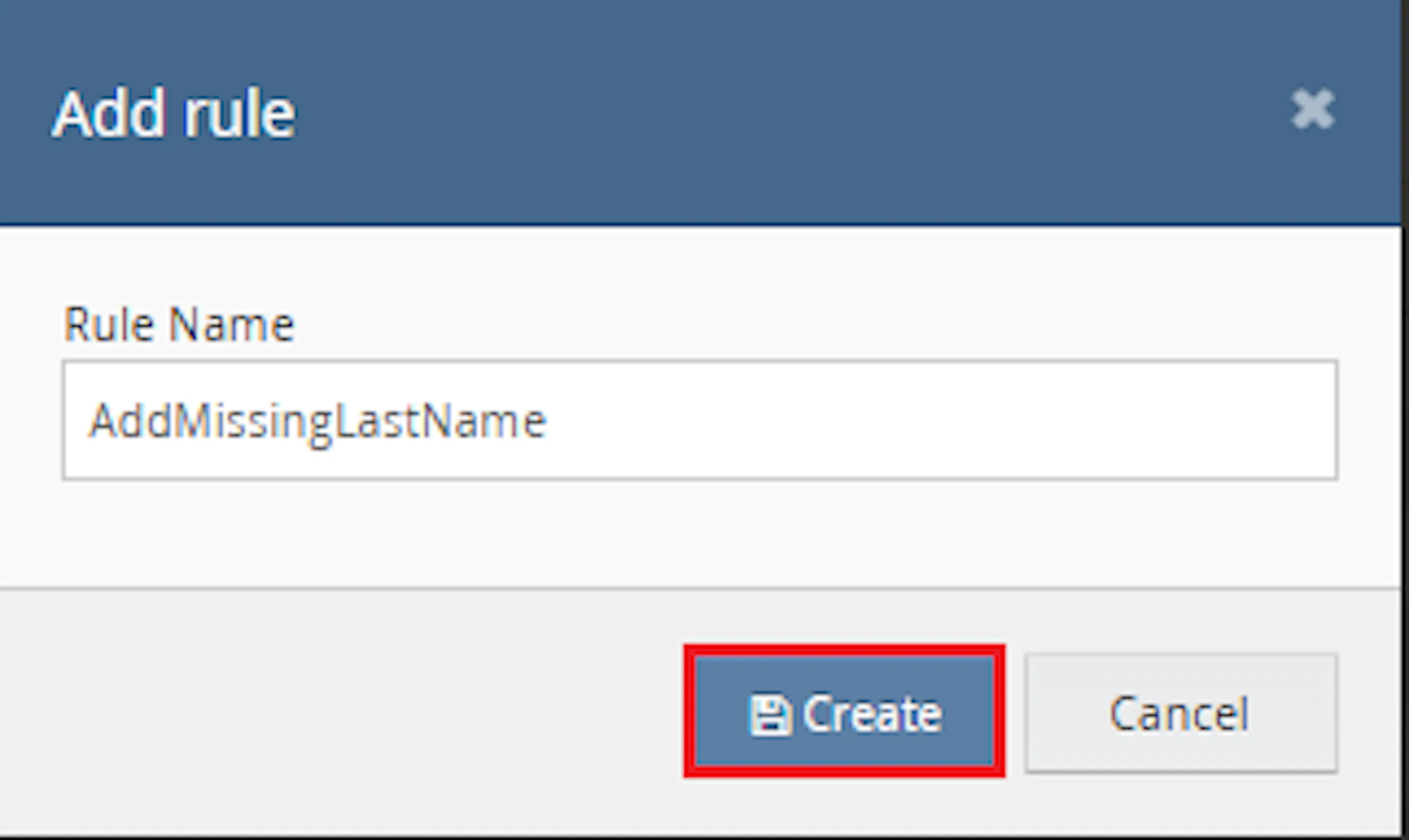
Go to Orders > Rules engine and click + Add new rule.
Enter the rule name and click Create.
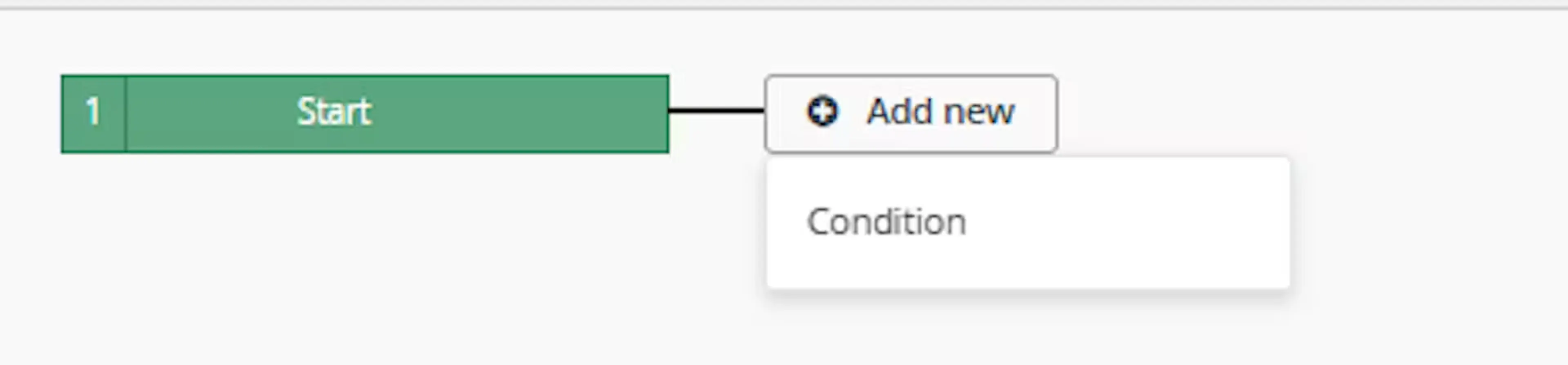
Click Add new, select Condition, set the condition as required, and save it.
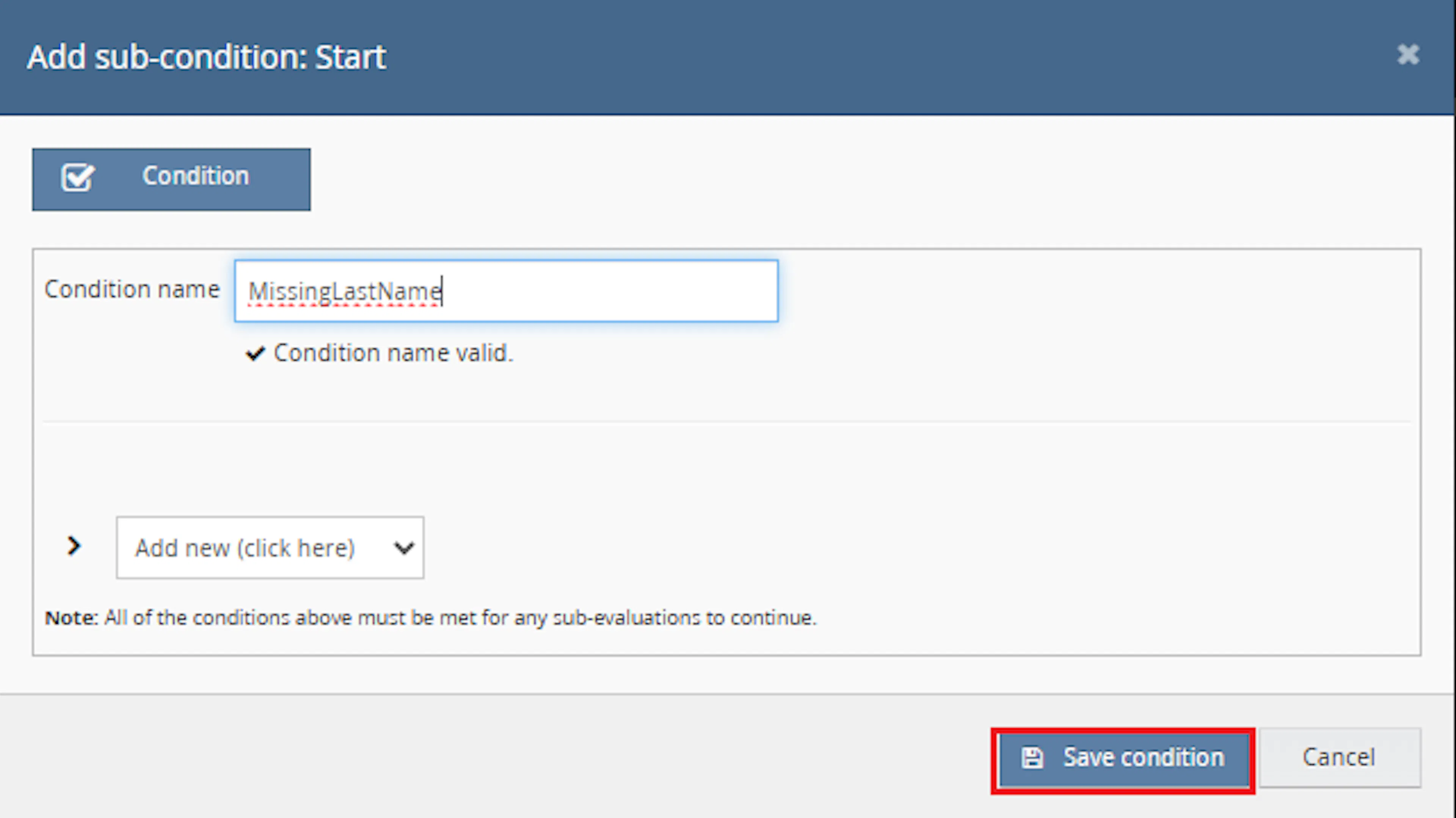
Choose the condition that identifies orders where the customer full name may be missing a last name.
Add the macro action and click Save.

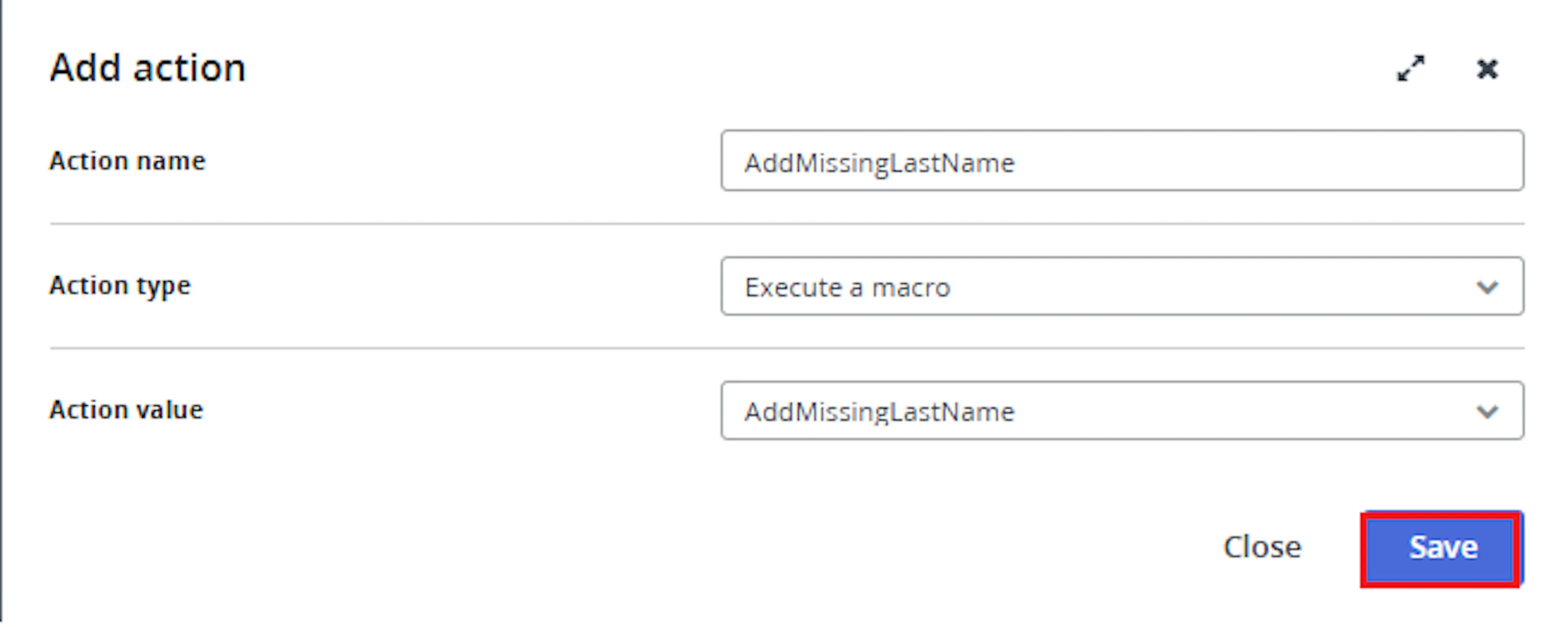
In the Add action window, enter the Action name, for example:
Add Missing Last Name
-
Set Action type to:
Execute a macro -
In Action value, select:
AddMissingLastName -
Click Save
Note: If the macro is not enabled, it will not appear in the Action value list when setting up the rule.
Review the saved rule setup.
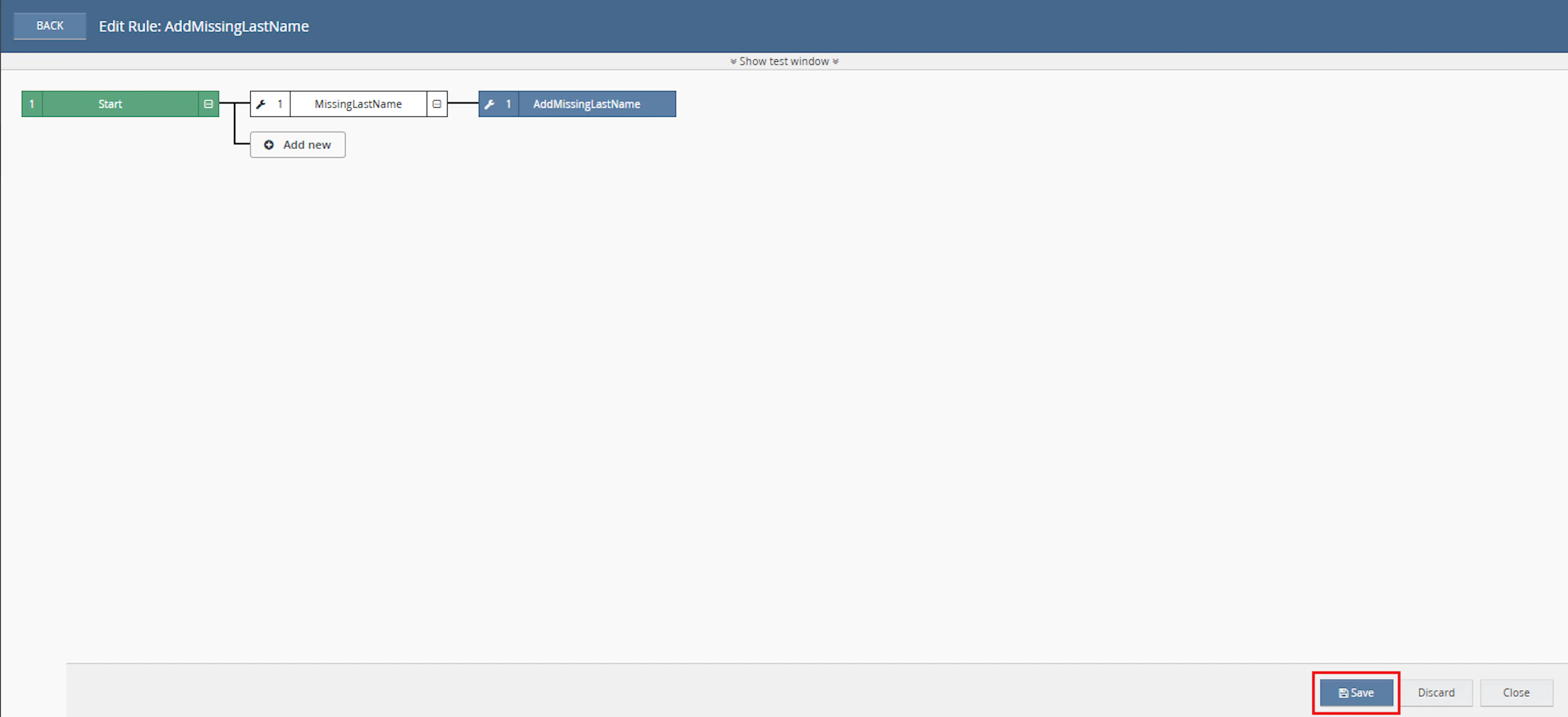
- Verify the condition and action are connected correctly
- Click Save in the bottom-right corner to save the rule
Key Benefits
Manually correcting incomplete customer names can slow down fulfilment and lead to inconsistent results. Add Missing Last Name applies the same fallback-name rule to every selected qualifying order.
Reduce manual customer-name corrections, improve address completeness, and help orders move through courier and fulfilment workflows more smoothly.
Fix Missing Last Names
Adds the configured fallback last name when the delivery FullName contains only one word.
Reduce Manual Editing
Removes the need to open and correct qualifying Linnworks orders individually.
Support Shipping Labels
Helps ensure delivery names contain both a first-name and last-name-style value before label generation.
Improve Courier Compatibility
Helps reduce courier validation issues caused by incomplete delivery customer names.
Preserve Existing Full Names
Customer names containing more than one word are not changed.
Automate Through Rules Engine
Processes selected orders automatically when they match the configured Linnworks rule.
Usage of App
Add Missing Last Name is triggered through the Linnworks Rule Engine to update qualifying customer delivery names automatically.
Execution
Trigger via Rule Engine
Call the AddMissingLastName macro through the Rule Engine with the required OrderIds and configured SetLastName value. No manual update is required after the macro is triggered.
Outcome
When the macro runs against an order, it:
Reads the customer FullName
Retrieves the delivery customer name from the selected Linnworks order.
Checks the number of name parts
Splits the FullName by spaces to determine whether only one name value is present.
Appends the fallback last name
Adds the configured SetLastName value when the FullName contains only one word.
Updates Linnworks customer information
Saves the corrected FullName back to the order.
Preserves complete names
Leaves the order unchanged when the FullName already contains multiple words.
Records execution results
Logs the order number, original name, updated name, unchanged status, errors, and completion.
Input Parameters
Add Missing Last Name requires the following inputs:
| Parameter | Required | Description |
|---|---|---|
| OrderIds | Yes | The Linnworks order IDs to process. These are supplied through the Rule Engine action. |
| SetLastName | Yes | The fallback last name value appended when the delivery FullName contains only one word. |
The updated name follows this format:
OriginalName SetLastName
For example:
| Original FullName | SetLastName | Updated FullName |
|---|---|---|
John | Customer | John Customer |
Name Update Rules
The macro applies the following customer-name rules:
| Customer FullName Condition | Macro Behaviour |
|---|---|
| FullName contains one word | Appends the configured SetLastName value. |
| FullName contains more than one word | Leaves the customer information unchanged. |
| Order is supplied through OrderIds | Processes the order through the configured Rule Engine action. |
| Customer information is updated | Saves the revised FullName back to the Linnworks order. |
Important: The configured SetLastName value is appended exactly as entered in the macro configuration.
Example Scenario
When an order contains the following customer name:
The macro updates the FullName to:
Updated Customer Full Name
John Customer
When the original FullName already contains multiple words, such as John Smith, the macro does not change the order.
Best Practices
Choose the fallback last name carefully and test the macro with sample orders before enabling it across a large order volume.
Use a suitable fallback value
Configure a fallback last name that is suitable for your courier, shipping-label, and operational requirements.
Use targeted rule conditions
Configure the Rule Engine to process only orders that may contain incomplete delivery customer names.
Test sample orders first
Test single-word and multi-word customer names before enabling the rule for a larger order volume.
Run before label generation
Trigger the macro before courier validation or shipping-label generation.
Review macro logs
Monitor logs for updated names, unchanged orders, and customer-information update errors.
Avoid unnecessary repeated execution
After the fallback value is added, the FullName contains multiple words and is not changed again by the macro.
FAQ
How is Add Missing Last Name triggered?
The macro is triggered through the Linnworks Rule Engine. Matching order IDs are supplied automatically through the OrderIds parameter.
What configuration value is required?
The macro requires the SetLastName value, which defines the fallback last name appended to qualifying customer names.
Which customer name does the macro check?
The macro checks CustomerInfo > Address > FullName on the selected Linnworks order.
When is the customer name updated?
The FullName is updated only when it contains one word.
What happens when the customer name already contains multiple words?
No update is made, and the macro logs Order Info Not Changed.
How is the new name created?
The macro combines the original FullName and the configured SetLastName value using this format:
OriginalName SetLastName
Does the macro change the first name?
No. The existing FullName is preserved, and the configured fallback value is appended.
Does the macro process every Linnworks order?
No. It processes only the order IDs supplied through the configured Rule Engine action.
Can the fallback last name be changed?
Yes. Update the SetLastName value in the macro configuration.
What happens after the customer name is updated?
The revised customer information is saved back to the Linnworks order.
Can the macro run more than once on the same order?
Yes, but once the fallback value has been added, the FullName contains multiple words and will not be changed again by the same logic.
Does the macro add an order note?
The supplied documentation describes customer-information updates and execution logging. It does not specify that an order note is created.
What information is recorded in the logs?
The macro records start, order number, customer name, updated name, unchanged orders, errors, and completion.
What should I check when the name is not updated?
Confirm that the FullName contains only one word and that the SetLastName parameter has been configured.
Legal Information
- Privacy Policy: https://rishvi.co.uk/privacy-policy/
- Terms and Conditions: https://rishvi.co.uk/terms-conditions/
Please review these pages to understand how data is handled and the terms governing the use of this application.
Summary
Add Missing Last Name automates the correction of Linnworks delivery customer names that contain only one name value.
Once connected to the Rule Engine, the macro retrieves each selected order, checks the customer FullName, appends the configured SetLastName value when required, and saves the updated customer information.
Automatic name validation
Delivery customer names are checked automatically to determine whether a fallback last name is required.
Configurable fallback value
The SetLastName parameter controls the value appended to qualifying customer names.
Safe customer updates
Names already containing multiple words are preserved without modification.
Rule Engine automation
Selected orders are processed automatically through the configured Linnworks rule.
For orders that do not update as expected, review the Rule Engine and macro logs, confirm that the FullName contains only one word, and verify that the SetLastName parameter has been configured correctly.