Multi-Location Auto Split & Auto Move
Automatically evaluates stock across multiple fulfilment locations and intelligently decides whether to keep, move, or split orders to maximise fulfilment efficiency while preventing duplicate processing.
Managing orders across multiple warehouses can become complex when stock is distributed between fulfilment locations. Determining whether an order should remain at its current location, be moved to another warehouse, or be split across multiple locations often requires manual review.
The Multi-Location Auto Split & Auto Move macro automates this decision-making process by analysing stock availability across all configured locations and determining the most efficient fulfilment strategy.
The macro supports standard inventory items, composite products, location priority rules, parent order rebasing, automatic warehouse moves, order splitting, duplicate processing protection, and optional label reprinting.
Automatically optimise fulfilment decisions across multiple warehouses using real-time stock availability.
Configure the Macro
Once the app is installed, you need to create a macro configuration so the system knows which warehouse priorities should be used and whether shipping labels should be regenerated when orders are split.
This setup can be adjusted anytime based on your fulfilment requirements.
Steps to Configure
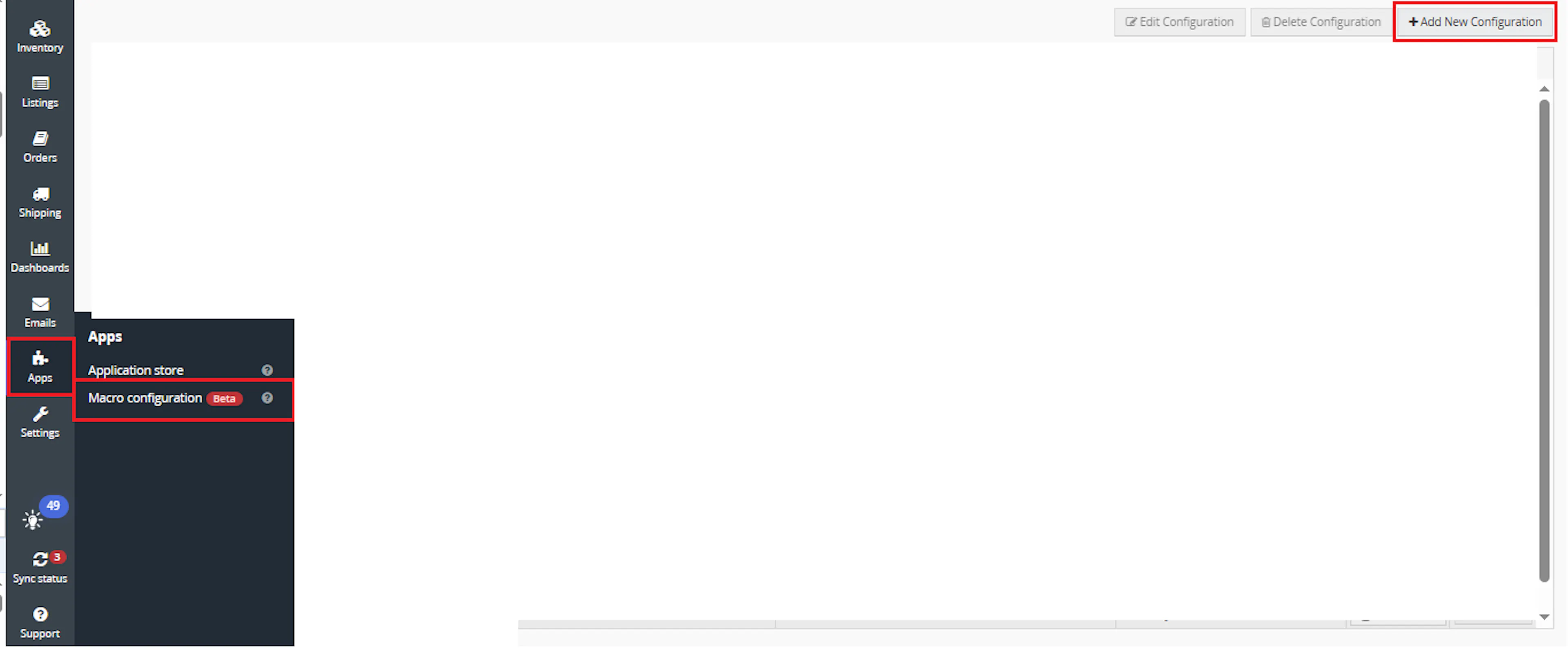
Go to Apps > Macro Configuration and click + Add new configuration.
Select the MultiLocationAutoSplit macro and click Create Configuration.
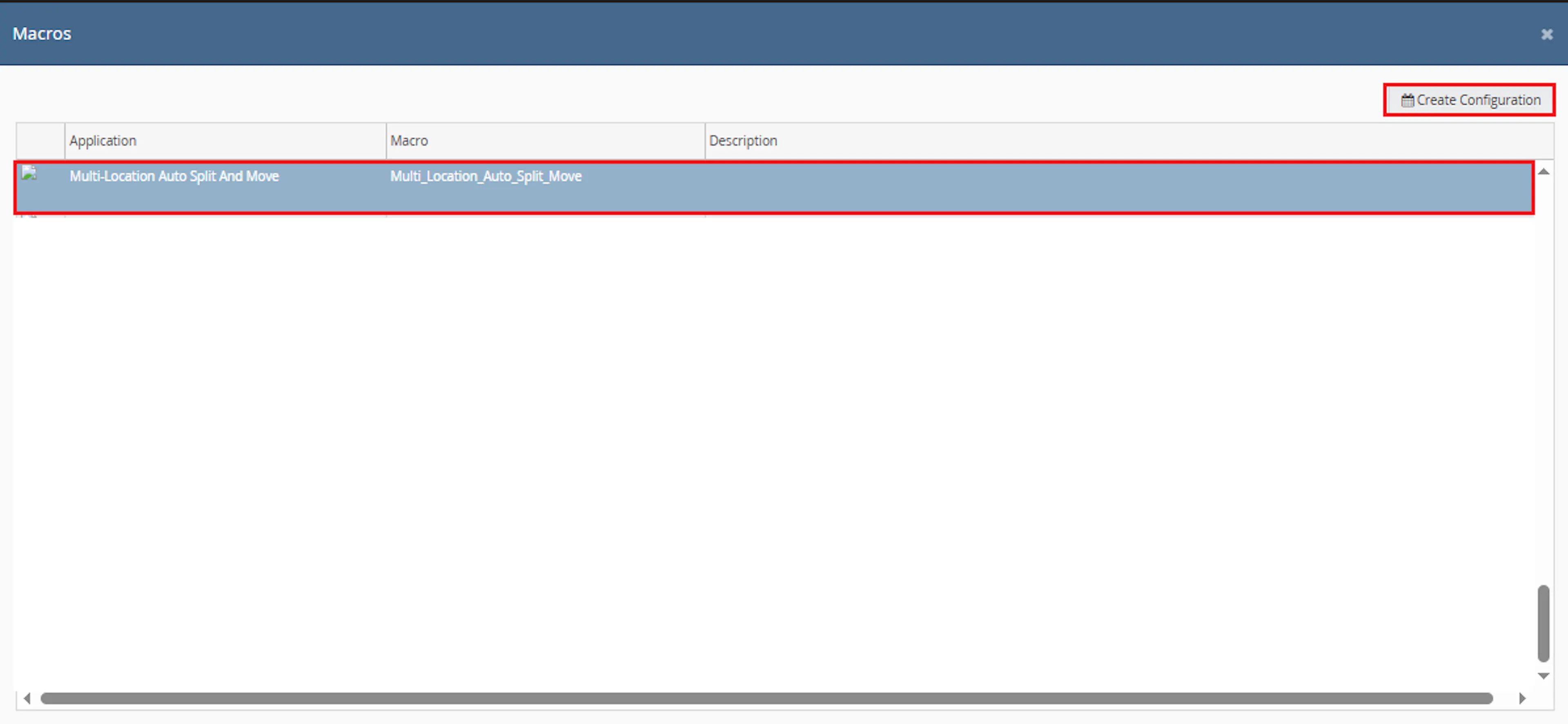
This creates a new configuration where you can define the required parameter values.
In the Macro Configuration screen, add the configuration name and parameter values.\
Configure the following parameters:
-
PriorityLocations
-
ReprintLabels
Example:
PriorityLocations = Warehouse A,Warehouse B,Warehouse C

ReprintLabels = True
Parameter descriptions:
| Parameter | Description |
|---|---|
| PriorityLocations | Comma-separated warehouse priority order |
| ReprintLabels | Controls whether shipping labels should be regenerated during split processing |
Note: Warehouse names must exactly match the Linnworks fulfilment location names.
Make sure to enable the macro before continuing.

Note: If the macro is not enabled, it will not appear in the Action Value dropdown when creating a rule.
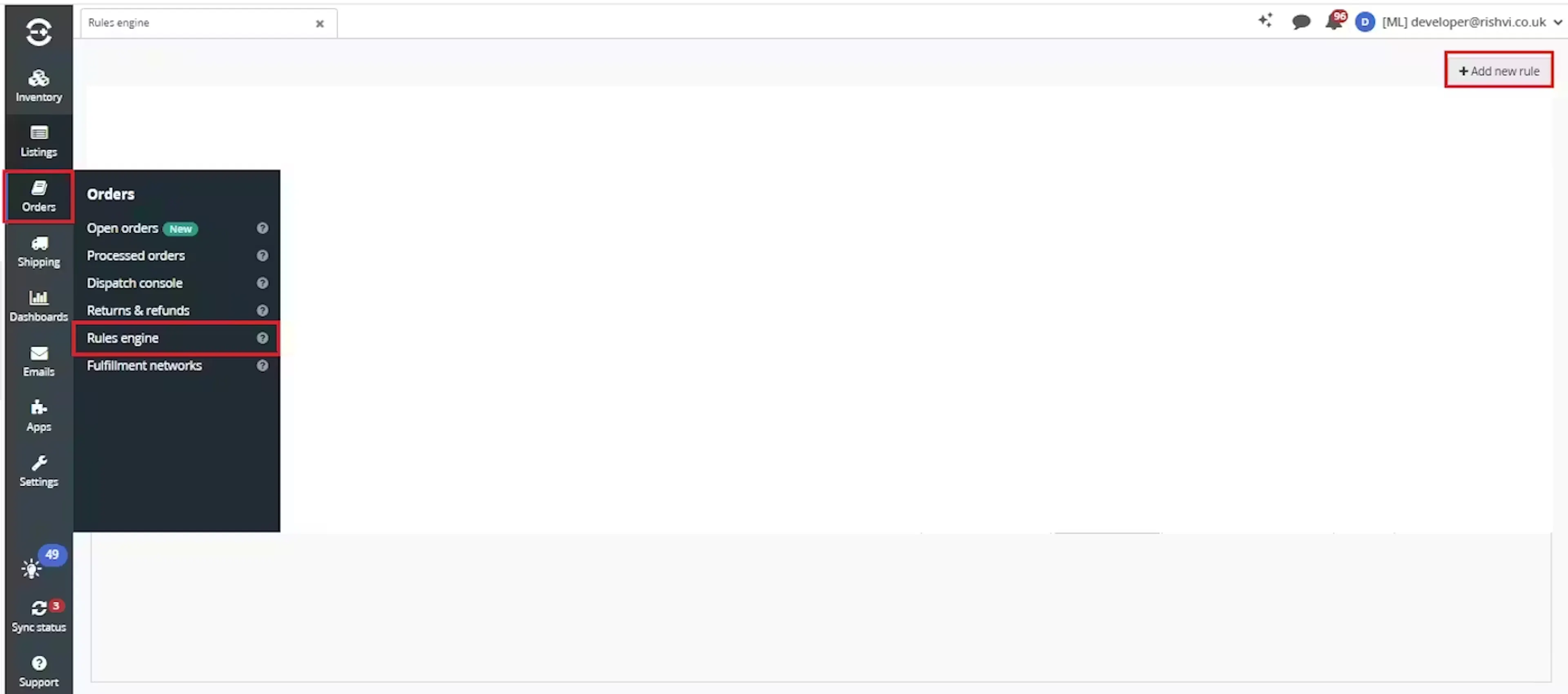
Go to Orders > Rules Engine and click + Add new rule.
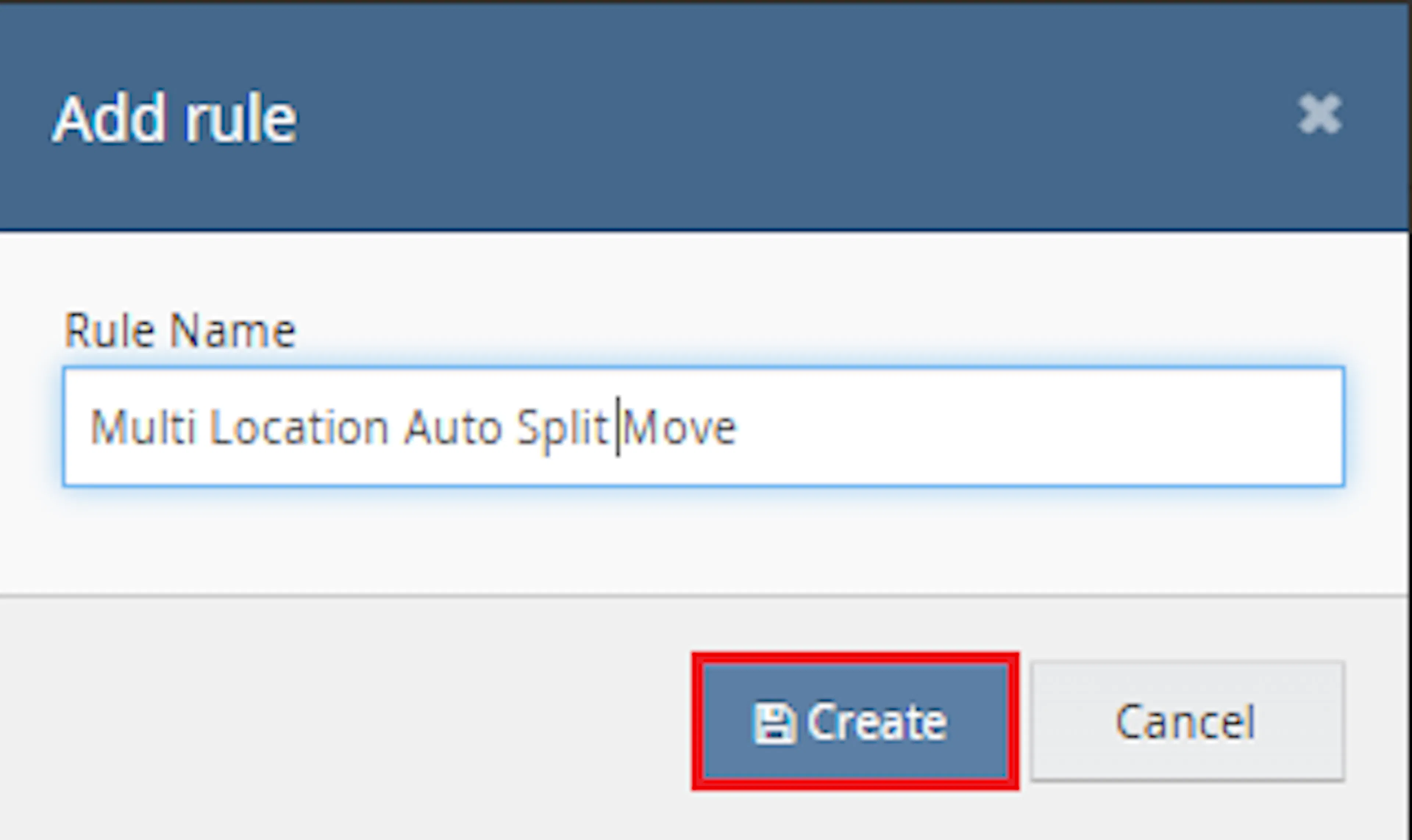
Enter the rule name and click Create.\
Click Add New and configure the rule conditions.
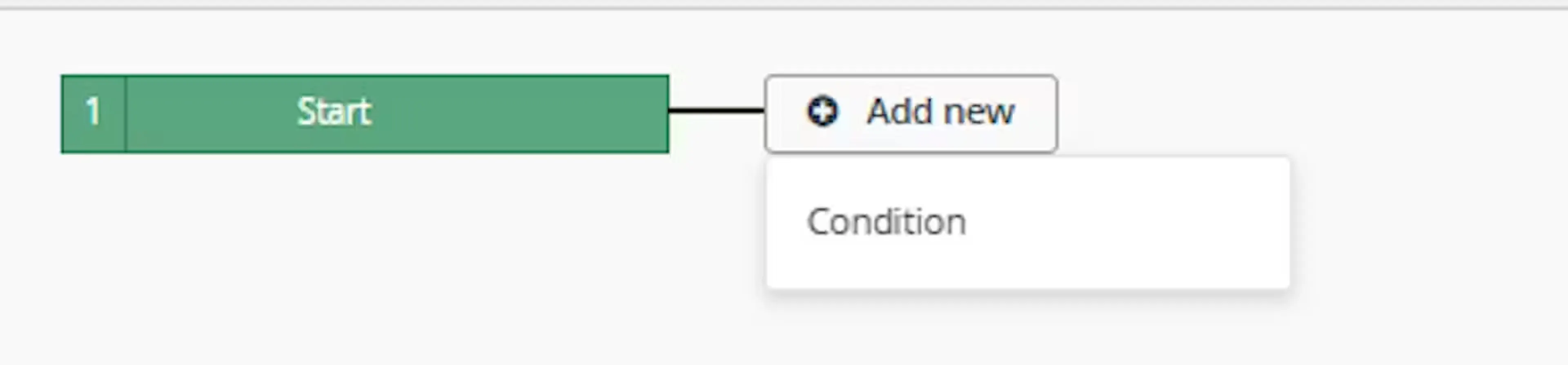
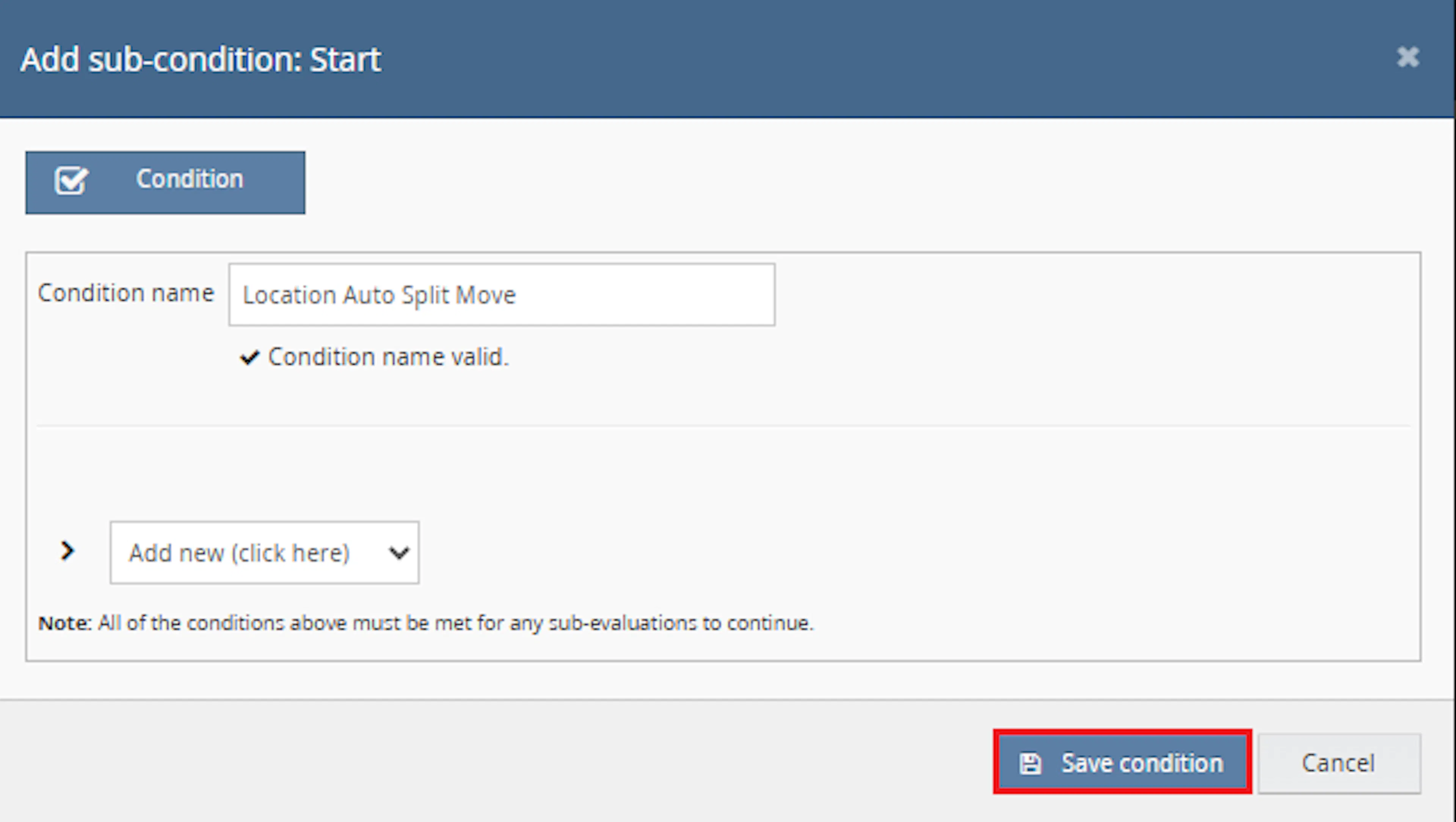
Example conditions:
-
Order Status = Open
-
Fulfilment Location is assigned
-
Order has not already been processed
The exact conditions depend on your fulfilment workflow.
Add the Macro Action and click Save.
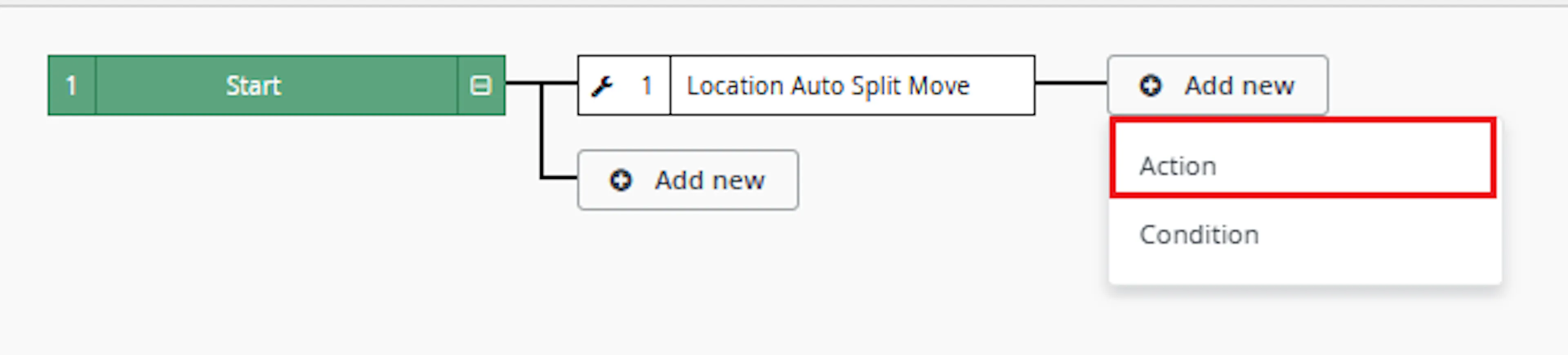
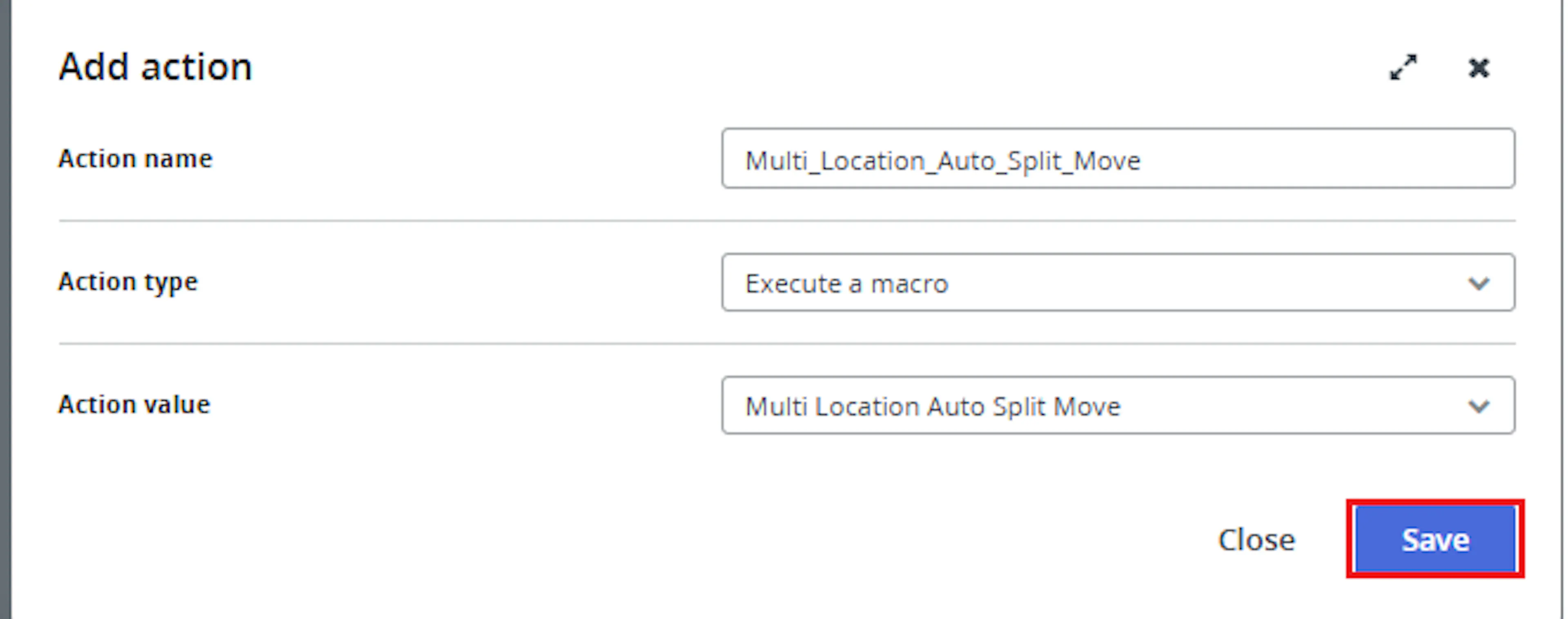
Configure:
Action Name:
Multi Location Auto Split & Auto Move

Action Type:
Execute a Macro

Action Value:
MultiLocationAutoSplit
Click Save.
Review the rule configuration and save the rule.
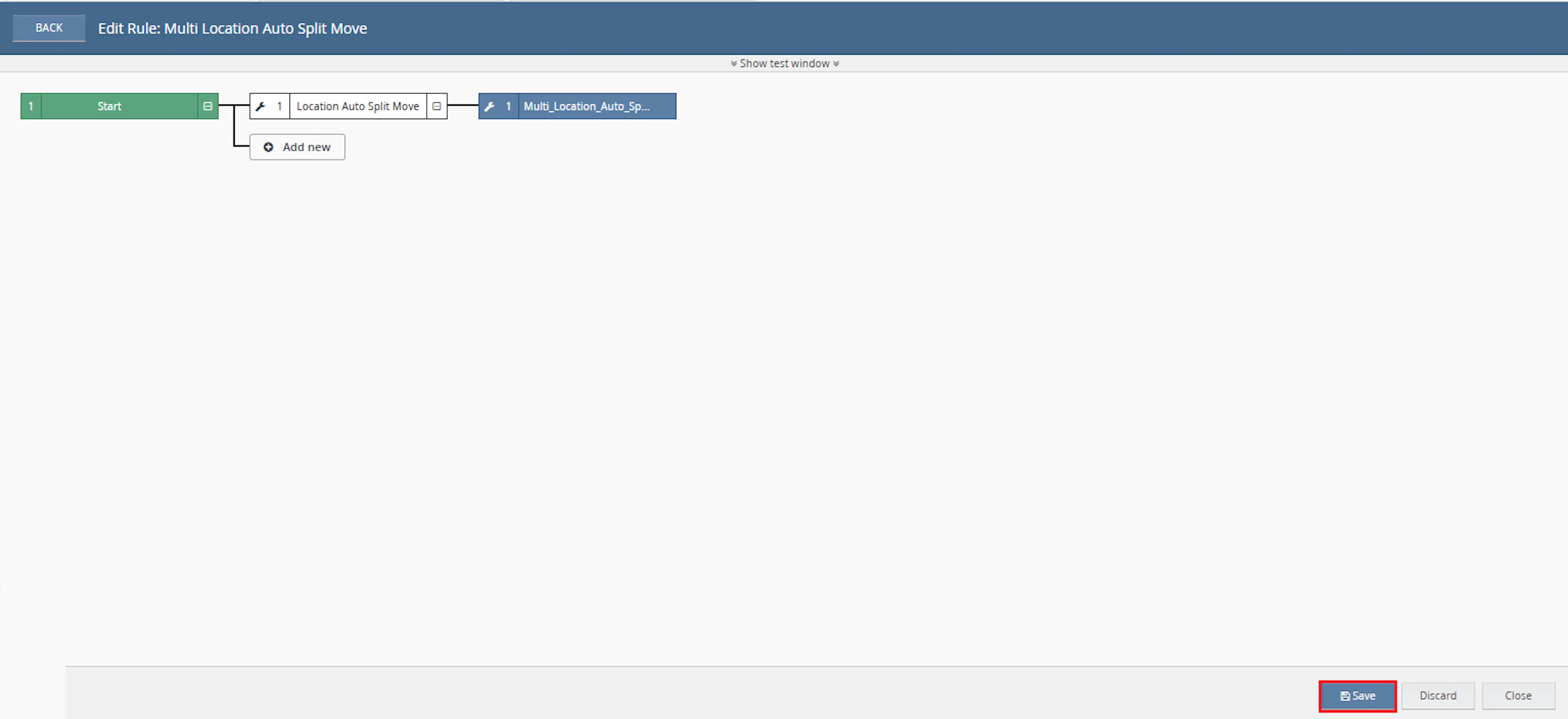
Verify:
-
Conditions are configured correctly
-
Execute a Macro action is attached
-
The rule is enabled
Click Save.
Automatic Warehouse Selection
Determines the most suitable fulfilment location automatically.
Order Splitting
Splits orders when stock is distributed across multiple warehouses.
Warehouse Moves
Moves complete orders when another warehouse can fulfil all items.
Composite Item Support
Evaluates component stock availability before fulfilment decisions are made.
Location Priority Rules
Supports configurable warehouse priority sequences.
Duplicate Processing Protection
Marks processed orders automatically to prevent duplicate execution.
How It Works
Step 1
The macro receives order IDs from the Rule Engine.
Step 2
All Linnworks stock locations are retrieved.
Step 3
Warehouse priority rules are applied using the configured PriorityLocations value.
Step 4
Orders that are parked are skipped automatically.
Step 5
Orders already marked as processed are skipped.
Step 6
The macro validates whether every item can be fulfilled from at least one warehouse.
Step 7
Orders containing unfulfillable items are logged and excluded from move or split processing.
Step 8
If the current warehouse can fulfil all items, the order remains in its current location.
Step 9
If another warehouse can fulfil the complete order, the order is queued for movement.
Step 10
If no single warehouse can fulfil the entire order, a split plan is generated.
Step 11
Each order item is assigned to the most appropriate warehouse.
Step 12
Parent orders may be rebased when no items remain in the original fulfilment location.
Step 13
Child orders are created automatically using Linnworks order splitting.
Step 14
Child orders are moved to their assigned fulfilment locations.
Step 15
Internal notes are written explaining every move, split, and fulfilment decision.
Step 16
Orders are marked as processed using an Extended Property to prevent duplicate execution.
Step 17
Processing statistics are written to the execution log.
Usage of App
PriorityLocations
Defines the warehouse fulfilment priority order.
ReprintLabels
Controls whether shipping labels should be regenerated during split processing.
OrderIds
The list of Linnworks orders supplied by the Rule Engine.
Extended Property Tracking
Uses an internal processed flag to prevent duplicate execution.
Order Notes
Adds internal notes documenting warehouse decisions.
Composite Product Support
Supports stock allocation for composite inventory items.
Example Parameter Values
PriorityLocations = Warehouse A,Warehouse B,Warehouse C

ReprintLabels = True
Key Points to Remember
-
Parked orders are skipped
-
Previously processed orders are skipped
-
Composite products are fully supported
-
Warehouse priority rules are configurable
-
Orders may remain in their current warehouse
-
Orders may be moved to another warehouse
-
Orders may be split across multiple warehouses
-
Parent orders may be rebased
-
Internal notes are created automatically
-
Processed orders are marked automatically
-
Orders containing unfulfillable items are not moved or split
-
Processing activity is fully logged
What You Can Expect
-
Automatic warehouse selection
-
Intelligent stock allocation
-
Reduced manual fulfilment decisions
-
Improved warehouse utilisation
-
Automated order movement
-
Automated order splitting
-
Improved stock visibility
-
Better fulfilment efficiency
-
Clear audit history through order notes
Overall Impact
This macro helps organisations operating multiple fulfilment locations automatically determine the most efficient fulfilment strategy for every order. By evaluating stock availability across warehouses, the macro reduces manual intervention, improves stock utilisation, minimises fulfilment delays, and ensures orders are routed to the most appropriate fulfilment location.
What To Do After the Macro Runs
After the macro completes, review the processing results.
Step 1
Review the macro execution log.
Step 2
Verify any warehouse moves that were performed.
Step 3
Review newly created split orders.
Step 4
Check internal order notes for fulfilment decisions.
Step 5
Confirm that fulfilment locations match operational expectations.
Why This Matters
Managing fulfilment across multiple warehouses manually can lead to delays, stock allocation mistakes, and unnecessary operational effort.
This macro helps:
-
Reduce manual warehouse decisions
-
Improve fulfilment accuracy
-
Optimise stock allocation
-
Reduce fulfilment delays
-
Improve warehouse utilisation
-
Maintain consistent fulfilment rules
-
Prevent duplicate processing
-
Improve operational visibility
Best Practices
-
Configure warehouse priorities carefully
-
Ensure stock levels remain accurate
-
Review warehouse naming consistency
-
Test using a small set of orders before deployment
-
Monitor split activity during the initial rollout
-
Review internal order notes regularly
-
Enable label regeneration only when operationally required
Troubleshooting
Order Was Not Split
Verify that stock exists in at least one warehouse for every order item.
Order Was Not Moved
Confirm that another warehouse can fulfil the complete order.
Order Was Skipped
Check whether the order was parked or already processed.
Unexpected Warehouse Selection
Review the PriorityLocations configuration and warehouse naming.
Composite Product Not Fulfilled
Verify that sufficient component stock exists at the target warehouse.
Order Marked as Already Processed
Review the processed Extended Property applied by previous executions.
Summary
The Multi-Location Auto Split & Auto Move macro analyses stock availability across all fulfilment locations and automatically determines whether an order should remain in its current warehouse, move to a different warehouse, or be split across multiple warehouses.
The macro supports warehouse priorities, composite products, parent order rebasing, duplicate processing protection, internal audit notes, and automated warehouse movement to ensure orders are fulfilled from the most appropriate location.