Update Purchase Price Daily (GBP Conversion)
Automatically updates inventory purchase prices using purchase order costs, converts foreign currency values to GBP, calculates unit costs, and prevents duplicate processing through automated purchase order tracking.
Overview
Update Purchase Price Daily (GBP Conversion) is a scheduled inventory-cost maintenance solution for Linnworks. It uses purchase order information to calculate and update the Purchase Price recorded against inventory items.
The macro retrieves purchase orders from the previous 365 days, identifies the currency used by each order, and converts foreign currency costs into GBP where required.
For purchase order lines containing more than one unit, the macro calculates the individual unit cost before updating the inventory item.
Successfully processed purchase orders are marked with the IsPurchasePriceUpdated extended property. Future executions skip purchase orders carrying this property, helping prevent the same costs from being applied repeatedly.
Keep Linnworks inventory purchase prices aligned with purchase order costs while standardising foreign currency values into GBP.
Who Should Use Update Purchase Price Daily
Purchasing Teams
Teams managing purchase orders can keep inventory costs aligned with the values recorded against supplier orders.
Finance & Reporting Teams
Finance teams benefit from more consistent GBP purchase prices for valuation, margin analysis, and reporting.
Integration Administrators
Administrators configure the schedule, enable the macro, and review execution and API-update activity.
Inventory Operations Teams
Inventory teams can reduce manual price maintenance across stock items linked to processed purchase orders.
Key Features
Purchase Order Cost Processing
Retrieves purchase orders from the previous 365 days and processes their inventory line costs.
GBP Currency Conversion
Converts foreign currency purchase costs into GBP using Linnworks currency conversion rates.
Automatic Unit Cost Calculation
Calculates a single-unit purchase cost when a purchase order line contains more than one unit.
Inventory Purchase Price Updates
Updates the Linnworks Purchase Price field for the relevant inventory items.
Duplicate Processing Protection
Skips purchase orders already marked with the IsPurchasePriceUpdated extended property.
API Activity Management
Monitors inventory update activity to help avoid exceeding applicable update limits.
How Update Purchase Price Daily Works
The macro follows a defined sequence whenever its configured schedule runs.
Step 1: Retrieve currency rates
The macro starts execution and retrieves the latest Linnworks currency conversion rates.
Step 2: Retrieve purchase orders
Purchase orders from the previous 365 days are retrieved for evaluation.
Step 3: Identify purchase order currency
The currency associated with each purchase order is identified.
Step 4: Check previous processing
The macro checks whether the purchase order has already been processed.
Step 5: Skip marked purchase orders
Purchase orders containing the IsPurchasePriceUpdated extended property are not processed again.
Step 6: Retrieve line items
The purchase order line items and their associated cost information are retrieved.
Step 7: Convert foreign currency costs
Purchase costs recorded in a foreign currency are converted into GBP where required.
Step 8: Calculate unit costs
When a purchase order line quantity exceeds one, the total cost is converted into an individual unit purchase cost.
Step 9: Update inventory purchase prices
The calculated GBP unit price is applied to the Linnworks Purchase Price field for the relevant inventory item.
Step 10: Monitor update activity
API update activity is monitored to help prevent update limits from being exceeded.
Step 11: Confirm successful processing
The macro checks whether all required inventory items for the purchase order were updated successfully.
Step 12: Mark the purchase order
The IsPurchasePriceUpdated extended property is added after successful processing.
Step 13: Record processing information
Purchase order, inventory update, conversion, and error information is written to the execution log.
Step 14: Complete execution
The macro finishes and records its final execution status.
Configure the Macro
Once the app is installed, you need to create a macro configuration and schedule so the system can automatically update inventory purchase prices without manual intervention.
This macro does not require any user-configurable parameters.
Steps to Configure
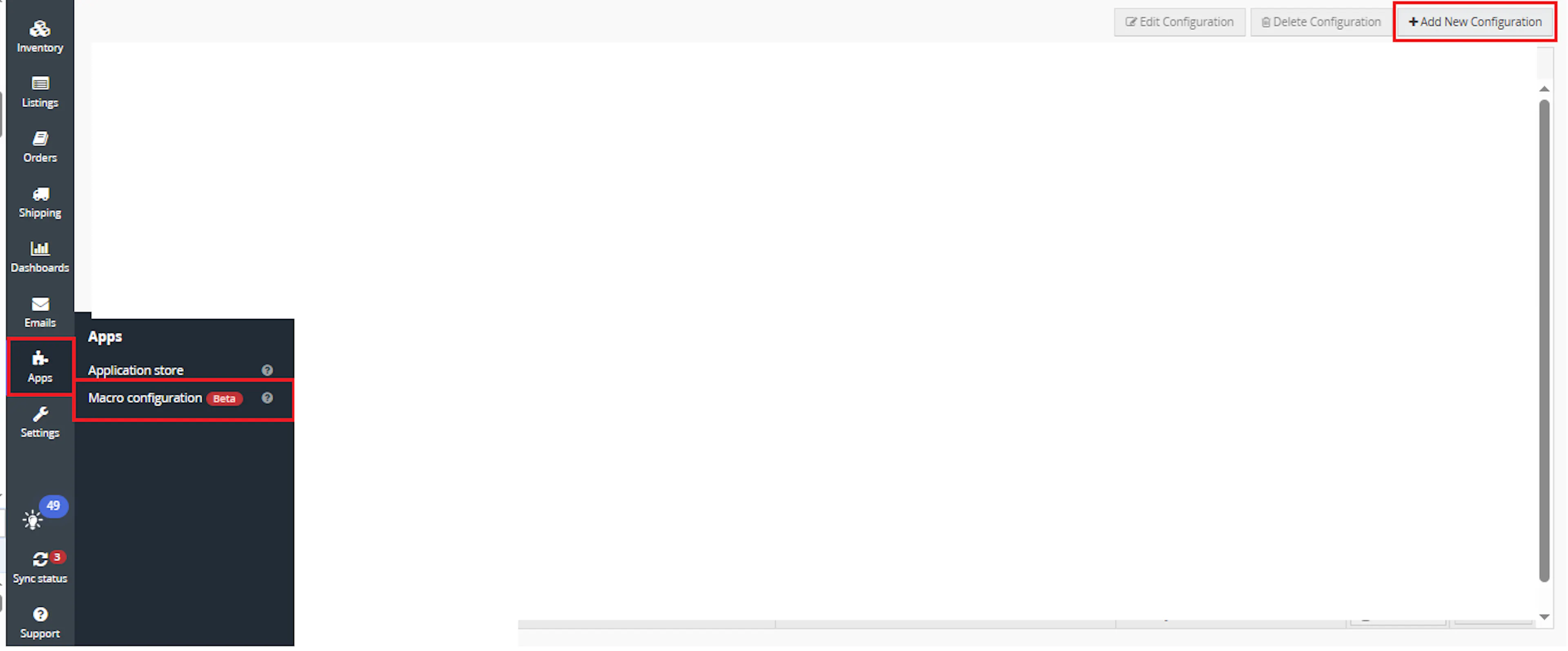
Go to Apps > Macro Configuration and click + Add new configuration.
Select the AutoFileMenifest macro and click Create Configuration.
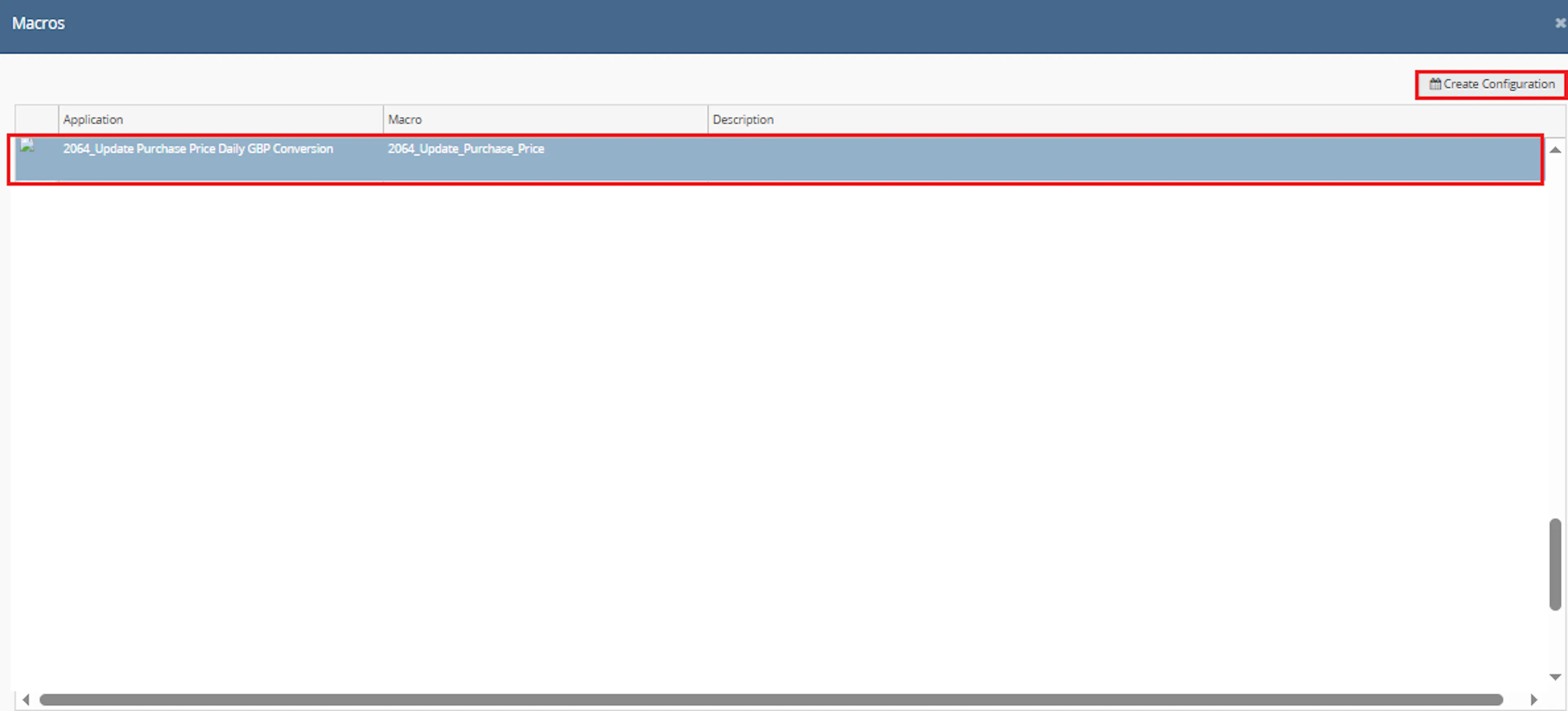
This creates a new configuration where you can define the schedule and required parameter values.
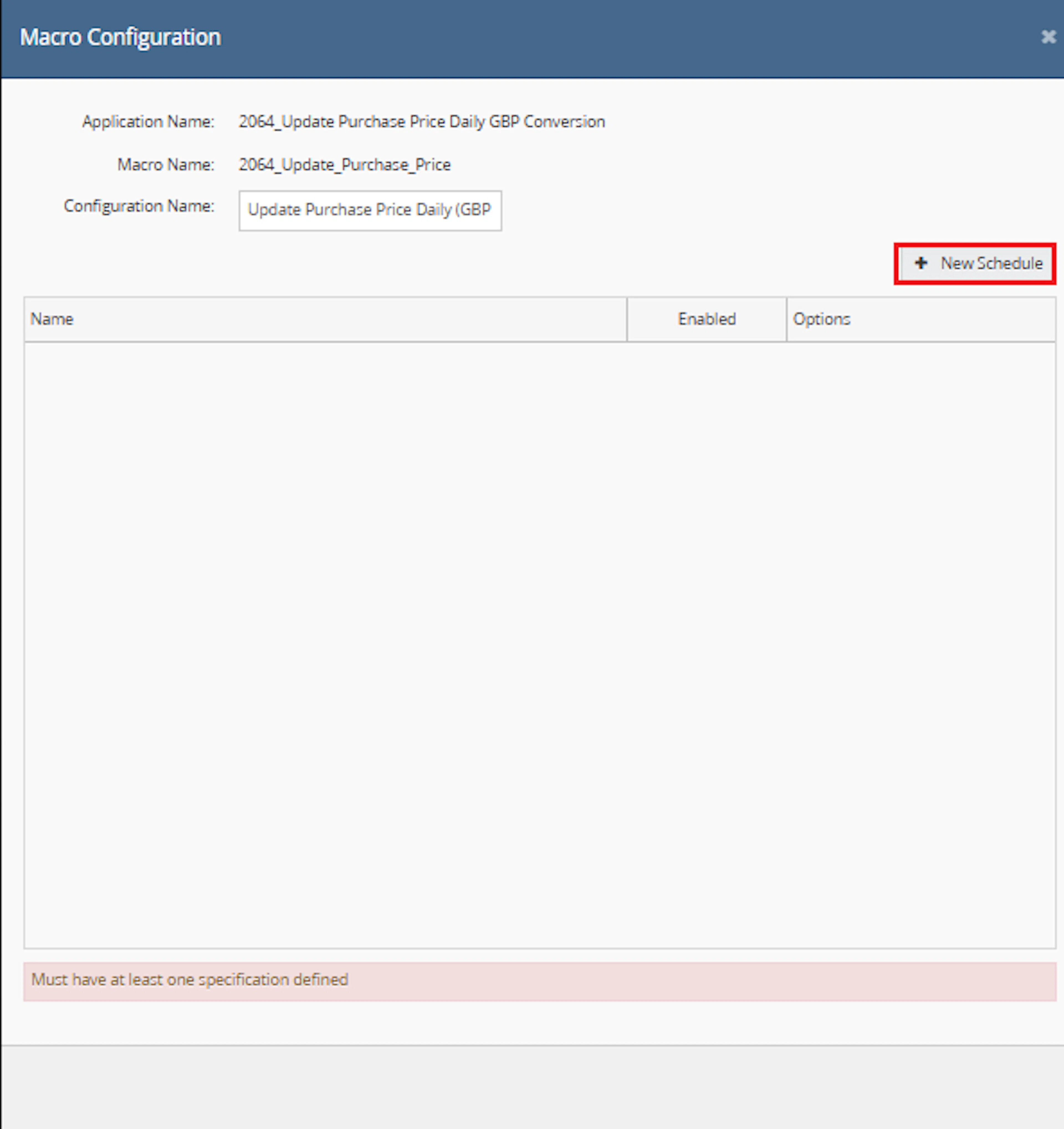
In the Macro Configuration screen, go to the Schedules tab and click on New Schedules.
- In the Schedule Config window, enter the Name
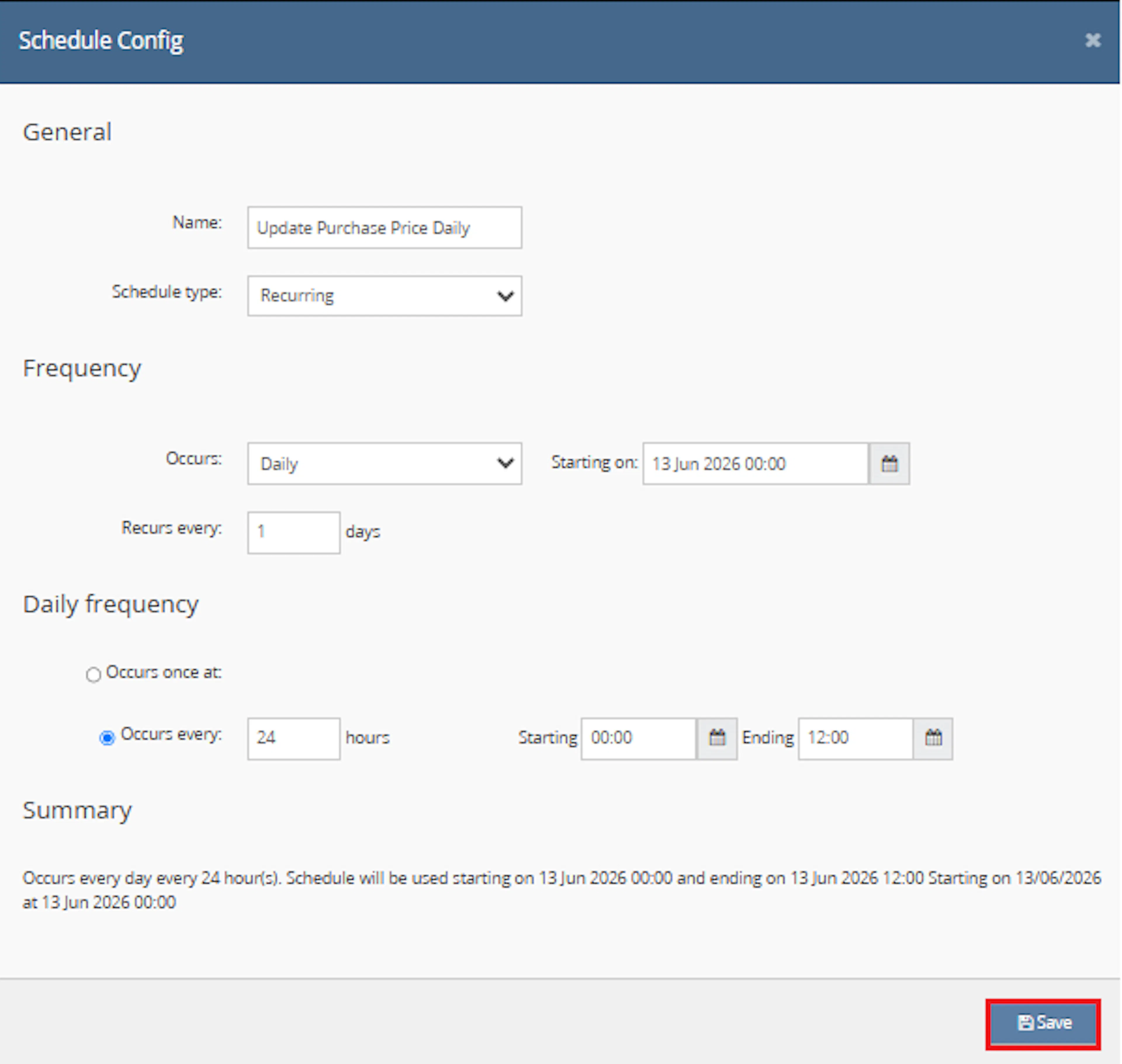
- Select Schedule type from the dropdown:
- One time runs only once
- Recurring runs repeatedly based on schedule
- If Recurring is selected:
- In Frequency, choose Occurs from dropdown:
- Daily
- Weekly
- In Frequency, choose Occurs from dropdown:
- Set Recurs every value, for example 1 day or 1 week
- Set the Starting on date and time
- Under Daily frequency, choose one option:
- Occurs once at → specify exact time
- Occurs every → enter interval in hours and define:
- Starting time
- Ending time
- Review the Summary section
- Click Save
- Enable the schedule and click Save.
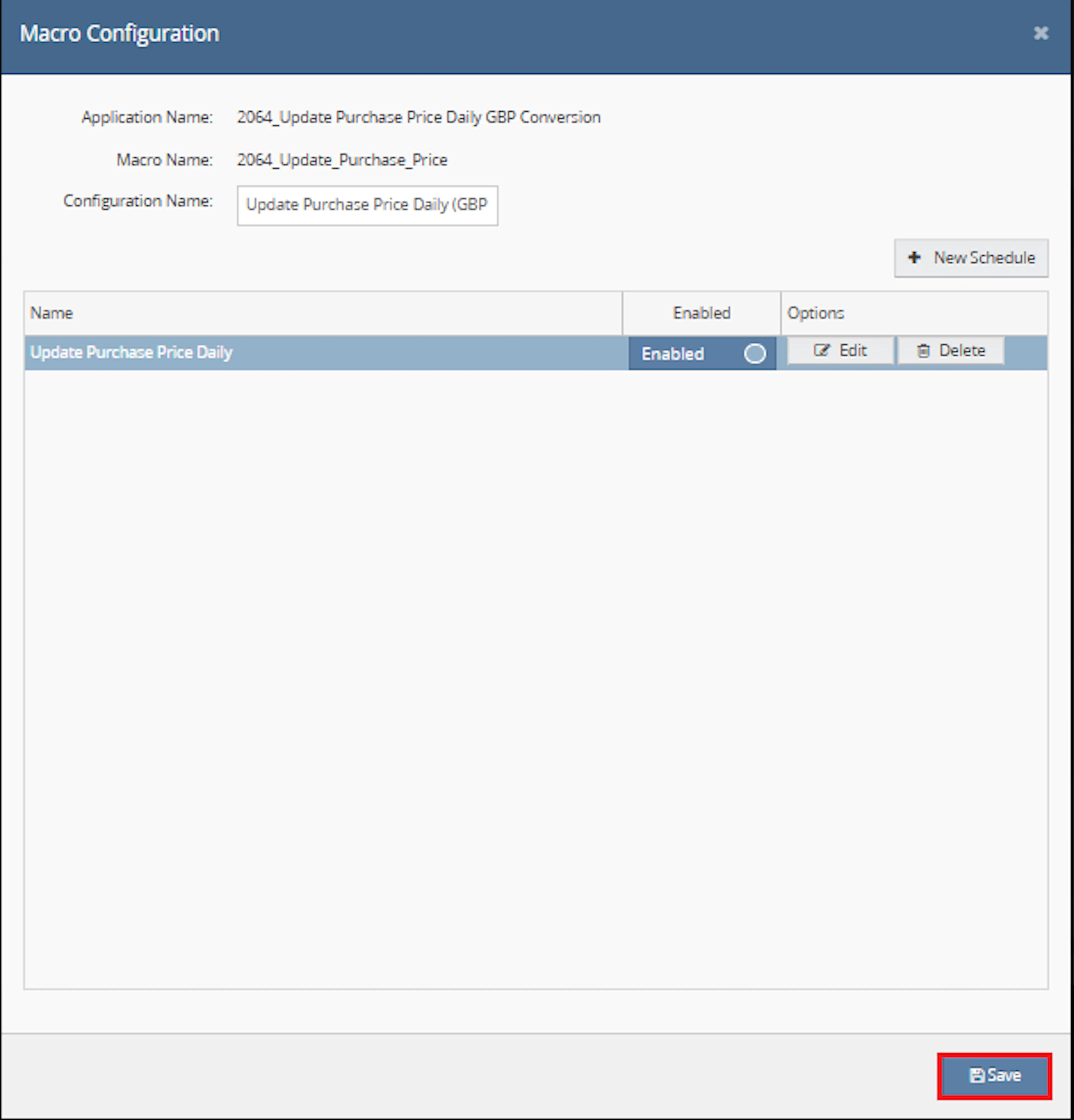
Verify the following before saving:
- The schedule is enabled
- The correct macro configuration is selected
- The schedule frequency is configured correctly
- The desired execution time has been specified
Once verified, click Save to activate the schedule.
Make sure to enable the macro to continue with the schedule Engine configuration.

Key Benefits
Maintaining purchase prices manually can create inconsistencies between supplier costs, purchase orders, and inventory records. Update Purchase Price Daily automates the main conversion and update steps.
Reduce manual price maintenance while improving the consistency of GBP inventory cost values.
Reduce Manual Price Updates
Removes the need to update inventory purchase prices individually after purchase orders are created.
Standardise Costs in GBP
Converts foreign currency purchase costs into a common GBP value.
Improve Inventory Valuation
Helps keep inventory cost information suitable for valuation and cost-based reporting.
Calculate Unit Costs Consistently
Converts total line costs into individual unit costs when quantities exceed one.
Prevent Duplicate Processing
Uses purchase order extended-property tracking to avoid applying the same purchase order repeatedly.
Support Scheduled Maintenance
Runs automatically according to the one-time or recurring schedule selected by the administrator.
Usage of App
Update Purchase Price Daily is designed to run through the Linnworks Macro Schedule Engine.
It does not require selected order IDs or user-entered parameter values. Each execution retrieves qualifying purchase orders and processes those that have not already been marked as completed.
Execution
Trigger via Schedule
Configure and enable a one-time or recurring schedule. The macro then retrieves purchase orders, converts costs, updates inventory prices, and records successful processing automatically.
Purchase Order Processing
| Processing Rule | Macro Behaviour |
|---|---|
| Purchase order is within the previous 365 days | Eligible for evaluation. |
| IsPurchasePriceUpdated property exists | Purchase order is skipped. |
| IsPurchasePriceUpdated property does not exist | Purchase order line items are processed. |
| Purchase order uses GBP | The documented flow does not require foreign currency conversion. |
| Purchase order uses another currency | The cost is converted into GBP. |
| Line quantity is greater than one | A single-unit cost is calculated. |
| All required inventory updates succeed | The purchase order is marked as processed. |
| One or more required updates fail | The purchase order should not be treated as fully completed by the documented flow. |
Purchase Price Calculation
The source describes the following calculation sequence:
- Retrieve the purchase order currency and cost values.
- Convert the cost into GBP when the purchase order uses another currency.
- Review the quantity recorded against the purchase order line.
- When quantity exceeds one, calculate the cost for one unit.
- Update the inventory Purchase Price field using the resulting GBP unit cost.
The exact currency-conversion and rounding formulas are implemented inside the macro and are not provided in the supplied documentation.
Extended Property Tracking
The macro uses the following purchase order extended property:
IsPurchasePriceUpdated = True
Once this property has been applied, the purchase order is skipped during later scheduled executions.
After the Macro Runs
Review the execution log
Check the Macro Execution Log for processed purchase orders, currency conversion activity, inventory updates, and errors.
Verify purchase order processing
Confirm that the expected purchase orders were evaluated successfully.
Check inventory purchase prices
Review sample inventory items to confirm that the calculated Purchase Price was applied.
Confirm extended-property tracking
Verify that successfully processed purchase orders contain IsPurchasePriceUpdated.
Continue normal purchasing activity
Continue with standard purchasing, inventory valuation, and reporting processes.
Input Parameters
Update Purchase Price Daily does not require user-configurable macro parameters.
| Input or Dependency | Required | Description |
|---|---|---|
| Schedule | Yes | A one-time or recurring schedule starts the macro. |
| OrderIds | No | The macro retrieves purchase orders directly and does not process selected sales orders. |
| Custom parameters | No | The source states that no user-configurable parameters are required. |
| Currency conversion rates | Yes | Retrieved from Linnworks and used when purchase order costs are not in GBP. |
| Purchase orders | Yes | Purchase orders from the previous 365 days are evaluated. |
| Purchase order line costs | Yes | Used to calculate the inventory purchase price. |
| Purchase order quantities | Yes | Used to calculate the individual unit cost where required. |
| Inventory item references | Yes | Used to identify the stock items whose Purchase Price should be updated. |
| Extended properties | Yes | Used to determine whether a purchase order has already been processed. |
No values need to be entered in a Parameters tab for the documented macro workflow.
The supplied configuration instructions identify AutoFileMenifest in Step 2. Confirm the intended macro selection in your Linnworks installation before enabling the schedule.
Best Practices
Test purchase order cost, quantity, and currency scenarios before relying on the macro for production inventory valuation.
Run during off-peak hours
Schedule the macro when inventory and purchase order update activity is lower.
Review currency rates
Periodically confirm that the Linnworks conversion rates used by the macro are current and appropriate.
Validate purchase order costs
Ensure supplier costs and purchase order quantities are accurate before scheduled processing.
Test quantity calculations
Test single-unit and multi-unit lines to confirm that the resulting unit cost matches expectations.
Monitor API activity
Review logs for update throttling, failed inventory changes, and incomplete purchase order processing.
Audit updated prices
Periodically compare inventory Purchase Price values with their originating purchase order costs.
FAQ
How is Update Purchase Price Daily triggered?
The macro runs through a one-time or recurring schedule configured in Linnworks Macro Configuration.
Does the macro require OrderIds?
No. It retrieves purchase orders directly.
Does the macro require any custom parameters?
No. The supplied documentation states that it does not require user-configurable parameters.
How far back does the macro search for purchase orders?
It retrieves purchase orders from the previous 365 days.
Which base currency is used?
GBP is used as the standard purchase price currency.
What happens when a purchase order is already in GBP?
The documented flow identifies the currency and performs foreign currency conversion only when required.
What happens when a purchase order uses another currency?
The purchase order cost is converted into GBP using Linnworks currency conversion rates.
How is the unit purchase price calculated?
When the purchase order quantity exceeds one, the cost is converted into a single-unit value before the inventory item is updated.
Does the macro document the exact conversion formula?
No. The source describes the conversion behaviour but does not provide the exact formula or rounding implementation.
Which inventory field is updated?
The Linnworks Purchase Price field is updated.
How does the macro prevent duplicate processing?
It checks for the IsPurchasePriceUpdated extended property on the purchase order.
What value is stored in the extended property?
The documented value is:
IsPurchasePriceUpdated = True
When is the extended property added?
It is added after the required inventory items for the purchase order have been updated successfully.
What happens when the property already exists?
The purchase order is skipped.
Does the macro remove or replace the tracking property?
No removal or replacement behaviour is described.
Does the macro update sales prices?
No. The documented behaviour applies to the inventory Purchase Price field.
Does it update supplier records?
No supplier-record update behaviour is described.
Does it change purchase order quantities or totals?
No. Purchase order values are read for calculation purposes.
How does the macro handle API limits?
The source states that update activity is monitored to avoid exceeding applicable limits. The exact throttling implementation is not provided.
What should be checked when a purchase price is not updated?
Confirm that the purchase order is within the 365-day period, does not already contain IsPurchasePriceUpdated, and has valid line and inventory data.
What should be checked when a purchase order is skipped?
Review whether the IsPurchasePriceUpdated extended property already exists.
What should be checked when currency conversion appears incorrect?
Review the Linnworks currency conversion rates and the currency assigned to the purchase order.
What should be checked when the purchase price is unexpected?
Verify the purchase order line cost, quantity, currency, and resulting unit-cost calculation.
What should be checked when only some items are updated?
Review the execution log for item-specific API errors or update-limit activity.
What should be checked when the macro does not run?
Confirm that the macro configuration and schedule are saved and enabled.
Legal Information
- Privacy Policy: https://rishvi.co.uk/privacy-policy/
- Terms and Conditions: https://rishvi.co.uk/terms-conditions/
Please review these pages to understand how data is handled and the terms governing the use of this application.
Because the macro changes inventory cost information used in valuation and reporting, access to its configuration and schedule should be restricted to authorised users.
Summary
Update Purchase Price Daily (GBP Conversion) automates the maintenance of inventory purchase prices in Linnworks.
Once scheduled and enabled, the macro retrieves purchase orders from the previous 365 days, checks whether each purchase order has already been processed, converts foreign currency costs into GBP, calculates unit costs, and updates the relevant inventory Purchase Price values.
Scheduled purchase order processing
Purchase orders are retrieved and evaluated automatically through the configured schedule.
GBP cost standardisation
Foreign currency purchase costs are converted into GBP before inventory prices are updated.
Automatic unit-cost calculation
Multi-unit purchase order costs are converted into an individual unit price.
Duplicate processing protection
IsPurchasePriceUpdated prevents successfully processed purchase orders from being updated again.
For unexpected results, review the schedule and enabled status, verify the purchase order cost, quantity, and currency, confirm the current Linnworks conversion rates, and inspect the macro execution log for inventory update errors.