Shipping Label Print to FTP
Automatically generate shipping label PDFs for selected open orders in Linnworks and upload them to a configured FTP location for external access, storage, or downstream fulfilment workflows.
Manually printing shipping labels and uploading them to an external location can be time-consuming, especially when handling high order volumes. The Shipping Label Print to FTP macro helps automate this process by finding eligible open orders, generating shipping label PDFs, and saving them directly to a configured FTP server.
This macro checks open orders from the last 24 hours, filters them by configured order identifiers, generates shipping label PDFs for orders where labels have not yet been printed, and uploads each PDF file to the specified FTP folder.
With this automated approach, your team can reduce manual label handling, improve fulfilment efficiency, and ensure shipping labels are available in a central FTP location for warehouse, courier, or integration workflows.
Automatically generate and upload shipping labels to FTP so your fulfilment team can access them without manual downloads.
Configure the Macro
Once the app is installed, you need to set up the macro configuration so the system knows which orders to check, which identifiers to include, and where the generated shipping label PDFs should be uploaded.
This configuration can be updated anytime if your FTP details, identifiers, or fulfilment workflow changes.
Steps to Configure
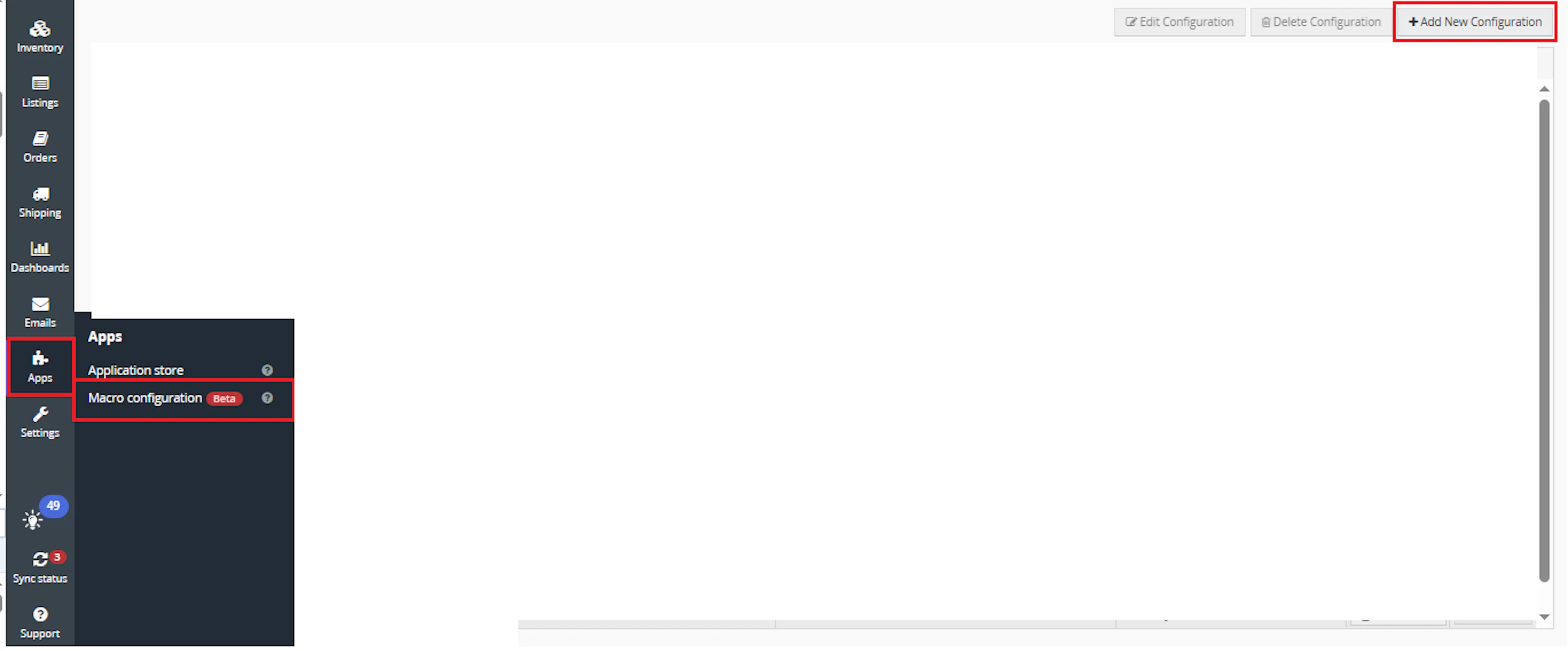
Go to Apps > Macro Configuration and click + Add new configuration.
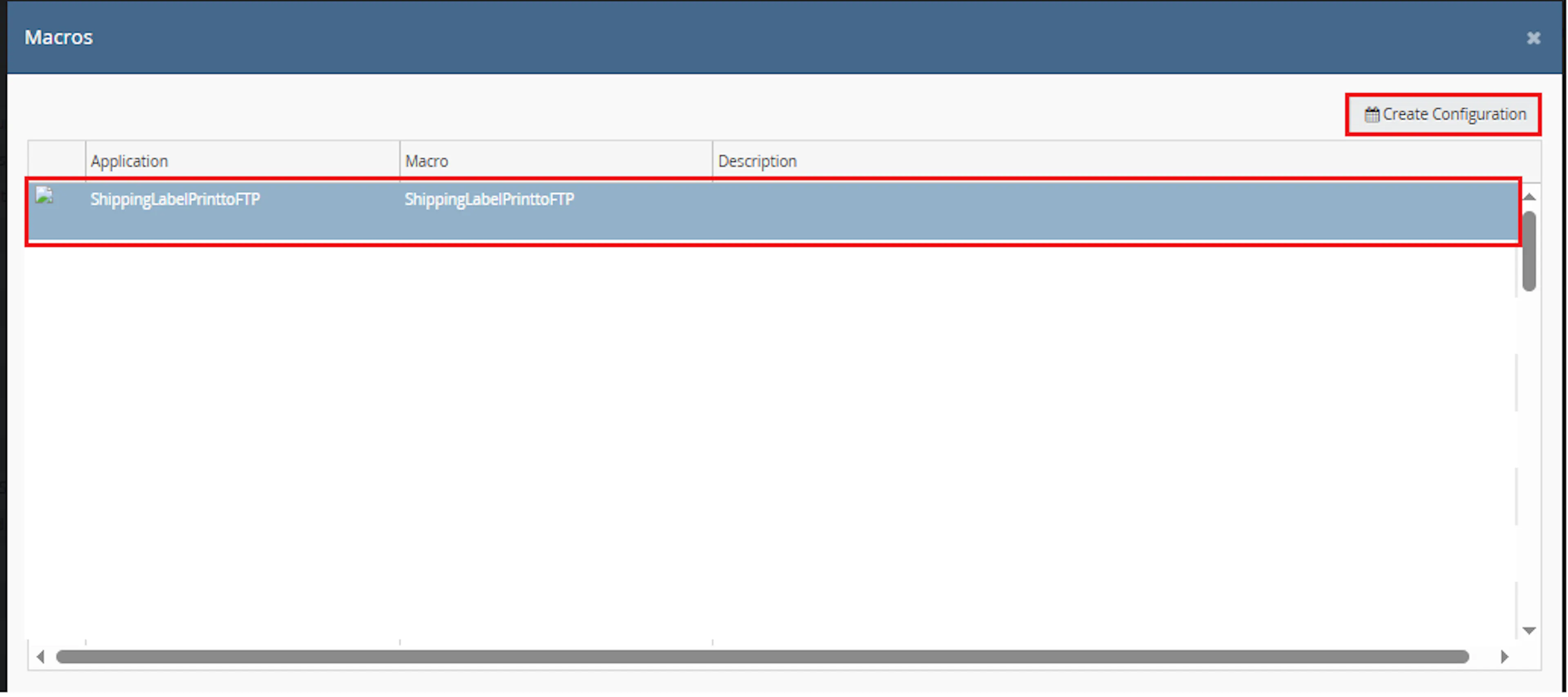
Select the Shipping Label Print to FTP macro and click Create Configuration.
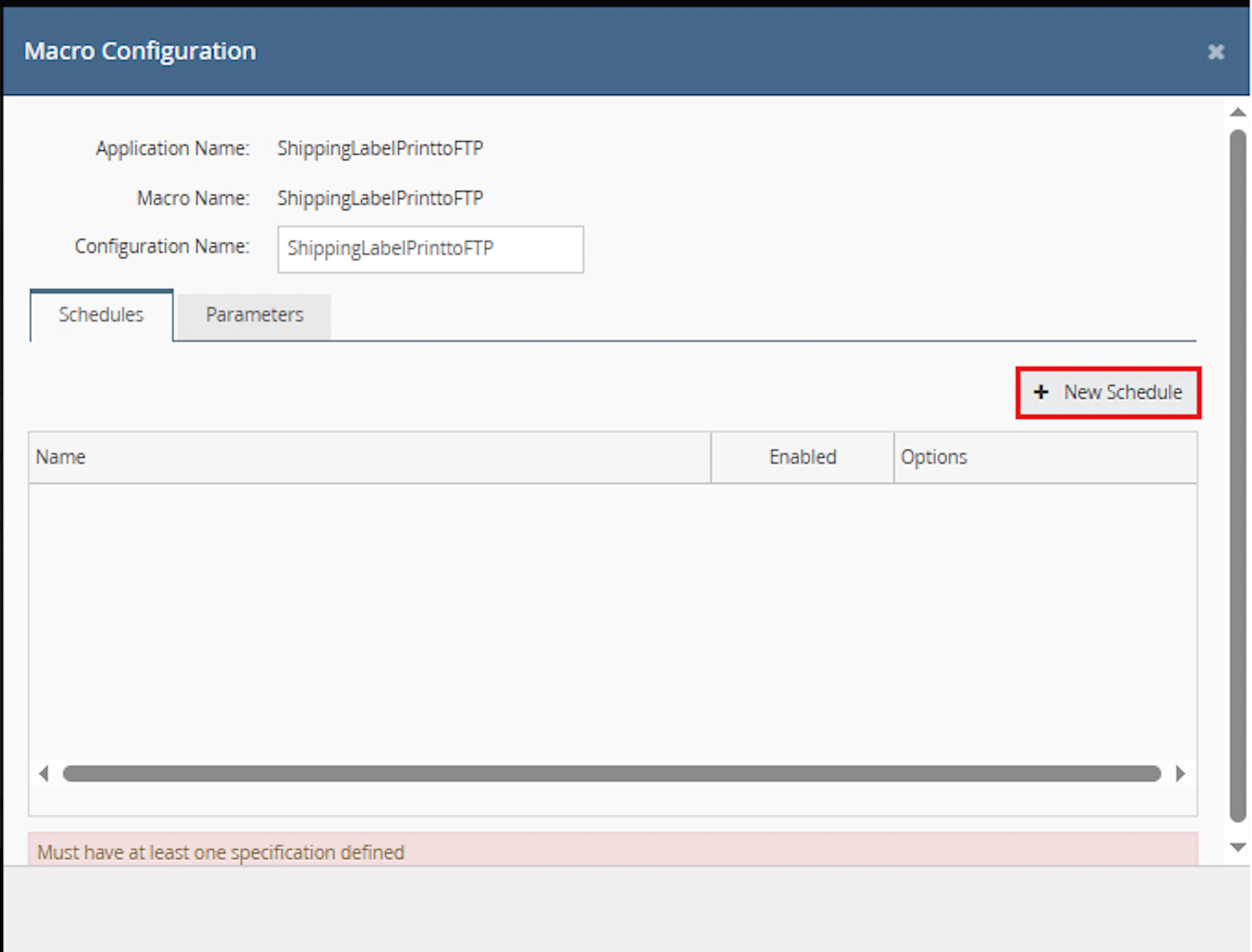
This creates a new configuration where you can define the schedule and FTP connection parameters.
In the Macro Configuration screen, go to the Schedules tab and click New Schedule.
Configure the schedule settings.
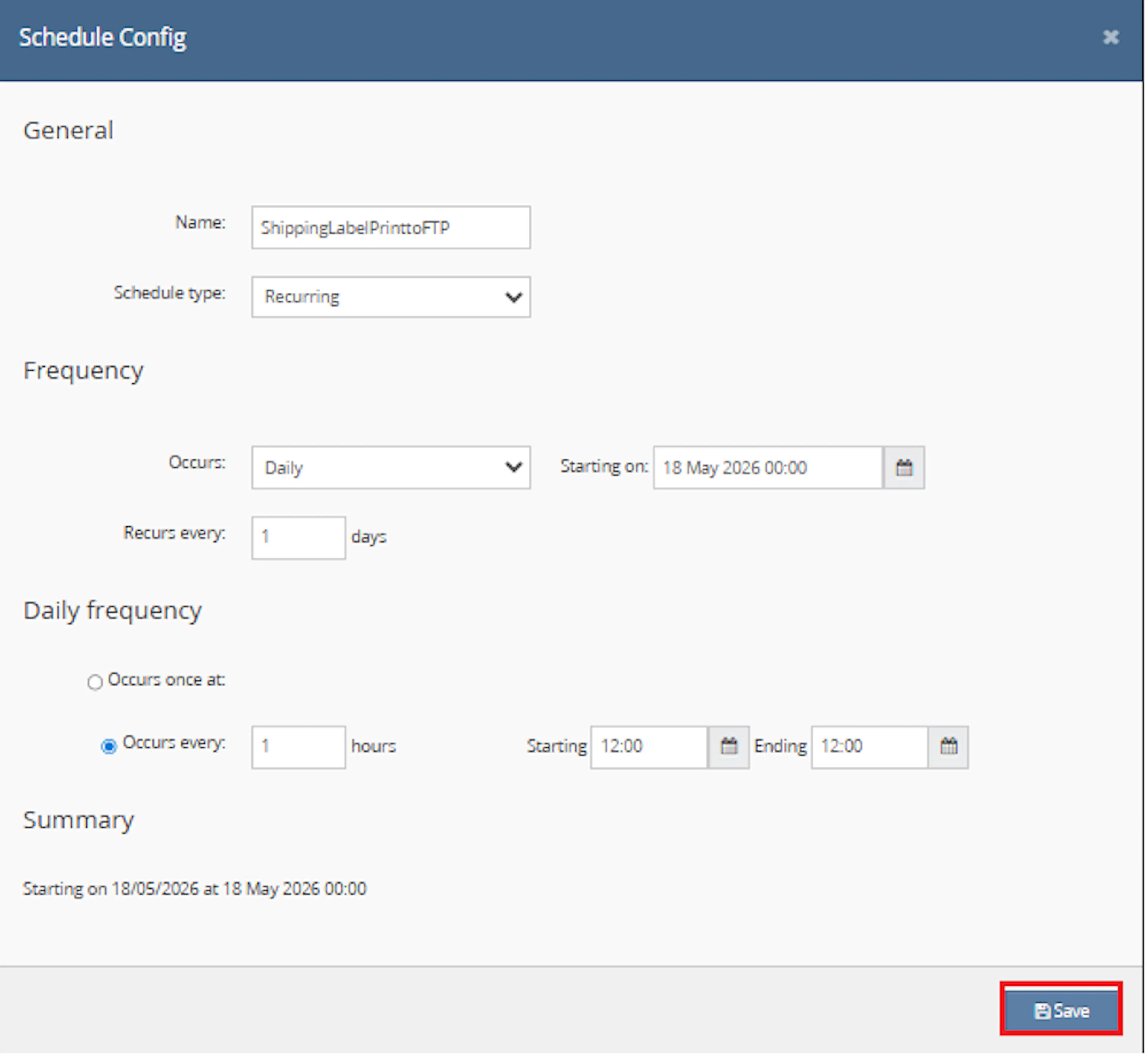
In the Schedule Config window, enter the Name
-
Select Schedule type from the dropdown:
-
One time — runs only once
-
Recurring — runs repeatedly based on schedule
-
-
If Recurring is selected:
-
In Frequency, choose Occurs from the dropdown:
-
Daily
-
Weekly
-
-
-
Set the Recurs every value, such as 1 day or 1 week
-
Set the Starting on date and time
-
Under Daily frequency, choose one option:
-
Occurs once at → specify an exact time
-
Occurs every → enter an interval in hours and define:
-
Starting time
-
Ending time
-
-
-
Review the Summary section
-
Click Save
Navigate to the Parameters tab and enter the required values.
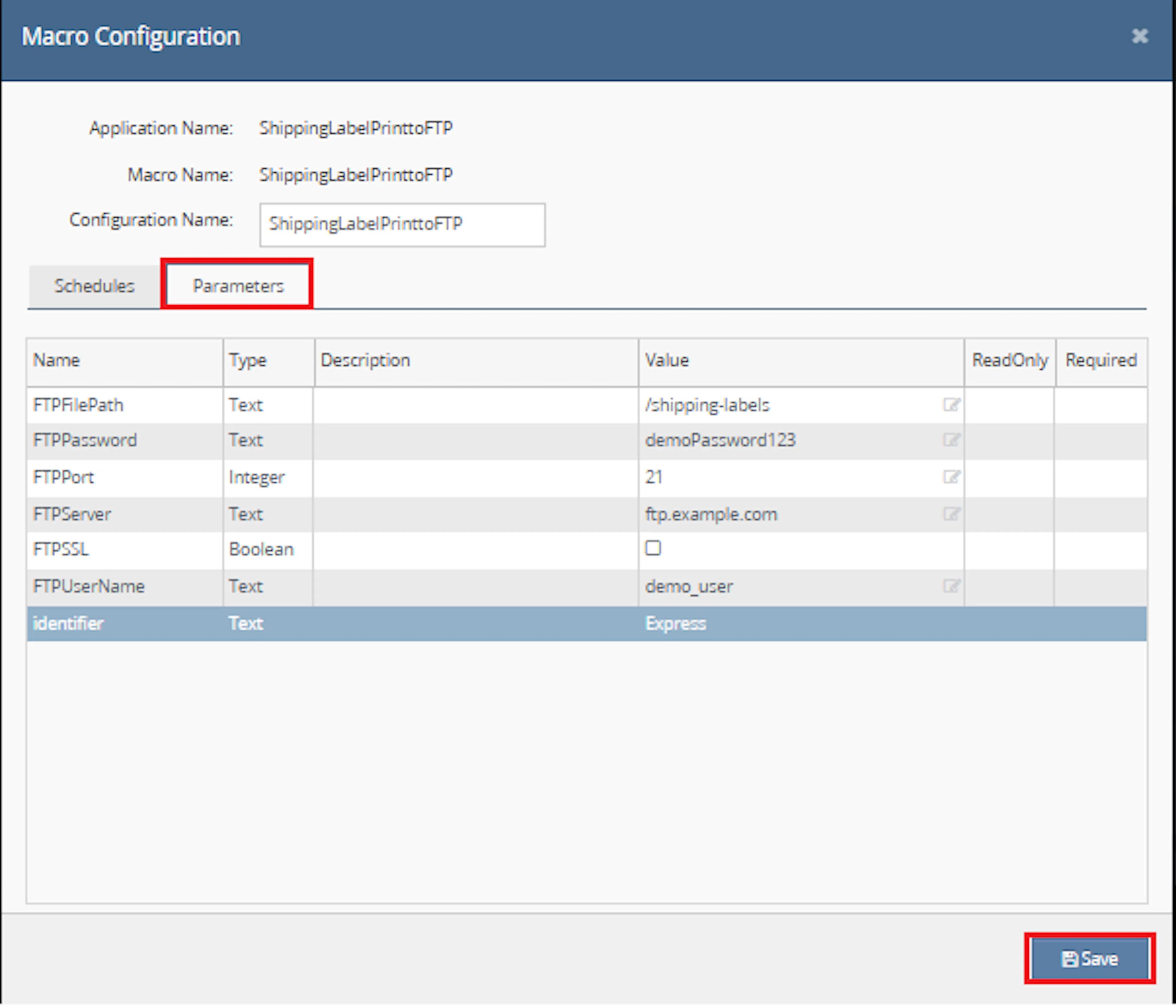
- Go to the Parameters tab
Example:
- Enter the required values in the Value column:
- FTPFilePath = /shipping-labels
- FTPPassword = demoPassword123
- FTPPort = 21
- FTPServer = ftp.example.com
- FTPSSL = unchecked / false
- FTPUserName = demo_user
- identifier = Express
- Confirm all required values are completed
- Click Save to apply the configuration
Make sure to enable the macro to continue with the schedule Engine configuration.
Make sure to enable the macro so it can run from the configured schedule.

Key Benefits
Printing labels and manually moving them to an external storage location can slow down order fulfilment. This macro automates the process by generating shipping label PDFs and uploading them directly to FTP.
Automate Label Generation
Generates shipping label PDFs automatically for eligible open orders without requiring manual label downloads.
Upload Labels to FTP
Saves generated label PDFs directly to the configured FTP folder using the order number as the file name.
Process Only Relevant Orders
Filters open orders by configured Linnworks identifiers so only matching orders are processed.
Avoid Duplicate Label Work
Checks whether the shipping label has already been printed and processes only orders where the label has not yet been printed.
Improve Fulfilment Speed
Makes labels available in a shared FTP location for warehouse teams, courier systems, or external workflows.
Track Upload Results
Logs successful FTP uploads, failed FTP uploads, and any errors that occur during macro execution.
How It Works
This macro runs in the background based on the configured schedule. It checks open orders from the last 24 hours, finds orders matching the configured identifiers, generates shipping labels, and uploads the PDF files to FTP.
Step 1
The macro starts execution and writes Macro started to the log.
Step 2
It creates a date filter covering orders from the last 24 hours using the general order date field.
Step 3
The macro retrieves open orders from Linnworks using the configured date filter.
Step 4
It splits the identifier parameter into a list and checks each order for matching Linnworks identifiers.
Step 5
Orders are filtered to include only those where the shipping label has not already been printed.
Step 6
For each eligible order, the macro generates a shipping label PDF using the Shipping Labels print template.
Step 7
The generated PDF is downloaded from the print response URL and converted into a byte file.
Step 8
The PDF is uploaded to the configured FTP path using the order number as the file name.
Step 9
The macro logs whether each FTP upload was successful or failed.
Usage of App
This macro is designed to work automatically once configured. It is useful when shipping labels need to be generated and exported to an FTP server for external access or downstream fulfilment processing.
identifier
Defines one or more Linnworks order identifier names used to select which open orders should be processed. Multiple identifiers can be entered as comma-separated values.
FTPServer
Defines the FTP server address where generated shipping label PDFs should be uploaded.
FTPUserName
Defines the FTP username used to authenticate the FTP upload connection.
FTPPassword
Defines the FTP password used to authenticate the FTP upload connection.
FTPSSL
Defines whether the FTP connection should use SSL.
FTPPort
Defines the FTP port used for the upload connection.
FTPFilePath
Defines the destination folder path where shipping label PDFs will be saved.
PDF File Naming
Each uploaded PDF is named using the Linnworks order number, for example 123456.pdf.
Key Points to Remember
-
The macro checks open orders from the last 24 hours
-
Orders must have one of the configured identifiers to be processed
-
Orders are processed only if LabelPrinted is false
-
Shipping labels are generated using the Shipping Labels print template
-
PDF files are uploaded to the configured FTP folder
-
The uploaded file name uses the Linnworks order number
-
FTP success, failure, and errors are recorded in the macro log
Once the macro is running, it provides an automated way to generate and store shipping label PDFs without manual intervention.
What You Can Expect
-
Eligible orders are automatically identified
The macro finds open orders from the last 24 hours that match the configured identifier list -
Only unprinted labels are processed
Orders where labels have already been printed are skipped -
Shipping label PDFs are generated
The macro creates PDF files using the configured Linnworks print service template -
PDF files are uploaded to FTP
Each generated label is uploaded to the configured FTP location -
Upload results are logged
Successful uploads, failed uploads, and errors are recorded for review
Overall Impact
This macro reduces manual label handling, improves fulfilment speed, and ensures generated shipping labels are available in a central FTP location for operational use.
What To Do After the Macro Runs
After the macro has completed, review the FTP folder and macro logs to confirm that shipping labels were generated and uploaded successfully.
Steps to Follow
Step 1
Open the configured FTP location.
Step 2
Confirm that PDF files have been uploaded for the expected order numbers.
Step 3
Open one or more PDF files to verify that the shipping labels were generated correctly.
Step 4
Review the macro logs for messages such as Saved In FTP Order Number or Error In Save FTP Order Number.
Step 5
If any upload failed, confirm the FTP server, username, password, port, SSL setting, and file path are correct.
Why This Matters
Automating label export helps:
-
Reduce manual download and upload work
-
Improve warehouse label availability
-
Support external fulfilment or courier workflows
-
Prevent delays caused by missing label files
-
Keep label handling more consistent and traceable
Best Practices
To get the most value from this macro, ensure identifiers and FTP settings are maintained carefully.
Recommended Guidelines
-
Use clear order identifiers
Apply meaningful identifiers to orders that should have labels generated and uploaded to FTP. -
Confirm the FTP path exists
Make sure the destination folder configured in FTPFilePath is valid and accessible. -
Use secure FTP settings where required
Enable FTPSSL when your FTP server requires secure connections. -
Schedule the macro regularly
Run the macro at intervals that match your fulfilment workflow, such as every hour or several times per day. -
Review logs after execution
Check logs for upload success or failure messages to detect FTP issues quickly. -
Avoid identifier mismatches
The configured identifier values must match the Linnworks identifier names used on orders.
Correct FTP configuration and accurate order identifiers are essential for reliable automated label export.
Example Scenario
To better understand how this works, here’s a simple example:
Configured values:
-
identifier = Express,Priority
-
FTPServer = ftp.example.com
-
FTPPort = 21
-
FTPFilePath = /shipping-labels
Orders found in Linnworks:
-
Order A has identifier Express and label not printed → PDF generated and uploaded
-
Order B has identifier Priority and label not printed → PDF generated and uploaded
-
Order C has identifier Standard → skipped
-
Order D has identifier Express but label already printed → skipped
What This Means
-
Only orders matching the configured identifiers are processed
-
Only orders without printed labels are included
-
Uploaded files are saved as order-number PDFs in the configured FTP folder
Final Summary
The Shipping Label Print to FTP macro helps automate the process of generating shipping label PDFs and uploading them to a configured FTP location.
By filtering open orders by identifier, skipping orders where labels are already printed, generating label PDFs, and saving them to FTP, this macro reduces manual effort and supports faster, more reliable fulfilment operations.