Bottle Split Packaging
Automatically split wine orders into packaging groups based on bottle sizes, distribute ice packs, create manual package splits, and assign processing identifiers for fulfilment workflows.
Wine orders often contain a mixture of bottle sizes that require different packaging rules. Manually determining package quantities, magnum allocations, and ice pack distribution can be time-consuming and prone to error.
The Bottle Split Packaging macro automates packaging decisions by analysing order items, normalising bottle sizes, grouping wine products into package configurations, distributing ice packs, and creating manual packaging splits within Linnworks.
This macro supports standard wine bottles, magnums, large-format bottles, and miscellaneous items such as ice packs and insurance products.
Automatically create packaging splits based on bottle size rules and fulfilment requirements.
Configure the Macro
Once the app is installed, you need to create a macro configuration so the system knows which inventory properties should be used to identify bottle sizes, wine products, and miscellaneous packaging items.
This setup can be adjusted anytime based on your operational requirements.
Steps to Configure
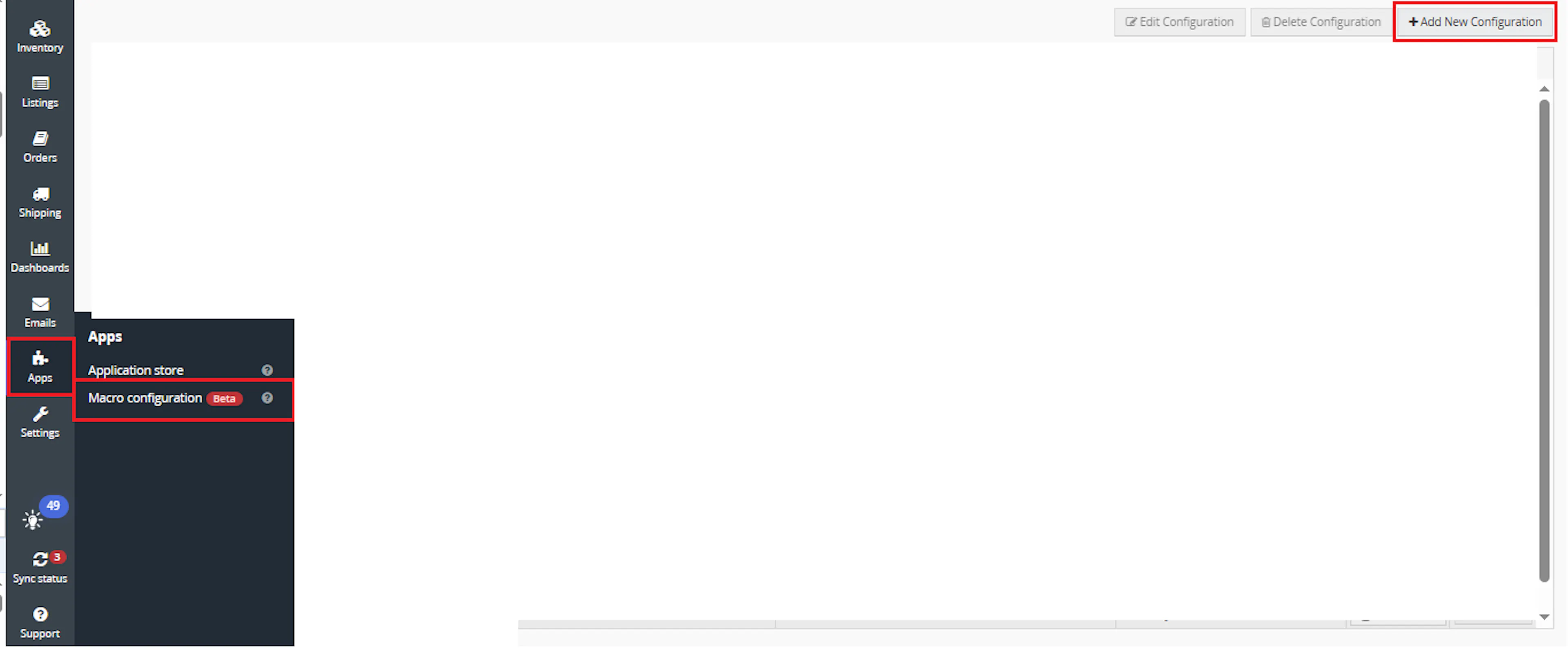
Go to Apps > Macro Configuration and click + Add new configuration.
Select the Bottle Split Packaging macro and click Create Configuration.
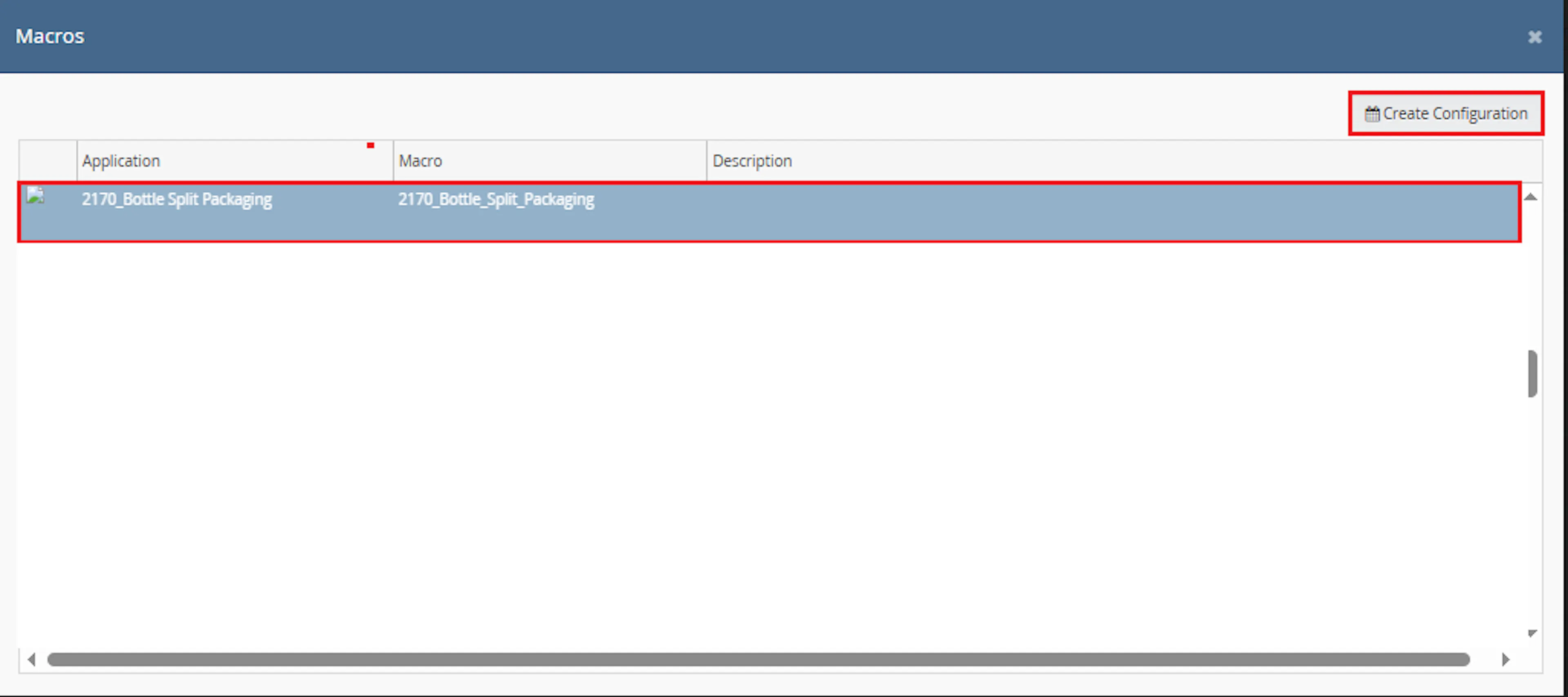
This creates a new configuration where you can define the required parameter values.
In the Macro Configuration screen, enter the configuration name and required parameters.
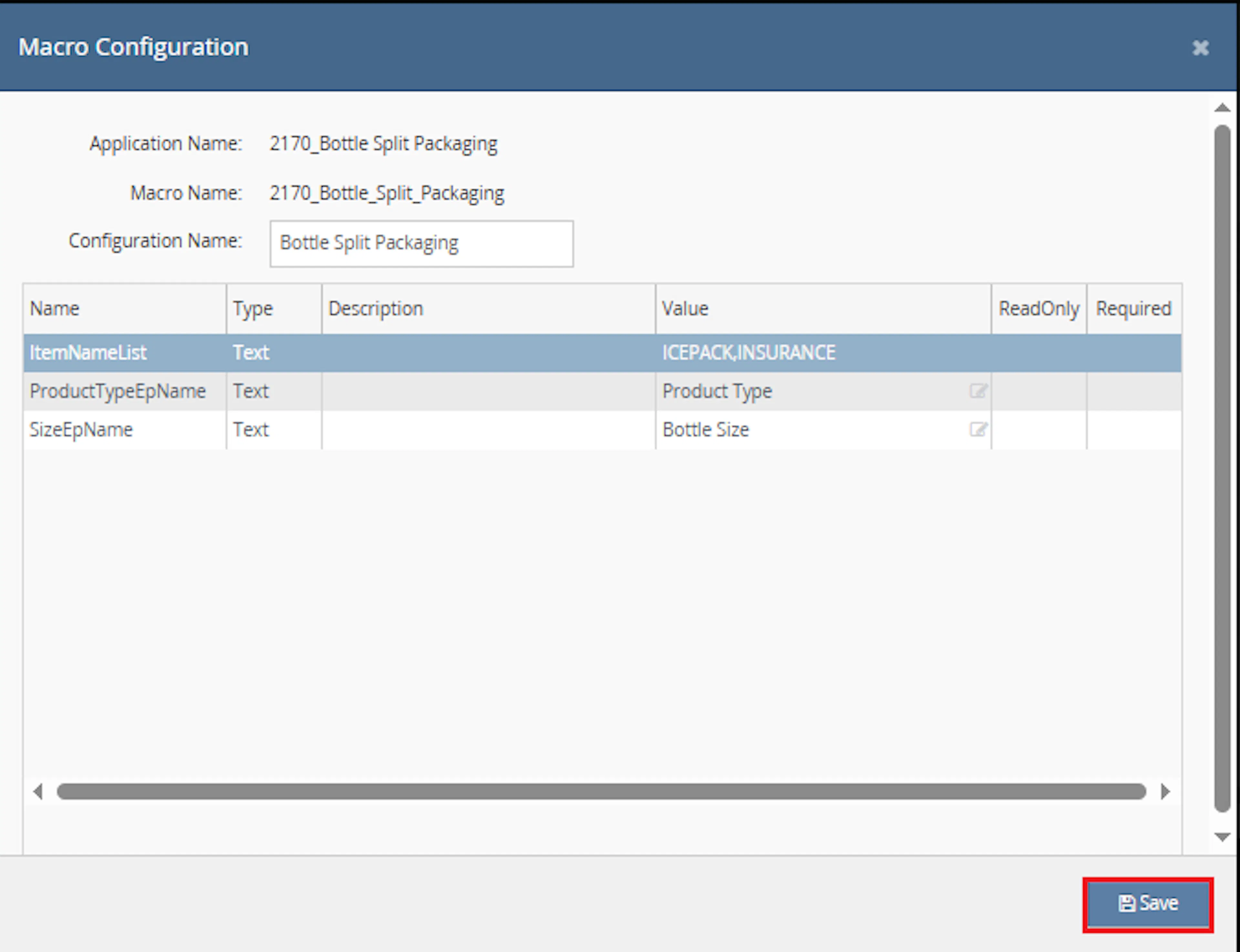
Configure the following parameters:
-
SizeEpName
-
ProductTypeEpName
-
ItemNameList
Example values:
SizeEpName = Bottle Size
ProductTypeEpName = Product Type
ItemNameList = ICEPACK,INSURANCE
Note: Parameter names must match the inventory extended property names configured in Linnworks.
Make sure to enable the macro to continue with the Rule Engine configuration.

Note: If the macro is not enabled, it will not appear in the Action value list when setting up the rule.
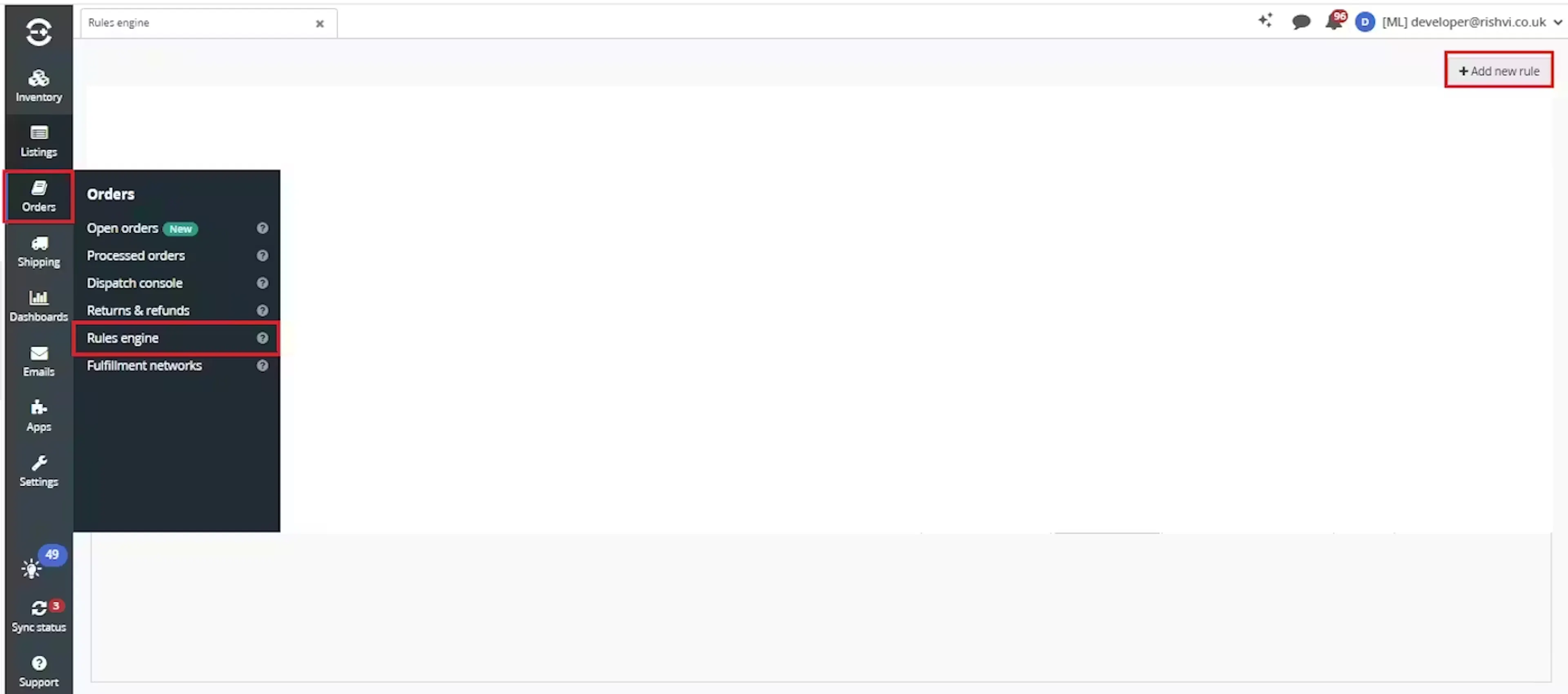
Go to Orders > Rules engine and click + Add new rule.
Enter the rule name and click Create.

Click Add new, select Condition, configure the condition as required, and save it.
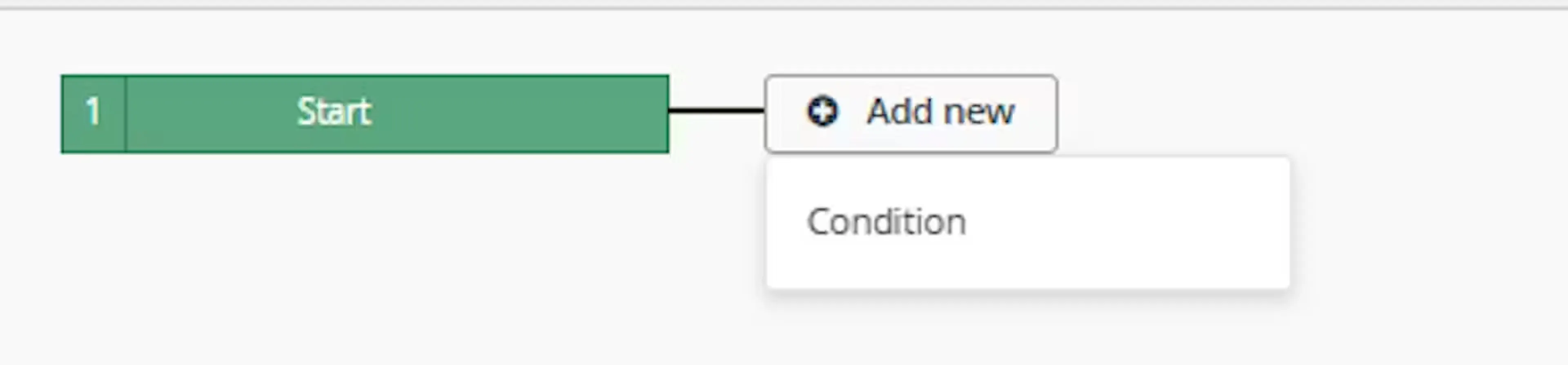
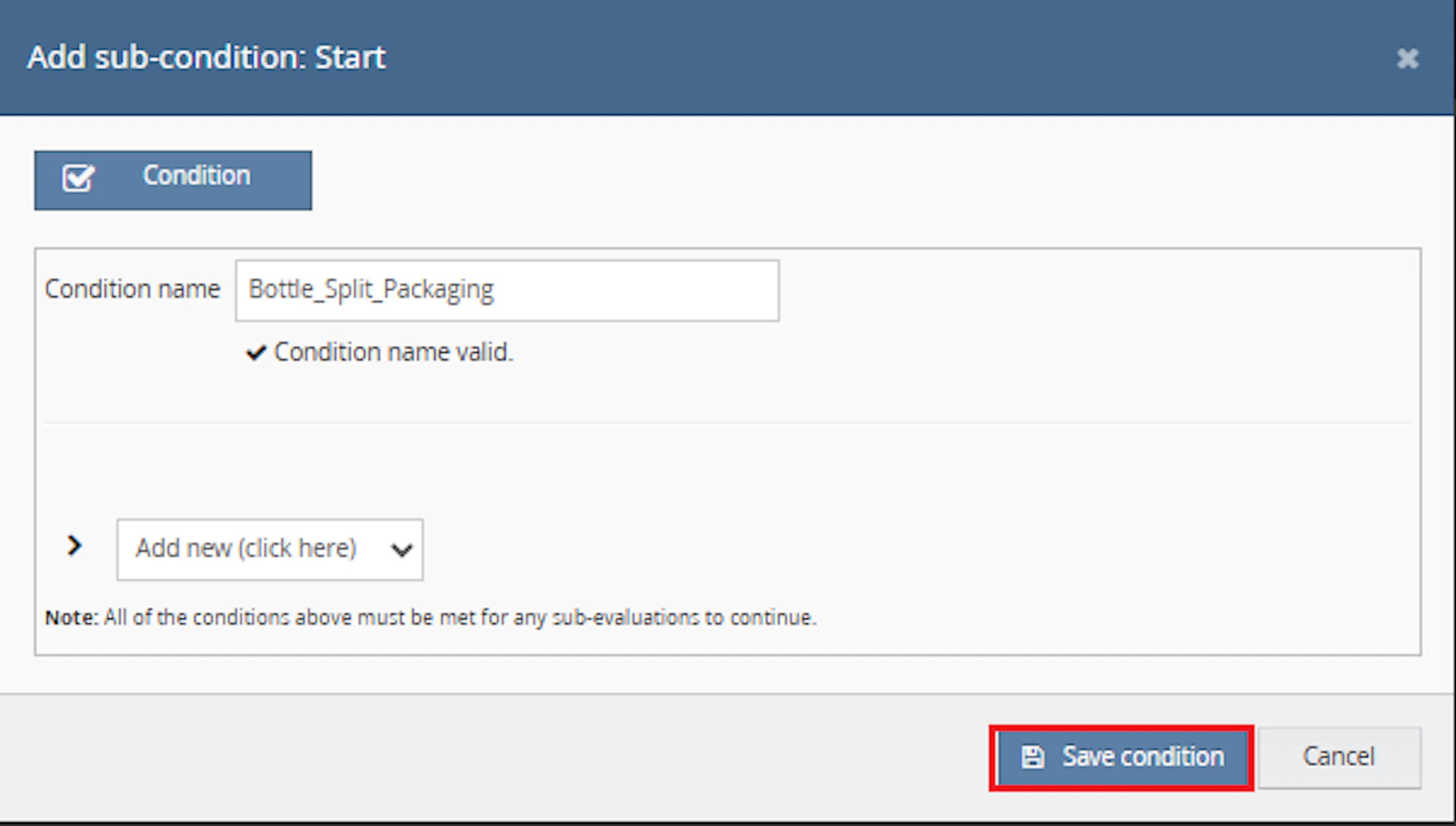
Use conditions that target orders requiring automatic bottle packaging and package splitting.
Add the macro action and click Save.
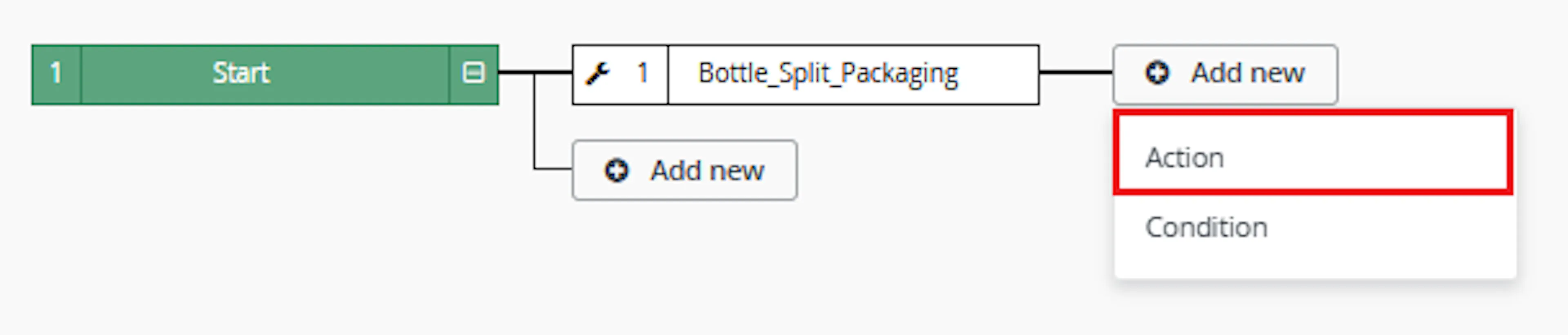
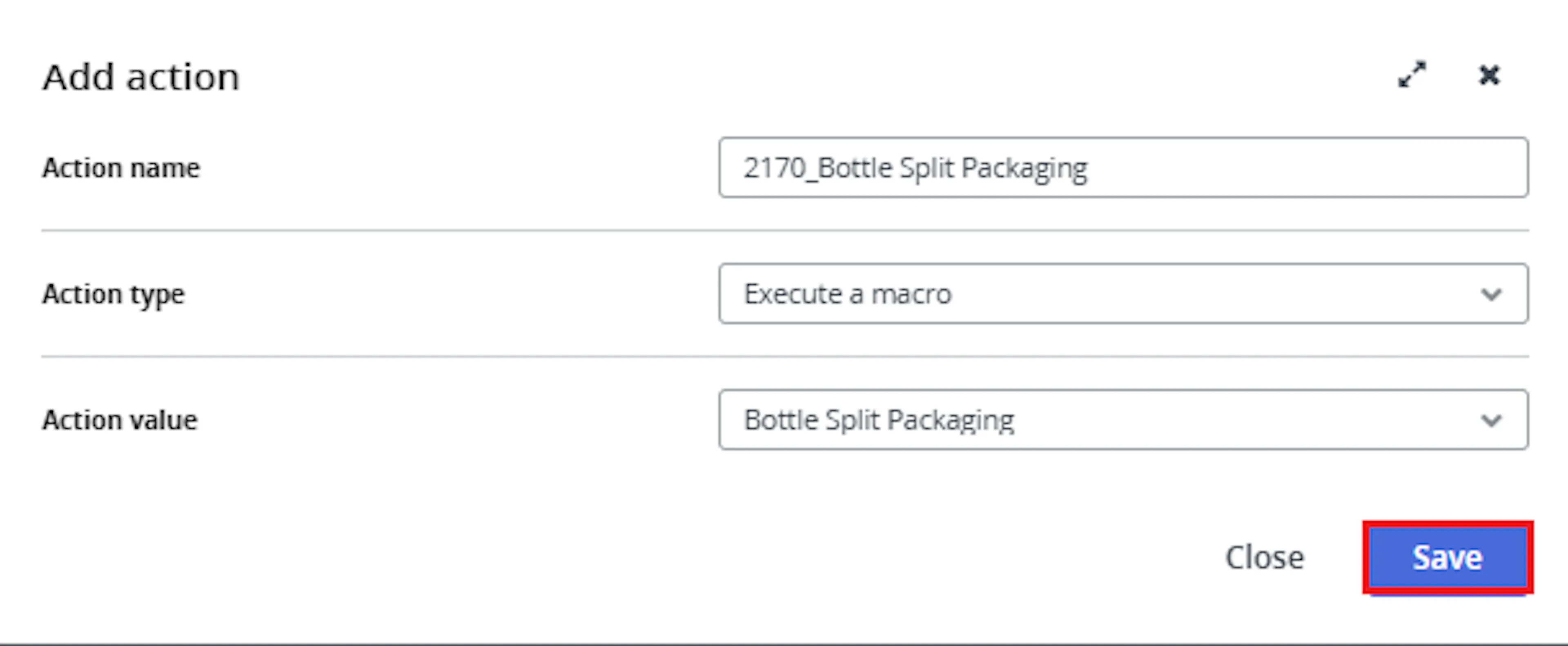
In the Add action window:
-
Enter the Action name
Example:
Bottle Split Packaging -
Set Action type to:
Execute a macro -
In Action value, select:
Bottle Split Packaging -
Click Save
Note: If the macro is not enabled, it will not appear in the Action value list.
Review the saved rule setup and save the rule.
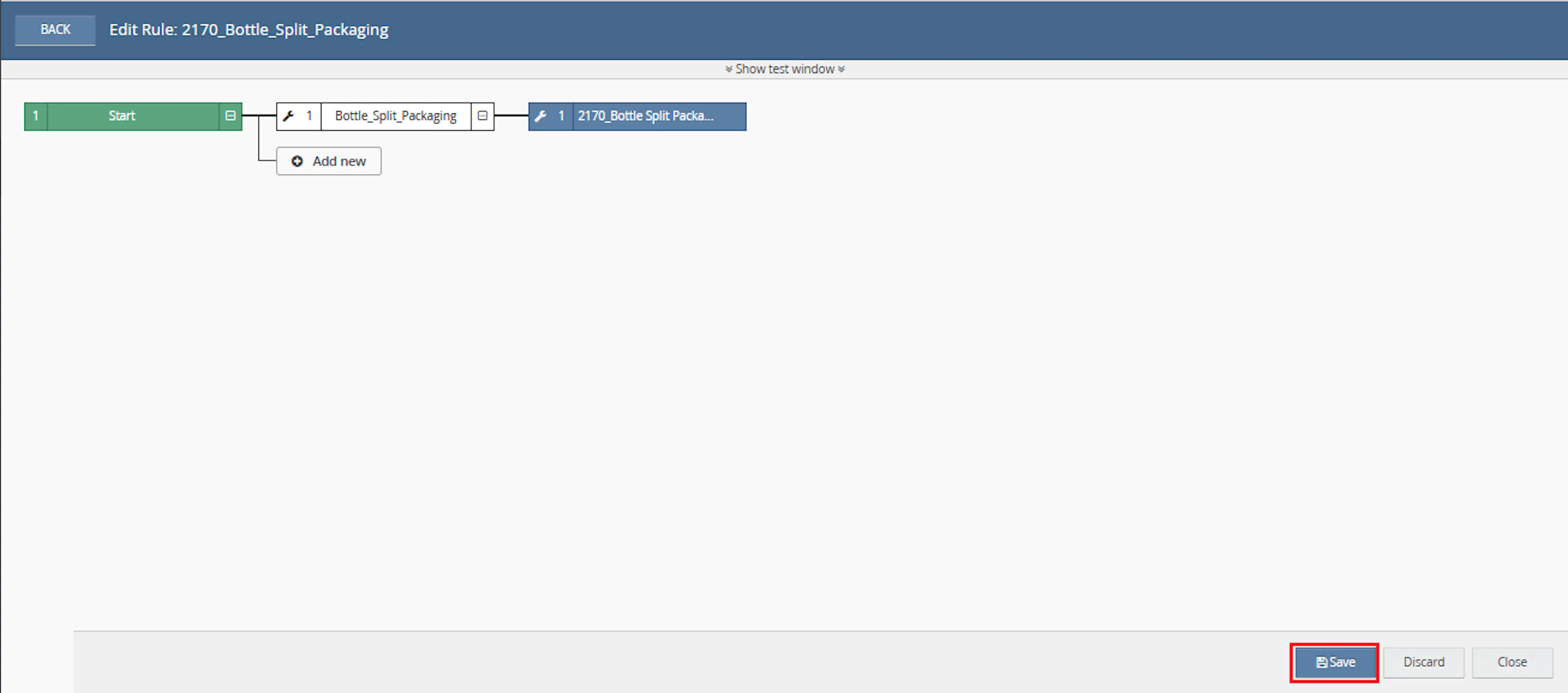
-
Verify the condition and action are connected correctly
-
Click Save in the bottom-right corner to save the rule
Required Parameters
SizeEpName
Defines the inventory extended property that stores the bottle size value.
ProductTypeEpName
Defines the inventory extended property used to identify wine products.
ItemNameList
Comma-separated list of miscellaneous SKUs such as ice packs or insurance items that require special handling.
Supported Bottle Sizes
The macro normalises bottle size values before processing.
| Input Examples | Normalized Size |
|---|---|
| 750ml, 720ml, 500ml, 375ml, 250ml | 750ml |
| 1.5L, 1500ml | 1.5l |
| 3L, 3000ml | 3l |
| 6L, 6000ml | 6l |
Packaging Rules
Standard Bottle Family
The following bottle sizes are treated as standard bottle products:
-
750ml
-
720ml
-
500ml
-
375ml
-
250ml
Packaging rule:
- Maximum 12 bottles per package
Magnum Bottles
The following sizes are treated as magnums:
- 1.5L
Packaging rule:
-
Maximum 6 bottles per package
-
Maximum 4 bottles per package when ice packs are present
Large Format Bottles
The following sizes are treated as large format bottles:
-
3L
-
6L
Packaging rule:
- One bottle per package
Key Benefits
Automatic Package Creation
Automatically creates packaging groups based on bottle size rules.
Bottle Size Normalisation
Handles multiple bottle size formats and converts them into standard packaging groups.
Magnum Handling
Applies dedicated packaging limits for magnum bottles.
Ice Pack Distribution
Distributes available ice packs across packages automatically.
Manual Packaging Split
Creates manual package splits directly within Linnworks.
Order Identification
Automatically assigns processing identifiers after completion.
How It Works
Step 1
The macro starts execution and logs the process start.
Step 2
Each selected order is retrieved from Linnworks.
Step 3
Order items are grouped by SKU and quantities are consolidated.
Step 4
The macro retrieves extended properties for each inventory item.
Step 5
Bottle size values are normalised into supported packaging groups.
Step 6
Wine products are categorised into bottle size groups.
Step 7
Ice pack and miscellaneous SKUs are separated from wine products.
Step 8
The macro creates package groups according to bottle size rules.
Step 9
Ice packs are distributed across eligible packages.
Step 10
Manual packaging split data is generated and sent to Linnworks.
Step 11
Processed orders receive a completion identifier.
Step 12
The macro logs completion and finishes execution.
Ice Pack Distribution Logic
When ice pack items exist in the order:
-
Magnum packages receive ice packs first.
-
Remaining ice packs are distributed across standard bottle packages.
-
Any remaining ice packs are added to the final package.
-
Other miscellaneous items such as insurance products are added to the first package.
Order Identifiers
The macro automatically assigns one of the following identifiers:
Split Done
Assigned when packaging is successfully created and processed.
Manual Cubing Needed
Assigned when uncategorised items or unsupported packaging situations require manual review.
Usage of App
Bottle Size Detection
Uses inventory extended properties to identify bottle sizes.
Wine Identification
Processes only items identified as Wine through the configured product type property.
Package Generation
Creates package groups based on configured bottle size rules.
Ice Pack Allocation
Distributes ice packs according to package priority rules.
Packaging Update
Creates manual package splits using Linnworks packaging APIs.
Execution Logging
Records start, validation, package creation, and completion information.
Key Points to Remember
-
Bottle sizes are normalised before processing
-
750ml family bottles are packed in groups of 12
-
1.5L bottles are packed separately using magnum rules
-
3L and 6L bottles receive individual packages
-
Ice packs are distributed automatically
-
Miscellaneous items can be added to package groups
-
Packaging splits are manually overwritten in Linnworks
-
Unsupported items may trigger manual review
-
Orders can receive processing identifiers automatically
Important: Ensure the bottle size extended property contains valid and consistent values. Incorrect bottle size values may result in unexpected package allocation.
Important: Review the ItemNameList configuration carefully to ensure miscellaneous items such as ice packs and insurance products are identified correctly.
What You Can Expect
-
Orders are automatically split into fulfilment packages
-
Bottle size rules are applied consistently
-
Ice packs are distributed automatically
-
Large format bottles receive dedicated packaging
-
Manual packaging splits are created in Linnworks
-
Processing identifiers are assigned automatically
-
Execution details are recorded in macro logs
Overall Impact
This macro helps automate wine order packaging by applying bottle size rules, handling magnums and large-format bottles, distributing ice packs, and creating package splits automatically. This reduces manual packaging effort, improves consistency, and supports fulfilment efficiency.
Troubleshooting
No packages created
Verify that wine items contain valid bottle size and product type extended properties.
Order marked for manual review
Review uncategorised items or unsupported bottle sizes that require manual packaging decisions.
Ice packs missing from packages
Confirm that ice pack SKUs are included within the configured ItemNameList value.
Unexpected package quantities
Verify bottle size values and ensure they normalize into supported packaging groups.
Identifier not assigned
Review macro logs and confirm that packaging was successfully created.
Packaging split not updated
Verify that the order packaging calculation data is available and that the order can be updated.
Summary
The Bottle Split Packaging macro automatically analyses wine orders, normalises bottle sizes, creates package groups, distributes ice packs, performs manual packaging splits, and assigns processing identifiers. It helps standardise packaging workflows while reducing manual fulfilment effort.