Mark Order Process Shipping Label Printed
Automatically process Linnworks open orders after the shipping label has been printed successfully and the configured waiting time has passed.
Processing orders manually after shipping labels are printed can create extra work and increase the chance of orders being left in Open status. The Automated Order Processing for Shipping Label Printed Orders macro helps keep fulfilment moving by identifying orders where the shipping label has already been printed successfully and then processing them automatically after the configured time threshold.
This solution checks Open Orders in Linnworks, filters orders with a printed shipping label and no label error, reviews the shipping label audit trail, and processes eligible orders once the configured number of minutes has passed.
With this automated approach, your team can reduce manual order processing steps, avoid delays after label creation, and keep the order workflow more consistent.
Automatically process labelled orders once they are ready, without needing manual follow-up.
Configure the Macro
Once the app is installed, you need to set up the configuration, so the system knows when to process orders after shipping labels are printed. This is a one-time setup and can be adjusted anytime based on your operational needs.
Steps to Configure
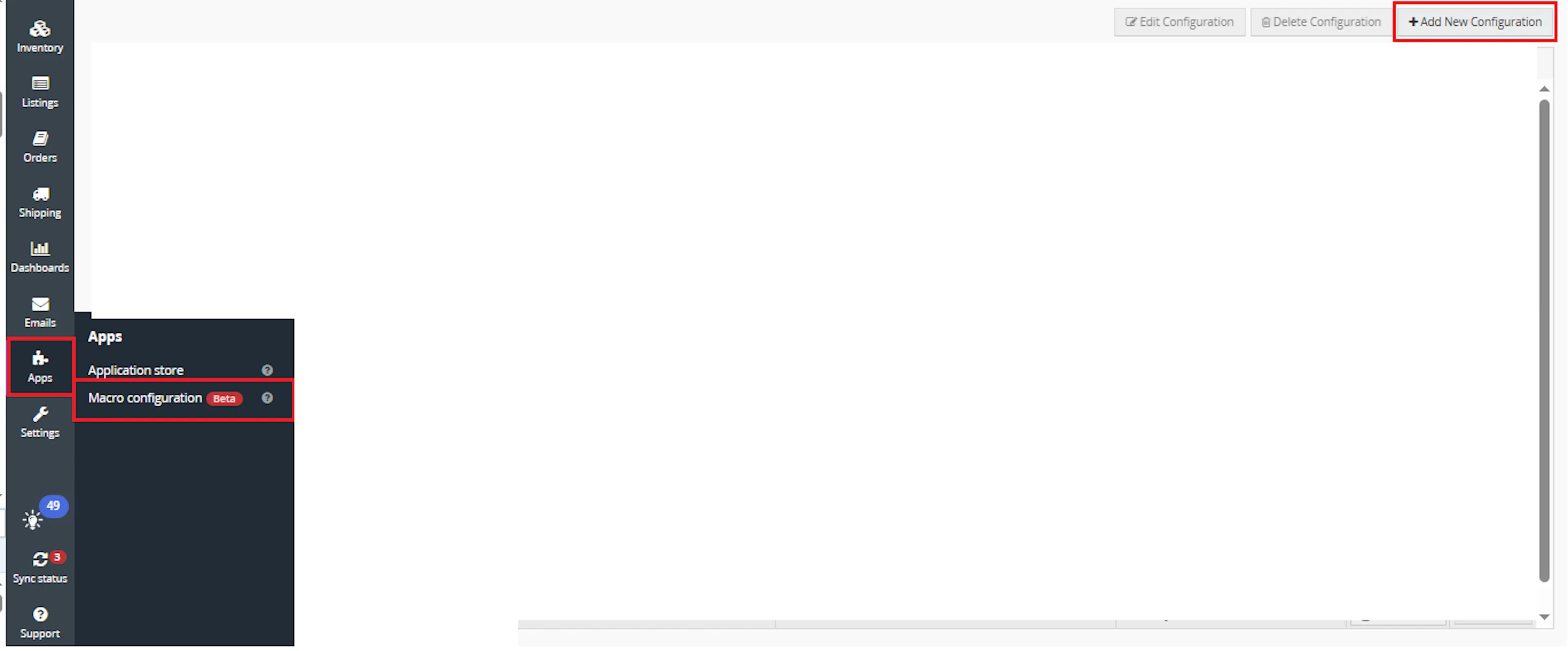
Go to Apps > Macro Configuration and click + Add new configuration.
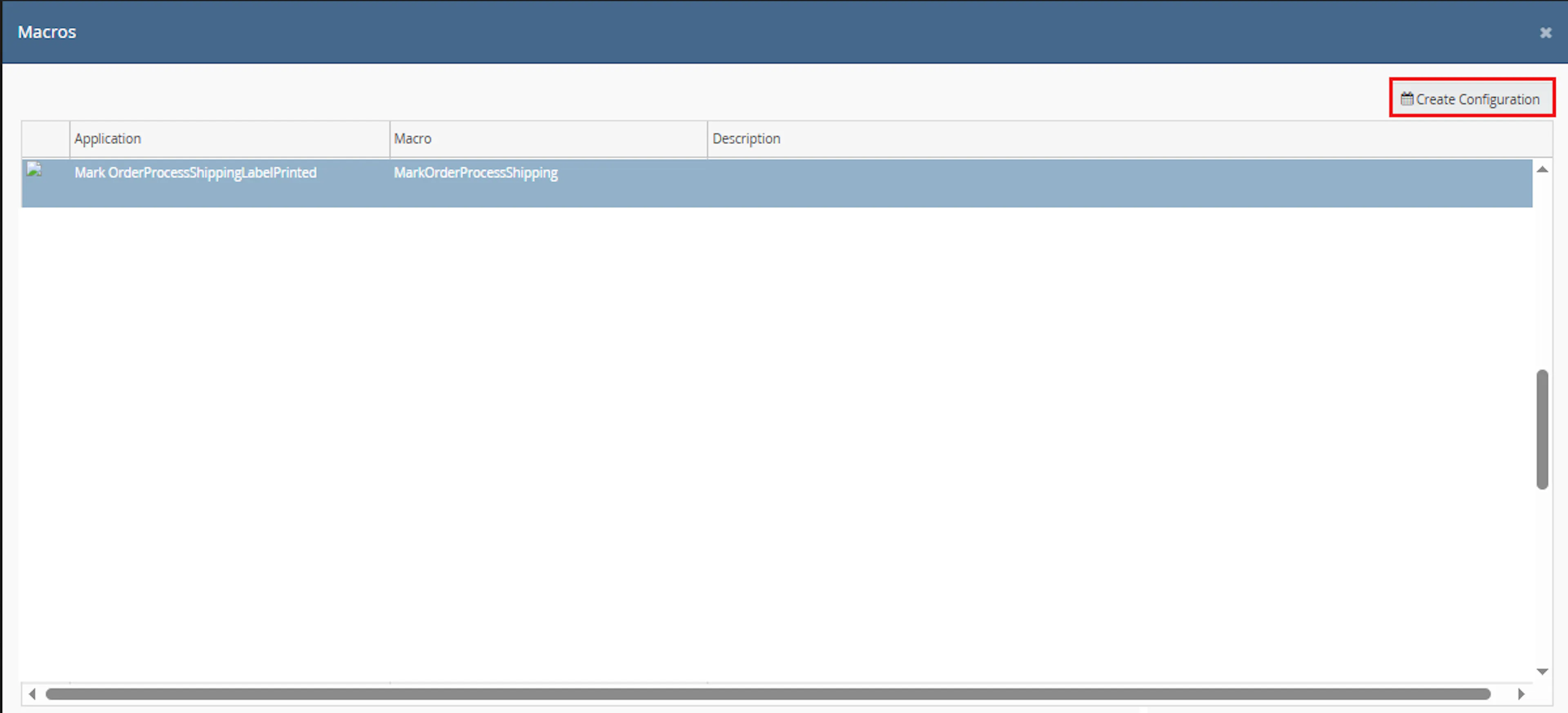
Select the MarkOrderProcessShippingLabelPrinted macro and click Create Configuration
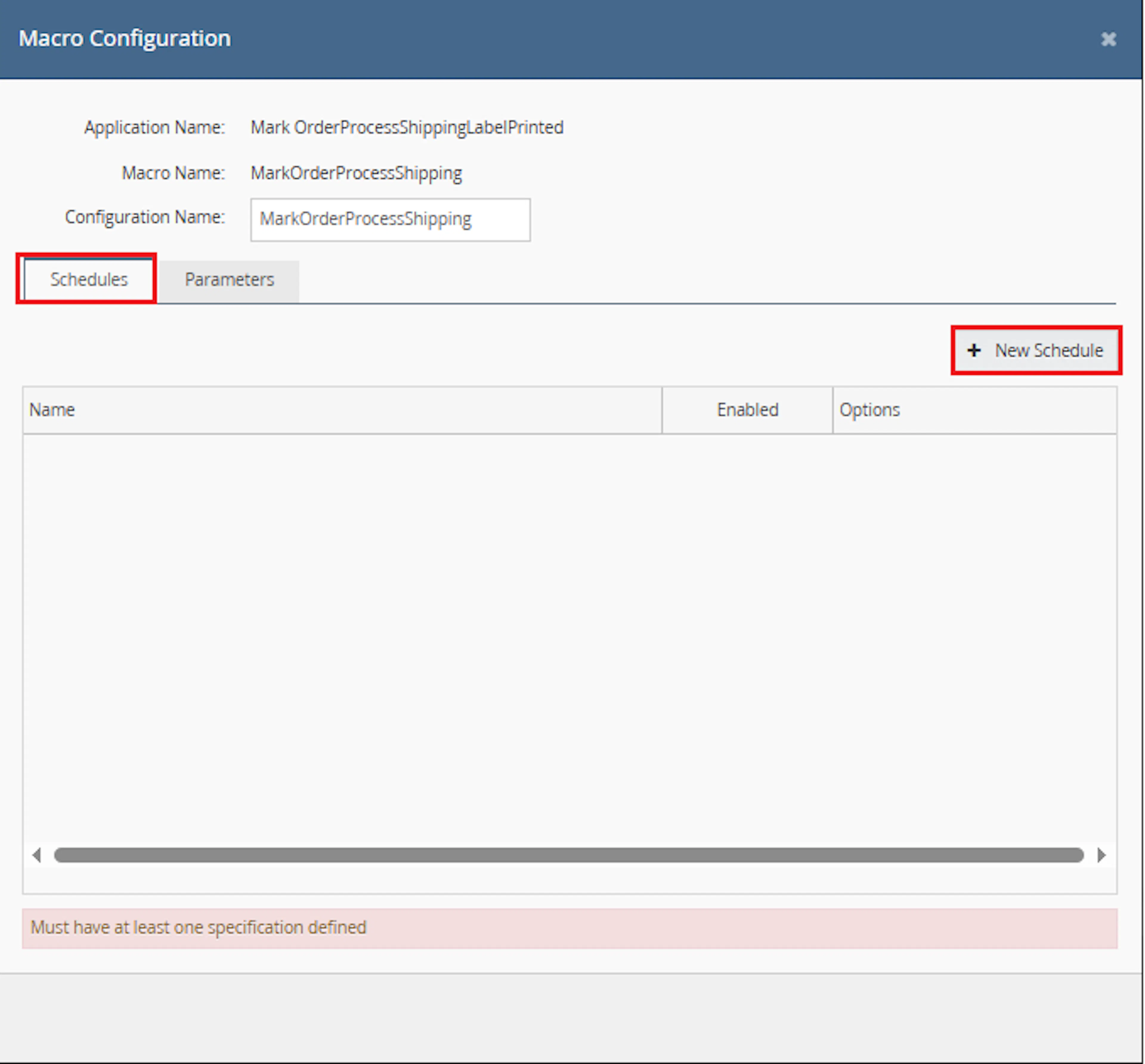
In the Macro Configuration screen, go to the Schedules tab and click on New Schedules.
-
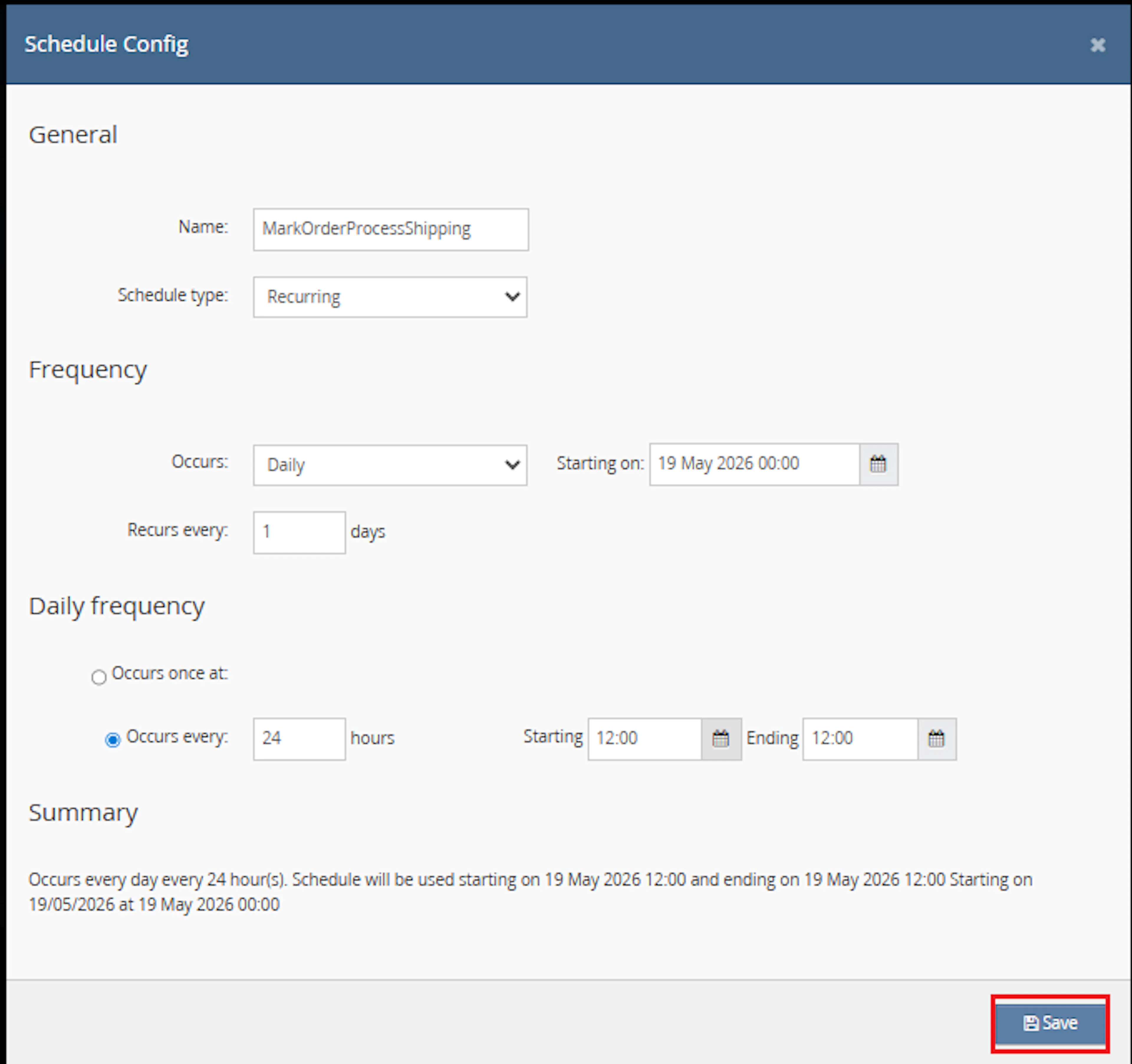
In the Schedule Config window, enter the Name
-
Select Schedule type from the dropdown:
-
One time (runs only once)
-
Recurring (runs repeatedly based on schedule)
-
-
If Recurring is selected:
-
In Frequency, choose Occurs from dropdown:
-
Daily
-
Weekly
-
-
-
Set Recurs every value (e.g., 1 day or 1 week)
-
Set the Starting on date and time
-
Under Daily frequency, choose one option:
-
Occurs once at → specify exact time
-
Occurs every → enter interval in hours and define:
-
Starting time
-
Ending time
-
-
-
Review the Summary section
-
Click Save
-
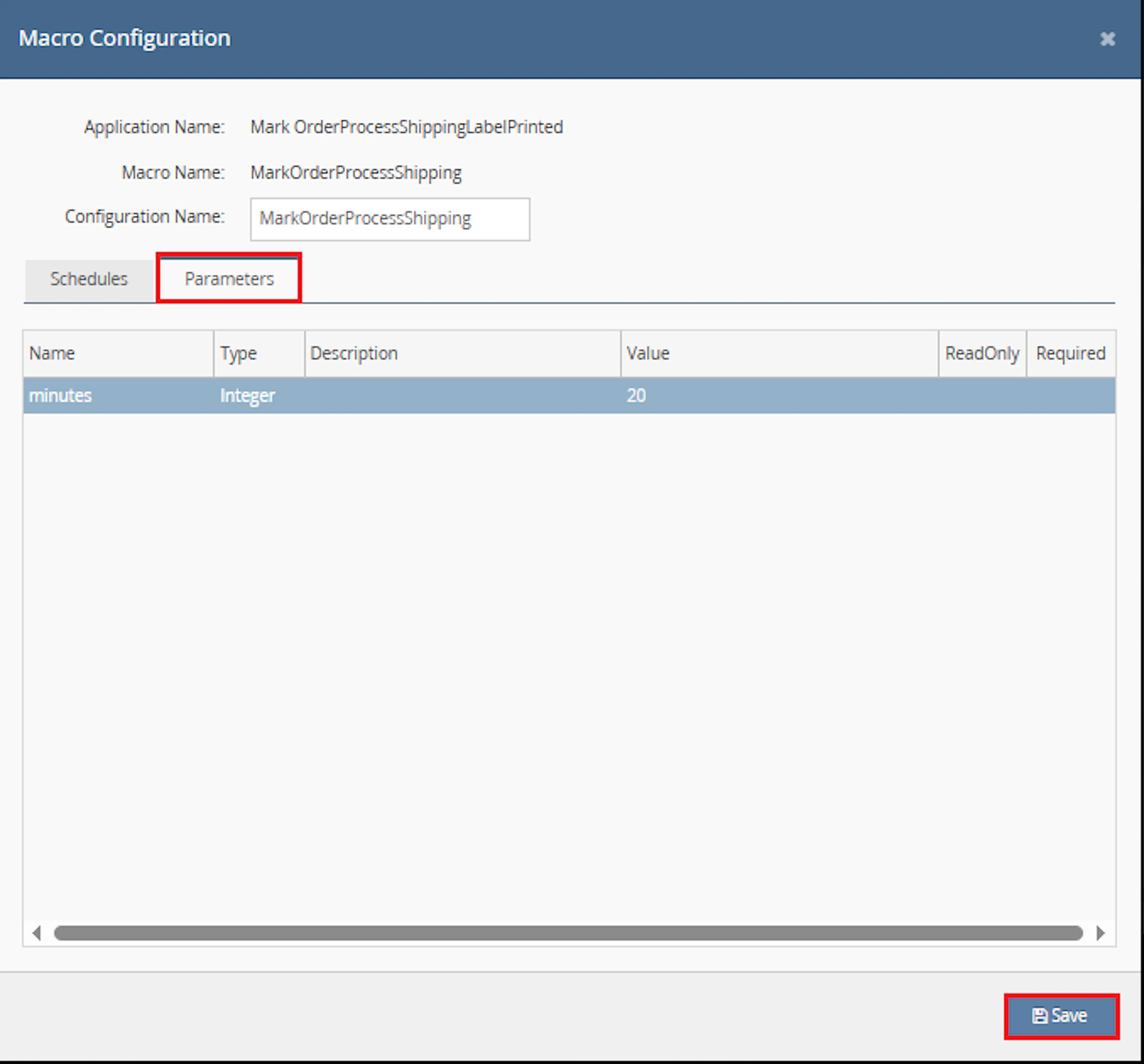
Navigate to the Parameters tab
-
In the parameters list, review the field minutes
-
Enter or update the value in the Value column as required
-
Ensure the minutes parameter is filled
-
Verify any ReadOnly fields (cannot be edited)
-
Click Save to apply the configuration
Make sure to enable the macro to continue with the schedule Engine configuration.

Key Benefits
Processing orders manually after labels are printed can be difficult when order volumes are high. This macro is designed to simplify that process by automatically identifying labelled orders that are ready to be processed.
Reduce Manual Processing
Automatically processes eligible orders after the shipping label has been printed successfully.
Keep Orders Moving
Helps prevent labelled orders from remaining in Open status longer than required.
Avoid Processing Label Errors
Only includes orders where the shipping label is printed and there is no label error recorded.
Use a Controlled Delay
The minutes parameter controls how long the macro waits after label printing before processing the order.
Batch Order Processing
Processes eligible orders together using the Linnworks batch processing API.
Log Failed Processing
If an order cannot be processed, the macro logs the failure message for review.
How It Works
This macro works in the background based on the configured schedule. Once it runs, it checks Open Orders and processes only the orders that match the required shipping label conditions.
Step 1
The macro starts and writes Macro started in the log.
Step 2
It retrieves Open Orders from Linnworks using the configured order filters.
Step 3
It filters orders where LabelPrinted is true and LabelError is null.
Step 4
It checks the order audit trail for the latest SHIPPING_LABEL_ entry.
Step 5
If the shipping label was printed more than the configured minutes value ago, the order is added to the processing list.
Step 6
Eligible orders are processed using ProcessOrdersInBatch.
Usage of App
This macro is designed to work automatically once configured. It does not require manual action during each run, as long as the schedule and minutes parameter are set correctly.
Minutes
Defines how long the macro waits after the shipping label is printed before processing the order. For example, if the value is 30, the macro processes eligible orders where the label was printed more than 30 minutes ago.
Open Orders
The macro checks orders that are still in Open status in Linnworks.
Shipping Label Printed
Only orders where GeneralInfo.LabelPrinted is true are included.
No Label Error
Orders are included only when GeneralInfo.LabelError is null.
Shipping Label Audit Trail
The macro checks the order audit trail for the latest SHIPPING_LABEL_ record to calculate how long ago the label was printed.
Batch Processing
Orders that meet the required conditions are processed together using the Linnworks order processing API.
Key Points to Remember
-
The macro only targets orders that are currently in Open Orders
-
Orders must have a successfully printed shipping label
-
Orders with label errors are not included
-
The minutes parameter controls the waiting time after label printing
-
Audit trails are checked in batches of 50 orders
-
If processing fails for any order, the failure message is written to the macro log
Once the macro is running, it helps ensure that labelled orders are processed automatically after the configured waiting time.
What You Can Expect
-
Eligible orders are identified automatically
Orders with successfully printed shipping labels are checked without manual review -
Orders are processed after the configured delay
The macro waits until the shipping label print time is older than the configured minutes value -
Failed processing responses are logged
Any order that cannot be processed will have the error message written in the macro log -
Open order workflow becomes more efficient
Your team spends less time manually processing orders after label printing -
Macro completion is logged
The macro writes Macro Finished after the run ends
Overall Impact
This helps reduce manual workload, keeps labelled orders moving through the fulfilment workflow, and supports a more consistent order processing operation.
What To Do When an Order Is Not Processed
If an expected order is not processed by the macro, review the order and macro conditions before taking manual action.
Steps to Follow
Step 1
Open Linnworks and locate the order that was expected to be processed.
Step 2
Confirm that the order is still in Open Orders.
Step 3
Check that the shipping label has been printed successfully and there is no label error.
Step 4
Confirm that the label print time is older than the configured minutes value.
Step 5
Review the macro logs for any processing failure message.
Why This Matters
Reviewing these conditions helps you understand whether the order was skipped because it was not eligible yet, had a label issue, or failed during order processing.
Best Practices
To get the most value from this macro, configure it in a way that matches your dispatch workflow and gives enough time for labels to print, documents to generate, and warehouse checks to complete.
Recommended Guidelines
-
Set a realistic minutes threshold
Choose a delay that gives your team enough time to confirm the label and shipment details before the order is processed -
Run the macro on a recurring schedule
Use a recurring schedule so eligible labelled orders are processed regularly -
Review macro logs regularly
Check logs for failed processing messages and resolve issues quickly -
Monitor shipping label errors
Keep shipping integrations and printer setup stable so orders do not get excluded due to label errors -
Test before production use
Validate the minutes value and processing behaviour on a small order set before using it at scale
Regular scheduling and log review are key to keeping labelled orders moving smoothly.
Example Scenario
To better understand how this works, here’s a simple example:
If your minutes value is set to 30:
-
Order A (label printed 45 minutes ago, no label error) → Order processed
-
Order B (label printed 10 minutes ago, no label error) → No action yet
-
Order C (label printed 60 minutes ago, label error exists) → Not processed
The macro processes only orders where the label has been printed successfully, no label error exists, and the configured waiting time has passed.
What This Means
-
Only orders ready for processing are selected
-
Orders with label errors are skipped
-
Recently printed labels are given time before processing
-
Failed processing results are logged for follow-up
Final Summary
The Automated Order Processing for Shipping Label Printed Orders macro helps you automate order processing after shipping labels are printed successfully.
By checking Open Orders, validating label status, reviewing the label audit trail, and processing eligible orders after the configured time threshold, this macro reduces manual effort and keeps your fulfilment workflow moving efficiently.