Evri 3PL Fulfilment Integration via Rishvi Services
A secure, scalable, API-driven middleware integration that automates the complete fulfilment workflow between Linnworks and Evri 3PL Fulfilment, powered by Rishvi Services.
Overview
The Evri 3PL Fulfilment Integration, powered by Rishvi Services, automates the complete fulfilment workflow between Linnworks and Evri 3PL Fulfilment. Rishvi Services acts as a secure, stateless, API-driven middleware layer between both systems - handling order submission, cancellation, shipment tracking updates, and stock synchronisation.
Architecture at a glance
Linnworks
Acts as the source system for orders and inventory. Open orders are submitted to Evri 3PL and stock levels are updated back from Evri 3PL through the middleware.
Rishvi Services
Acts as the middleware platform - a secure, stateless, API-driven layer that validates, maps, and routes data between Linnworks and Evri 3PL Fulfilment.
Evri 3PL Fulfilment
Acts as the fulfilment partner responsible for warehouse fulfilment, despatch, and stock-level updates sent back via webhooks.
Once configured, the integration runs automatically. Most operations require no manual intervention - orders flow from Linnworks to Evri 3PL, and shipment and stock updates flow back, all without manual data entry.
Integration Scope
The integration covers four key areas of the fulfilment workflow.
Order Fulfilment
Eligible Linnworks orders are validated, mapped, and submitted to Evri 3PL Fulfilment automatically. A clear link is maintained between the Linnworks order ID and the Evri 3PL fulfilment reference throughout the order lifecycle.
Stock Synchronisation
When stock levels change in Evri 3PL Fulfilment, the middleware processes the update and sends the latest available quantity to Linnworks. Reconciliation jobs provide a fallback for missed or delayed updates.
Shipment Tracking Updates
After Evri 3PL despatches an order, webhook notifications are sent to Rishvi Services. These are validated and processed, then Linnworks is updated with shipment status, tracking numbers, multi-parcel tracking details, and shipped quantities.
Tenant Configuration Management
The integration supports multiple Linnworks tenants, each with its own credentials, shipping service mappings, and feature toggles. A support portal provides operational visibility and management tools.
Installation Guide
Before you can use the Evri 3PL Fulfilment Integration, you need to install the Evri 3PL application in your Linnworks account and sign in to the integration portal. Follow the steps below.
Steps to Install
Open the application from Linnworks
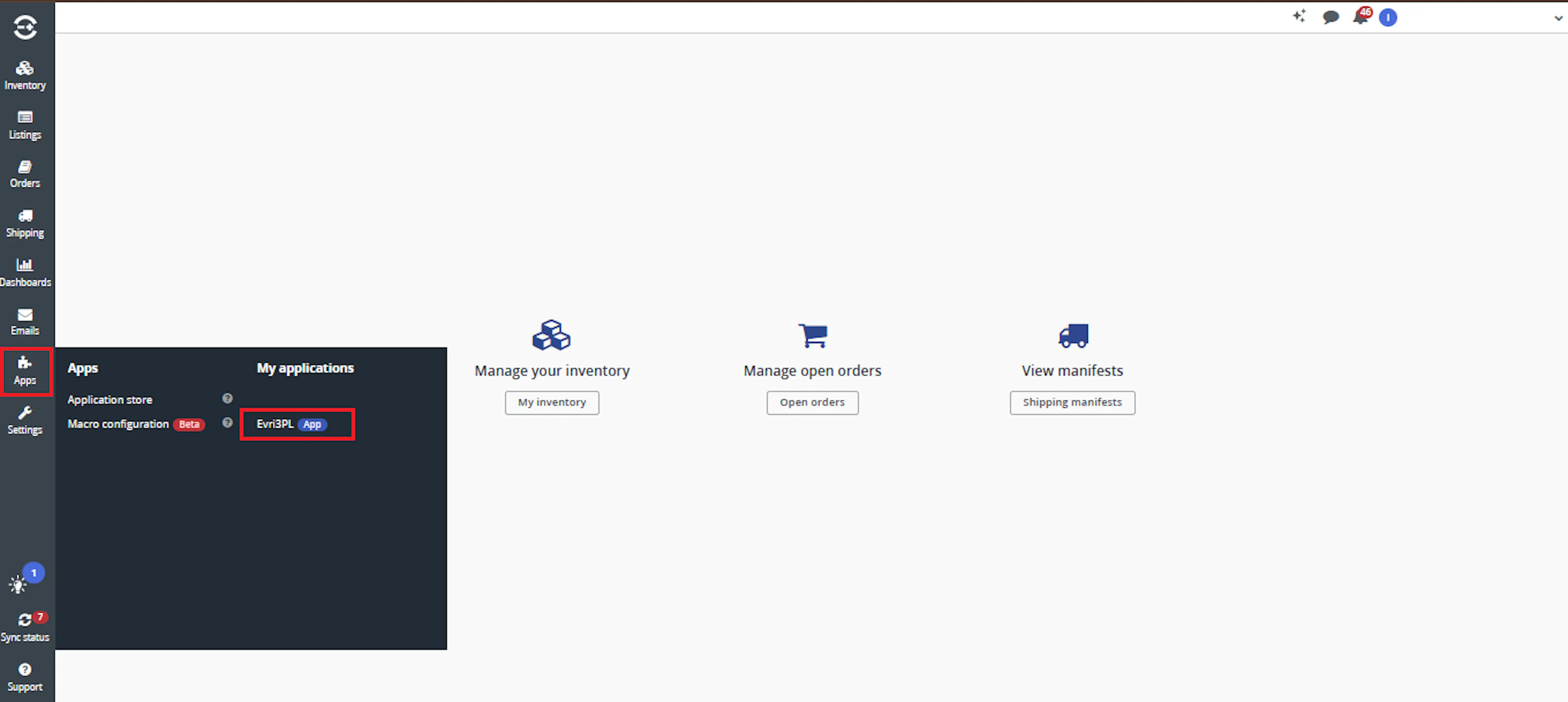
- Sign in to your Linnworks account.
- From the left-hand menu, open Apps.
- Under My Applications, locate Evri 3PL Integration.
- Select the application to open it.
Sign in to the Evri 3PL Integration portal
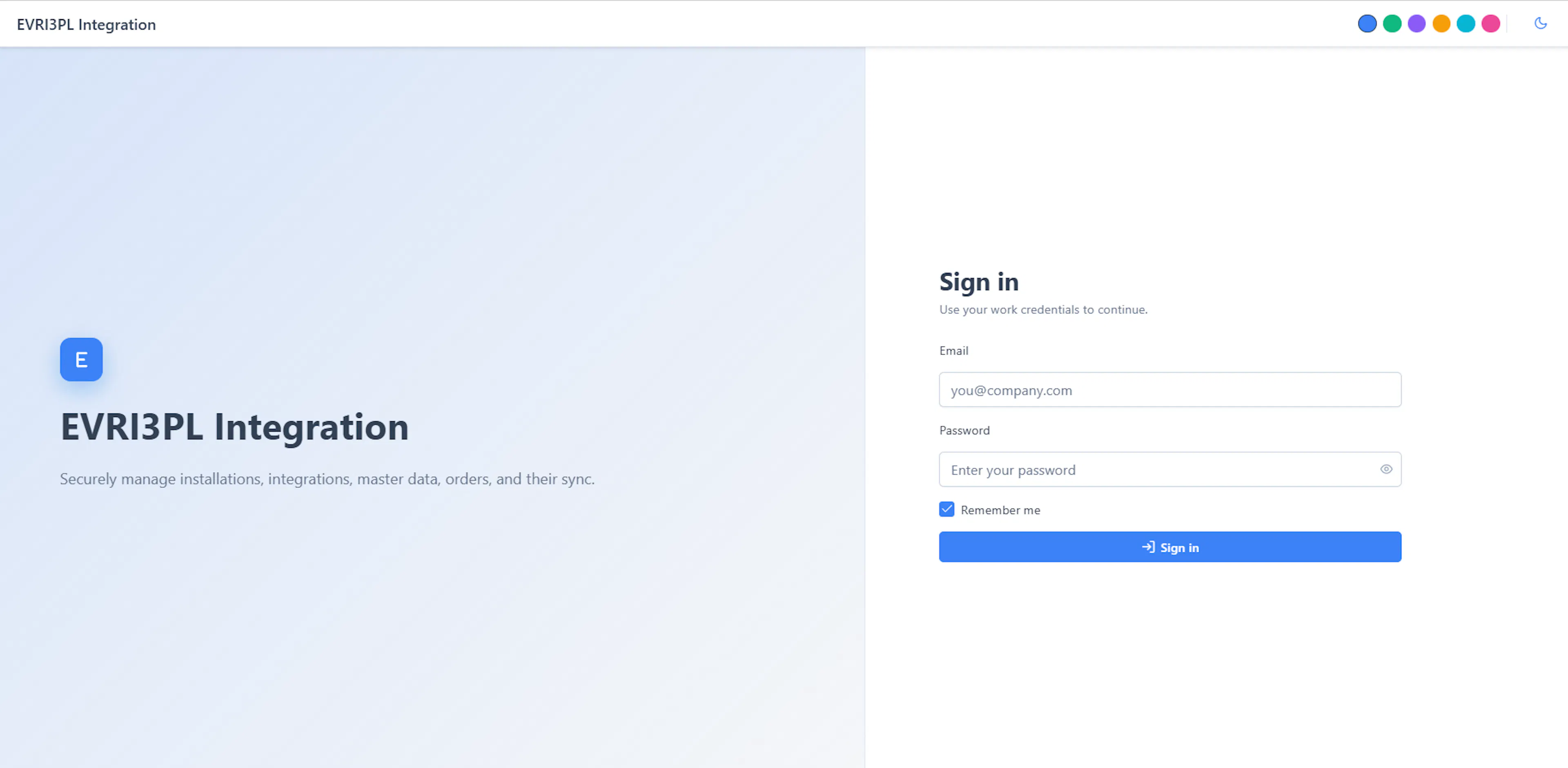
The Evri 3PL Integration sign-in page opens.
- Enter your authorized Email Address.
- Enter your Password.
- Click Sign in.
After signing in, continue to the Integrations List to create the Evri 3PL shipping integration.
Open the Integrations List
After signing in, use the portal navigation to start creating a new integration.
- From the left-hand navigation menu, open Integrations.
- Select Integrations List.
- Review any existing integrations displayed in the list.
- Click Add Integration in the top-right corner.
The Add Evri 3PL shipping integration form opens.
The Integrations List can also be filtered by installation ID, profile name, configuration stage, status, and date range.
Configure the Evri 3PL shipping integration
Complete the integration form using the credentials and business details supplied by the authorized integration administrator.
Required Details
Complete the fields marked with an asterisk:
| Field | Description |
|---|---|
| Account Name | A unique name used to identify the integration |
| Installation | The Linnworks installation connected to this integration |
| Evri Username | The authorized Evri account username |
| Evri API Key | The API key supplied for the Evri account |
| Contact Name | Primary operational contact |
| Company Name | Registered or trading company name |
| Address Line 1 | Primary company or collection address |
| Address Line 2 | Additional address information, when applicable |
| Address Line 3 | Additional address information, when applicable |
| City | City or town |
| County | County, state, or region |
| Country Code | Applicable country code |
| Contact Phone No | Primary contact telephone number |
| Default Delivery Phone Number | Fallback delivery telephone number |
| Post Code | Postal or ZIP code |
| Order Lookback Days | Number of previous days checked when retrieving eligible orders |
Integration Options
Review the available checkboxes:
- Order Sync Enabled
Enables eligible-order synchronization from Linnworks. - Order Dispatch Sync Enabled
Enables dispatch and shipment updates. - Use Current Date As Hands On Date
Uses the current processing date as the hands-on date. - Order Cancel Enabled
Enables supported order-cancellation processing. - Webhook Status Cancel In Linnworks Enabled
Allows an applicable webhook status to update a Linnworks order as cancelled. - Active
Makes the integration available for processing after configuration is saved.
Save the Integration
- Confirm that all required fields are complete.
- Review the selected synchronization options.
- Confirm that the correct Linnworks installation is selected.
- Click Save.
- Return to Integrations List.
- Confirm that the new integration appears with the expected status and configuration stage.
Security: Never publish a real Evri username, API key, installation identifier, telephone number, or company address in public documentation or screenshots.
How Orders Are Fulfilled
When an eligible order is available in Linnworks, the integration follows a defined sequence to submit it to Evri 3PL Fulfilment.
Step 1 - Tenant configuration validation
Rishvi Services validates the tenant configuration before any order data is processed. This includes confirming that Linnworks credentials, Evri 3PL credentials, and shipping service mappings are present and valid. If configuration validation fails, the order is not submitted and an error is recorded.
Step 2 - Order data mapping
The middleware reads the Linnworks order and maps all required fields to the Evri 3PL Fulfilment request format. Mapped fields include:
- Customer information - name and contact details
- Delivery address - full address including postcode and country
- Shipping service - mapped from the Linnworks service to the configured Evri 3PL service code
- SKUs - item codes as recognised by Evri 3PL Fulfilment
- Quantities - ordered quantities per line item
Step 3 - Order submission to Evri 3PL
Once validated and mapped, the order is submitted to Evri 3PL Fulfilment via the Evri 3PL API. The middleware applies retry and backoff handling for transient API errors to ensure reliable delivery.
Step 4 - Order linkage stored
On successful submission, the middleware stores a clear link between the Linnworks order ID and the Evri 3PL fulfilment reference. This linkage is used throughout the order lifecycle for tracking, reconciliation, and cancellation handling.
Step 5 - Linnworks order updated
The Linnworks order is updated to reflect that it has been submitted to Evri 3PL Fulfilment. Relevant notes or identifiers are applied so warehouse and support teams can see the current status at a glance.
Order Cancellation
If an order needs to be cancelled before it is despatched by Evri 3PL, the integration provides cancellation handling.
Cancellation Handling
When a cancellation request is received, Rishvi Services uses the stored Linnworks ↔ Evri 3PL order linkage to identify the corresponding Evri 3PL fulfilment reference. The cancellation request is then passed to Evri 3PL where the order is still eligible for cancellation (i.e. not yet despatched). The result is recorded and Linnworks is updated accordingly.
Cancellation is only possible before Evri 3PL despatches the order. Once despatch has occurred, the shipment tracking update flow applies instead.
Shipment Tracking Updates
After Evri 3PL despatches an order, Rishvi Services receives webhook notifications and updates Linnworks with the latest shipment information.
Evri 3PL sends webhook notifications to Rishvi Services after each despatch event. The middleware:
- Receives the webhook event securely over HTTPS
- Validates the event against the expected schema and tenant credentials
- Logs the event with a correlation ID for traceability
- Queues the event for processing
The validated webhook event is processed by the middleware. The Linnworks order is identified using the stored Evri 3PL fulfilment reference ↔ Linnworks order ID linkage.
The following shipment details are extracted from the Evri 3PL webhook payload and mapped to Linnworks fields:
| Evri 3PL Webhook Field | Linnworks Update |
|---|---|
| Shipment status | Order status / shipping info |
| Tracking number(s) | Tracking number on the order |
| Multi-parcel tracking details | Per-parcel tracking references |
| Shipped quantities | Shipped line item quantities |
Once processed, Rishvi Services updates the Linnworks order with:
- Shipment status - updated in the order's shipping information
- Tracking numbers - written to the order for customer and warehouse visibility
- Multi-parcel tracking details - individual tracking references for each parcel where applicable
- Shipped quantities - per-line shipped quantities updated on the order
If the update to Linnworks fails, the event is retried automatically up to the configured maximum retry attempts.
If a webhook event fails to process, the middleware increments the retry count and reprocesses the event on the next cycle. Events are retried up to the configured maximum number of attempts. If all retries are exhausted, the event is marked as failed and surfaced in the support portal for manual review and retry.
Stock Synchronisation
Stock levels in Evri 3PL Fulfilment are kept in sync with Linnworks through a combination of webhook events and reconciliation jobs.
When stock levels change in Evri 3PL Fulfilment (for example, after a despatch, a stock receipt, or an adjustment), Evri 3PL sends a webhook event to Rishvi Services.
The middleware:
- Receives and validates the stock update event
- Extracts the SKU and latest available stock quantity
- Maps the Evri 3PL SKU to the corresponding Linnworks stock item
- Sends the updated stock level to Linnworks
Stock updates are applied immediately on receipt of a valid webhook event.
To improve reliability and catch missed, delayed, or failed stock updates, reconciliation jobs run as a fallback mechanism.
Reconciliation jobs:
- Compare stock levels held in Evri 3PL Fulfilment against stock levels in Linnworks
- Identify discrepancies between the two systems
- Submit corrective stock updates to Linnworks where differences are found
- Log all reconciliation actions with correlation IDs for auditability
Reconciliation job frequency is configurable per tenant.
Multi-Tenant Configuration
The integration is designed to support multiple Linnworks tenants from a single middleware platform. Each tenant operates independently with its own configuration.
Per-Tenant Configuration
Each tenant can have its own settings, allowing the same middleware to support different customers, regions, fulfilment rules, and configuration requirements.
| Configuration Area | Description |
|---|---|
| Linnworks Credentials | API credentials for the tenant's Linnworks account, used to read orders and update stock and shipment data. |
| Evri 3PL Credentials | API credentials for the tenant's Evri 3PL Fulfilment account, used to submit orders, receive webhooks, and query stock. |
| Shipping Service Mappings | Maps Linnworks postal services to the corresponding Evri 3PL service codes for each tenant. |
| Feature Toggles | Enables or disables specific integration features per tenant, such as stock sync, shipment tracking, or cancellation handling. |
| Reconciliation Schedule | Configures the frequency of reconciliation jobs for each tenant. |
Multi-Tenant Benefits
Support Multiple Customers
The same middleware platform can serve multiple Linnworks accounts, each with its own Evri 3PL credentials and configuration, without interference between tenants.
Support Multiple Regions
Different tenants can be configured for different regions, with region-specific shipping service mappings and fulfilment rules applied independently.
Independent Feature Control
Feature toggles allow specific integration capabilities to be enabled or disabled per tenant, without affecting other tenants on the platform.
Isolated Credentials
Each tenant's Linnworks and Evri 3PL credentials are stored and used independently, ensuring secure isolation between tenants.
Production-Readiness Features
The integration is built with production-readiness as a core requirement. The following features ensure the middleware is reliable, traceable, scalable, and maintainable.
Rate Limiting
API rate limits are respected for both Linnworks and Evri 3PL. The middleware applies rate limiting controls to prevent throttling and API bans during high-volume processing.
Retry and Backoff Handling
Transient errors from both Linnworks and Evri 3PL APIs trigger automatic retries with exponential backoff. This ensures temporary failures do not result in lost orders or stock updates.
Fail-Fast Configuration Validation
Configuration is validated before any order processing begins. If required credentials or mappings are missing or invalid, the integration fails fast with a clear error - preventing silent failures or partial processing.
Structured Logging
All operations are logged in a structured format, including timestamps, tenant identifiers, operation type, and outcome. Logs are searchable and filterable for operational diagnostics.
Correlation IDs
Every operation - order submission, webhook receipt, stock update, reconciliation - is assigned a unique correlation ID. This allows end-to-end tracing of any event across all systems.
Horizontal Scalability
The middleware is stateless and designed for horizontal scalability. Additional instances can be added to handle increased order volumes or additional tenants without architectural changes.
Support Portal
A support portal provides operational visibility and management tools for the integration.
What Support Users Can Do
Manage Tenant Setup
Create and update tenant configurations, including Linnworks credentials, Evri 3PL credentials, and feature toggles.
Configure Shipping Mappings
Set up and update shipping service mappings between Linnworks postal services and Evri 3PL service codes for each tenant.
View Diagnostics
Access structured logs, event histories, and reconciliation reports to monitor the health of the integration and identify issues.
Review Failed Events
View a list of failed order submissions, shipment updates, and stock sync events, along with the error details and correlation IDs for each failure.
Retry Failed Processes
Manually trigger retries for failed events directly from the support portal, without requiring code changes or system restarts.
Audit Trail
Review a full audit trail of all operations performed against each tenant, including timestamps, correlation IDs, and outcomes.
Order Lifecycle
Every order that passes through the integration follows a defined progression of statuses visible in the middleware and support portal.
| Status | Description |
|---|---|
| Pending | The order has been identified as eligible for submission to Evri 3PL Fulfilment and is queued for processing. |
| Validating | Tenant configuration and order data are being validated before submission. |
| Submitted | The order has been successfully submitted to Evri 3PL Fulfilment. A fulfilment reference has been received and stored. |
| Failed | The order submission failed. The error has been recorded and the order will be retried automatically. |
| Cancelled | A cancellation request has been submitted to Evri 3PL. The order will not be despatched. |
| Despatched | Evri 3PL has despatched the order. Shipment tracking details have been received and written to Linnworks. |
| Partially Despatched | Evri 3PL has despatched part of the order. Shipped quantities and tracking details for the despatched items have been updated in Linnworks. |
Lifecycle flow
Pending
An eligible Linnworks order is identified and queued for processing by the middleware.
Validating
Tenant configuration is validated and order data is mapped to the Evri 3PL request format.
Submitted or Failed
If Evri 3PL accepts the order, the status moves to Submitted and the fulfilment reference is stored. If Evri 3PL rejects the order or the API is unavailable, the status moves to Failed and a retry is scheduled.
Despatched
When Evri 3PL despatches the order, a webhook event is received by the middleware. The status is updated to Despatched and Linnworks is updated with tracking details and shipped quantities.
Cancelled (if applicable)
If a cancellation is requested before despatch, the middleware submits the cancellation to Evri 3PL and the status is updated to Cancelled.
Validation Errors and Common Causes
The following errors can prevent an order from being submitted to Evri 3PL Fulfilment. These are surfaced in the support portal with error details and correlation IDs.
| Validation Error | Cause |
|---|---|
| Tenant configuration not found | No active configuration exists for this Linnworks account. Create a tenant configuration in the support portal. |
| Linnworks credentials invalid or expired | The Linnworks API token stored for the tenant is invalid or has been revoked. Update the credentials in the support portal. |
| Evri 3PL credentials invalid | The Evri 3PL API credentials stored for the tenant are invalid. Update the credentials in the support portal. |
| Shipping service mapping missing | The Linnworks postal service on the order has no corresponding Evri 3PL service code mapping. Add the mapping in the support portal. |
| SKU not found in Evri 3PL | One or more SKUs on the order are not recognised by Evri 3PL Fulfilment. Verify that the SKUs are correctly registered in Evri 3PL. |
| Delivery address incomplete | The order's delivery address is missing required fields. Address Line 1, Town, Postcode, and Country are required. |
| Order already submitted | The order has already been submitted to Evri 3PL Fulfilment. Duplicate submission is blocked. |
| Order already despatched | A cancellation was requested but the order has already been despatched by Evri 3PL. |
Troubleshooting Guide
Order not submitted to Evri 3PL
Symptom: Order remains in Pending or Failed status
Likely cause: Tenant configuration is missing or invalid, or the shipping service has no Evri 3PL mapping
Resolution: Open the support portal, verify the tenant configuration, confirm shipping service mappings are complete, and trigger a manual retry
Shipment tracking not updating in Linnworks
Symptom: No tracking number or shipment status on the Linnworks order after Evri 3PL despatch
Likely cause: Webhook event was not received, failed validation, or failed to update Linnworks
Resolution: Check the support portal for failed webhook events, review the error details and correlation ID, and trigger a retry
Stock levels out of sync
Symptom: Linnworks stock quantities do not match Evri 3PL Fulfilment stock levels
Likely cause: A stock update webhook was missed, delayed, or failed to process
Resolution: Trigger a manual reconciliation job from the support portal to compare and correct stock levels between Evri 3PL and Linnworks
Cancellation not processed
Symptom: Order is still showing as active in Evri 3PL after a cancellation request
Likely cause: The order may already have been despatched by Evri 3PL, or the cancellation API call failed
Resolution: Check the order status in Evri 3PL directly. If the order is despatched, cancellation is no longer possible. If the cancellation failed, review the error in the support portal and retry
Tenant configuration validation failing
Symptom: All orders for a tenant are failing at the validation stage
Likely cause: Linnworks or Evri 3PL credentials have expired or been revoked, or a required shipping mapping is missing
Resolution: Open the support portal, navigate to the tenant configuration, update the relevant credentials or mappings, and re-enable the tenant
Duplicate order submission error
Symptom: An order submission is rejected with a duplicate submission error
Likely cause: The order was already successfully submitted to Evri 3PL in a previous cycle
Resolution: Check the order status in the support portal. If the order is in Submitted status with a valid Evri 3PL fulfilment reference, no further action is needed
Deliverables
The final deliverables for this integration are as follows.
Production-Ready Middleware Service
A fully tested, production-ready middleware service implementing all four integration areas: order fulfilment, stock synchronisation, shipment tracking, and tenant configuration management.
API Documentation
Full API documentation covering all endpoints exposed and consumed by the middleware, including request and response schemas, authentication requirements, and error codes.
Webhook Schemas
Documented webhook schemas for all Evri 3PL Fulfilment webhook events processed by the middleware, including shipment tracking and stock update payloads.
Support Portal
A support portal providing tenant management, shipping mapping configuration, diagnostics, failed event review, and manual retry capabilities.
Automated Unit Test Coverage
Automated unit tests covering the core middleware logic, including order mapping, configuration validation, retry handling, and webhook processing.
Automated Integration Test Coverage
Automated integration tests verifying end-to-end flows between the middleware, Linnworks, and Evri 3PL Fulfilment in a controlled test environment.
Automated Contract Test Coverage
Automated contract tests verifying that the middleware correctly implements the API contracts defined by both Linnworks and Evri 3PL Fulfilment, protecting against breaking changes.
Best Practices
Consistent configuration and regular monitoring are key to a reliable and cost-effective fulfilment integration.
Validate tenant configuration before go-live
Ensure all credentials, shipping service mappings, and feature toggles are fully configured and tested before enabling the integration for a live tenant.
Keep credentials up to date
Linnworks and Evri 3PL API credentials should be reviewed and refreshed whenever they are rotated or revoked to prevent validation failures.
Monitor failed events daily
Check the support portal daily for failed order submissions, shipment update errors, and stock sync failures. Act on failures promptly to prevent order backlogs.
Keep SKUs consistent across systems
Ensure SKU codes in Linnworks match the SKU codes registered in Evri 3PL Fulfilment. Mismatches will cause order submission failures.
Configure reconciliation jobs appropriately
Set reconciliation job frequency to match your expected stock update volume. More frequent reconciliation reduces the window for stock discrepancies but increases API call volume.
Use correlation IDs when investigating issues
Every operation has a unique correlation ID. Always reference the correlation ID when investigating a specific order, webhook event, or stock update to trace the full operation history.
FAQ
How does the middleware know which orders to submit to Evri 3PL?
The middleware processes orders that are eligible based on the tenant configuration. Eligibility is determined by the order status in Linnworks and the configured feature toggles for the tenant. Only orders that pass configuration validation and data mapping are submitted to Evri 3PL.
What happens if Evri 3PL is temporarily unavailable?
If the Evri 3PL API is unavailable, order submissions will fail. The middleware applies retry and backoff handling, automatically retrying failed submissions at increasing intervals. If the maximum retry limit is reached, the order is marked as failed and surfaced in the support portal for manual review and retry.
Can the same middleware support multiple Linnworks accounts?
Yes. The integration is multi-tenant by design. Each Linnworks account is configured as a separate tenant with its own credentials, shipping mappings, and feature toggles. Tenants are fully isolated from one another.
How are multi-parcel shipments handled?
When Evri 3PL despatches an order across multiple parcels, the webhook payload contains individual tracking references for each parcel. The middleware extracts all parcel tracking details and writes them to the Linnworks order so each parcel is traceable independently.
What happens if a webhook event is missed?
Reconciliation jobs act as a fallback mechanism. If a stock update webhook is missed or delayed, the reconciliation job will detect the discrepancy between Evri 3PL and Linnworks stock levels and submit a corrective update. For shipment tracking, failed webhook events are surfaced in the support portal and can be retried manually.
Can I cancel an order after it has been submitted to Evri 3PL?
Yes, provided the order has not yet been despatched by Evri 3PL. The middleware will pass the cancellation request to Evri 3PL using the stored fulfilment reference. If the order has already been despatched, cancellation is no longer possible and the shipment tracking flow applies instead.
How do I add a new shipping service mapping?
Shipping service mappings are managed through the support portal. Navigate to the tenant configuration, open the shipping mappings section, and add the new mapping between the Linnworks postal service and the corresponding Evri 3PL service code.
How are errors traced across systems?
Every operation performed by the middleware is assigned a unique correlation ID. This ID is recorded in the structured logs and is visible in the support portal alongside each event. When investigating an issue, the correlation ID allows you to trace the full operation history across the middleware, Linnworks, and Evri 3PL.
What test coverage is included?
The integration includes automated unit tests, integration tests, and contract tests. Unit tests cover core middleware logic. Integration tests verify end-to-end flows in a test environment. Contract tests verify that the middleware correctly implements the API contracts defined by Linnworks and Evri 3PL, protecting against breaking changes in either system.
I installed the app but cannot see it in Linnworks. What should I do?
After installation, the app appears under Apps > My Applications in Linnworks. If it does not appear, try refreshing the page or logging out and back in. If the issue persists, confirm that you used your Linnworks Master Account credentials during installation - sub-account credentials will not complete the installation correctly.
I cannot sign in to the Evri 3PL3PL Integration portal. What should I do?
Ensure you are using the email address and password provided to you for the Evri 3PL3PL Integration - these are separate from your Linnworks credentials. If you have forgotten your password, contact your administrator or the Rishvi support team.
Legal Information
- Privacy Policy: [https://rishvi.co.uk/privacy-policy/]
- Terms and Conditions: [https://rishvi.co.uk/terms-conditions/]
Please review these pages to understand how data is handled and the terms governing the use of this integration.
Summary
The Linnworks ↔ Evri 3PL Fulfilment Integration, powered by Rishvi Services, provides a secure, scalable, and maintainable foundation for automated fulfilment between Linnworks and Evri 3PL Fulfilment.
Automated order fulfilment
Eligible Linnworks orders are validated, mapped, and submitted to Evri 3PL automatically with retry handling for transient failures.
Real-time shipment tracking
Evri 3PL webhook events are securely received and processed, updating Linnworks with tracking numbers, shipment status, and multi-parcel details.
Reliable stock synchronisation
Stock levels are kept in sync via webhook events and fallback reconciliation jobs that detect and correct discrepancies automatically.
Multi-tenant support
A single middleware platform supports multiple Linnworks tenants, each with independent credentials, mappings, and feature configuration.
Production-ready reliability
Rate limiting, retry and backoff, fail-fast validation, structured logging, correlation IDs, and horizontal scalability are built in from the ground up.
Support portal visibility
The support portal gives operational teams full visibility into tenant setup, failed events, diagnostics, and manual retry capabilities.
For any issues that cannot be automatically resolved, the support portal provides the error details, correlation IDs, and retry tools needed to diagnose and correct the problem quickly.